This nonprofit pitch guide is for grant makers, donors and other funders. Its job is to connect a 12-slide story to a specific ask, a reconciled budget and an honest impact logic. It is not an equity-investor deck or a promise of financial return.
Grant and Donor Pitch Examples: Ask, Budget and Impact
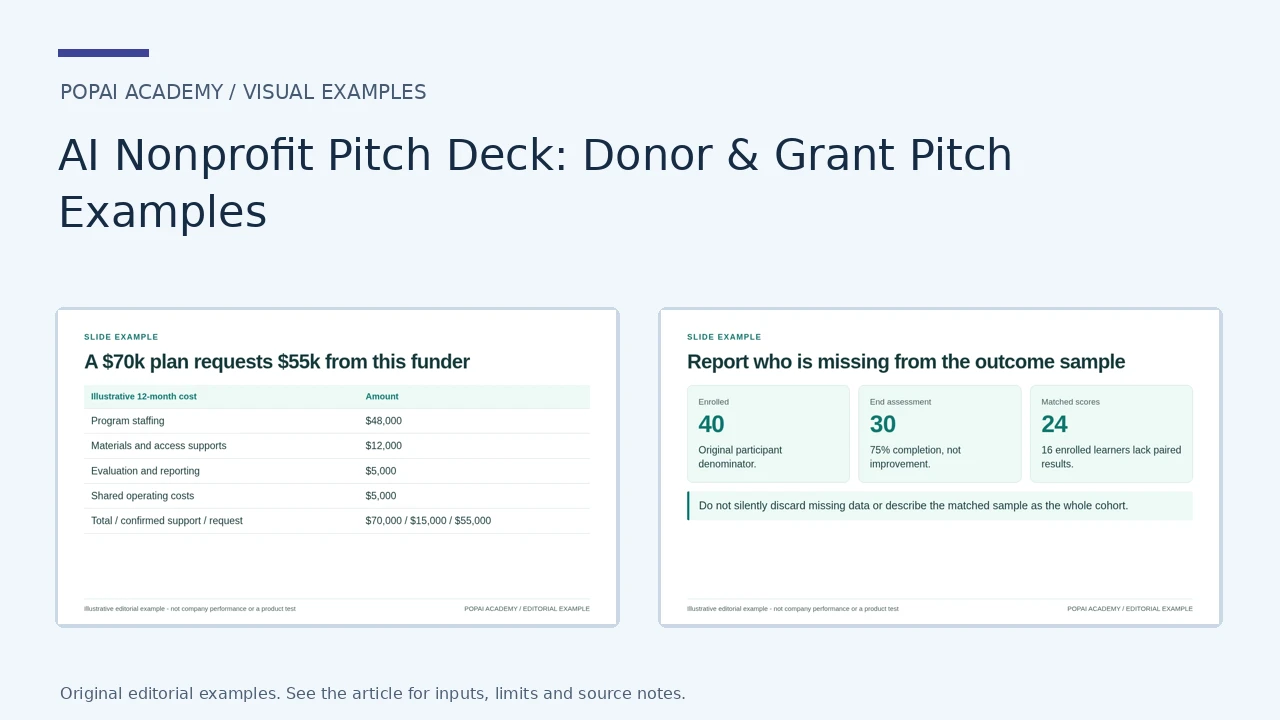
These three examples show the relationship between the request, planned work and outcome evidence. The $70,000 budget and 40/30/24 assessment example are fictional and should not be combined into one cohort claim.
Open full-size examples and editable HTML layouts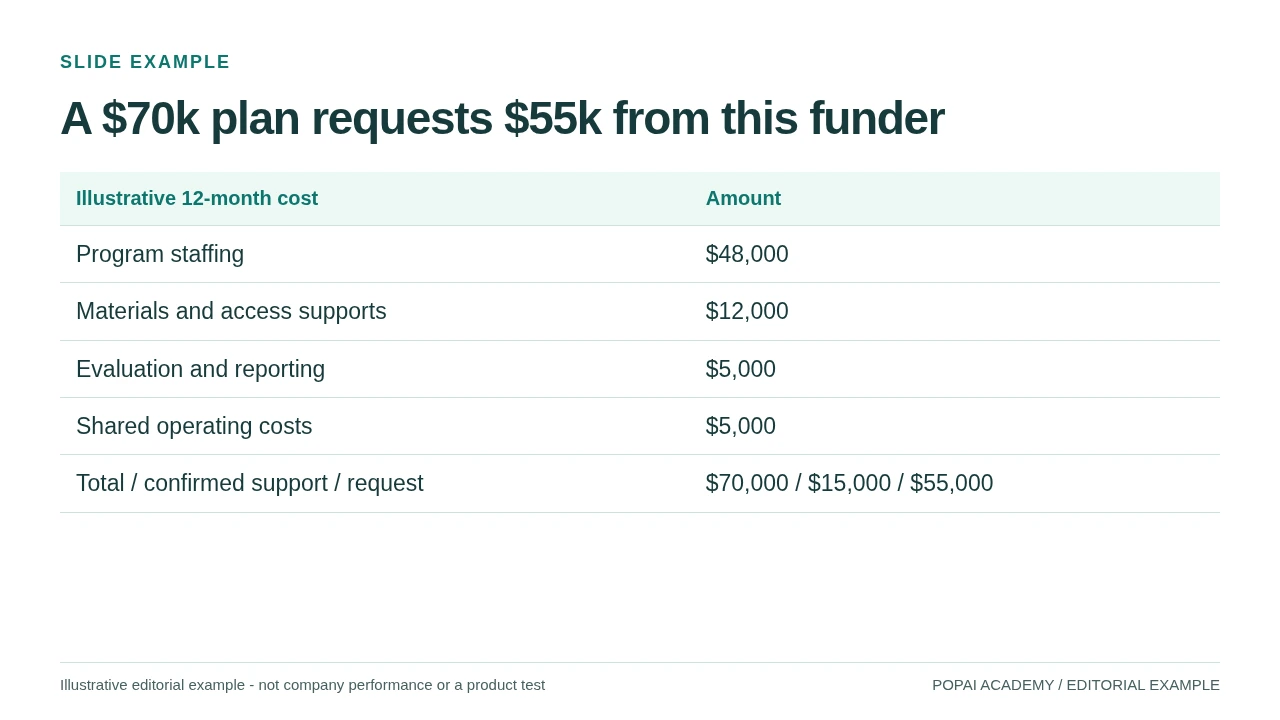
A donor/grant request, not an investor return: source values must replace the fictional budget.
Read or copy the slide content
Illustrative 12-month cost
Amount
Program staffing
$48,000
Materials and access supports
$12,000
Evaluation and reporting
$5,000
Shared operating costs
$5,000
Total / confirmed support / request
$70,000 / $15,000 / $55,000
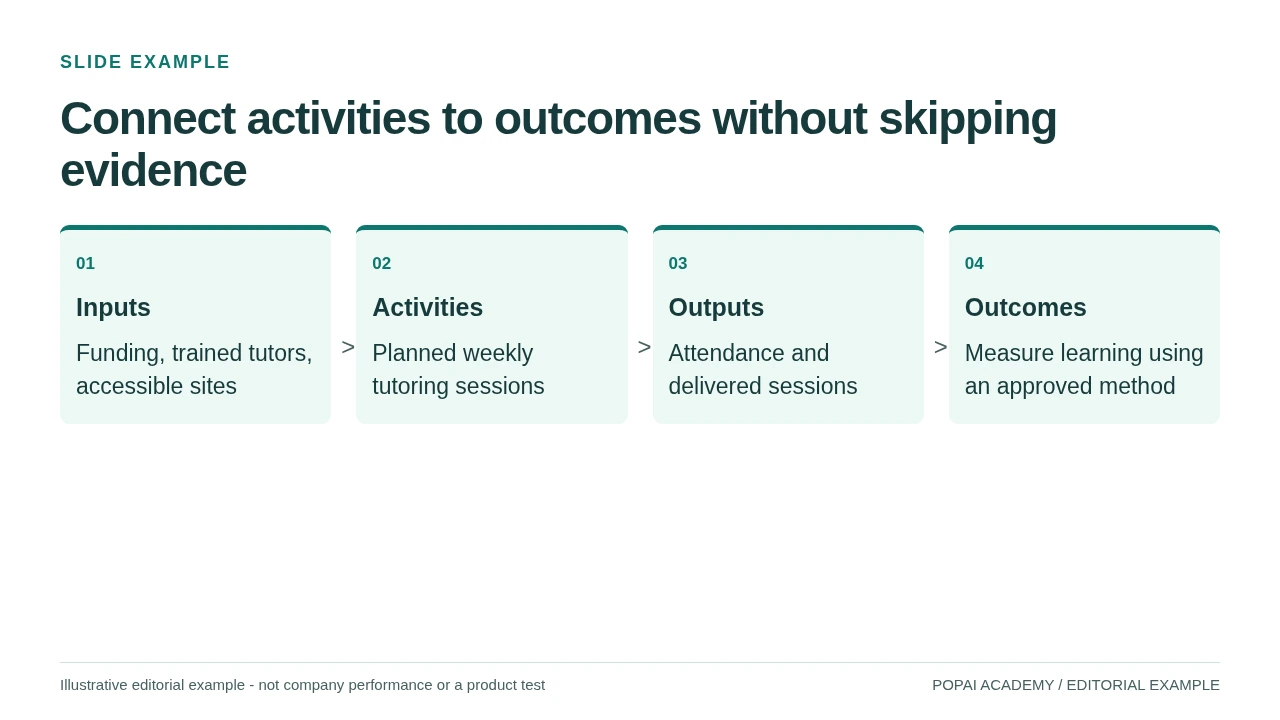
A Theory of Change illustration; the final step is a measurement need, not a promised result.
Read or copy the slide content
01
Inputs
Funding, trained tutors, accessible sites
02
Activities
Planned weekly tutoring sessions
03
Outputs
Attendance and delivered sessions
04
Outcomes
Measure learning using an approved method
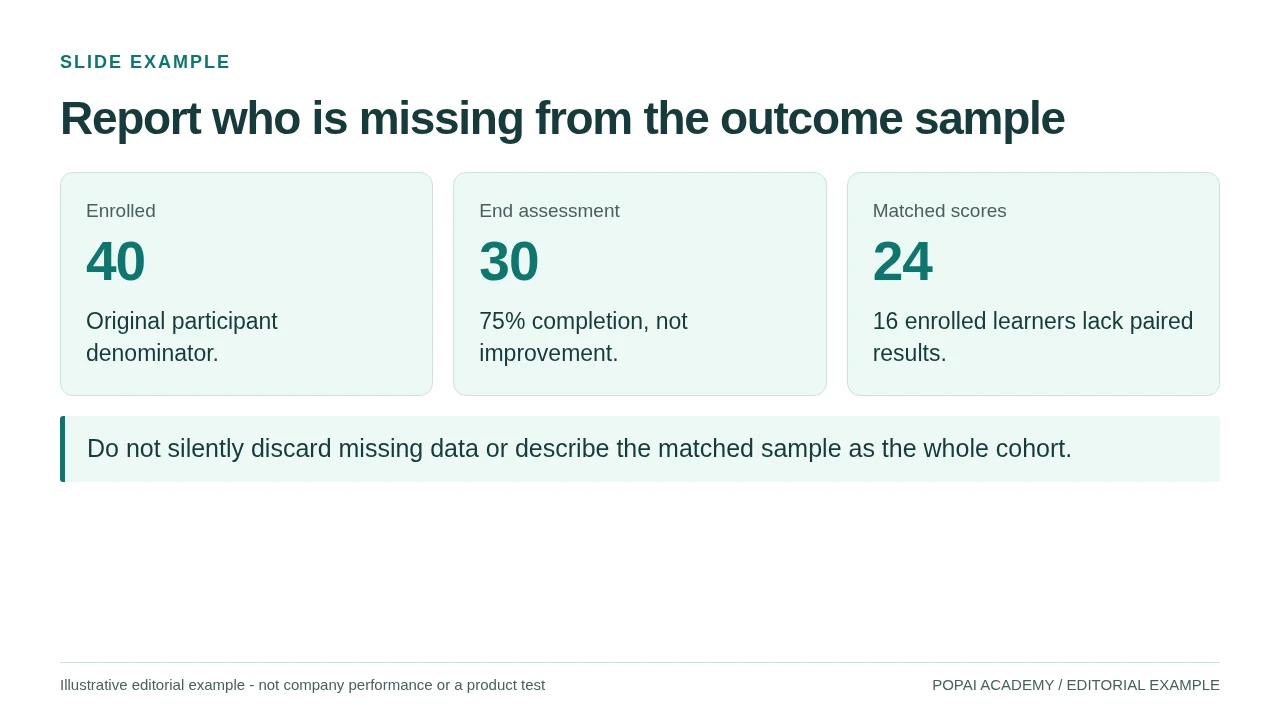
This preserves the worked example's fictional 40 / 30 / 24 example.
Read or copy the slide content
Enrolled
40
Original participant denominator.
End assessment
30
75% completion, not improvement.
Matched scores
24
16 enrolled learners lack paired results.
Do not silently discard missing data or describe the matched sample as the whole cohort.
Prompt for this example set
Create a slide with the purpose "Report who is missing from the outcome sample". Use these approved source fields or replace the illustrative inputs before use: Enrolled 40 Original participant denominator. End assessment 30 75% completion, not improvement. Matched scores 24 16 enrolled learners lack paired results. Do not silently discard missing data or describe the matched sample as the whole cohort.. Preserve labels, units, source notes and any uncertainty. Do not add results, claims, customers or capabilities. Suggest a readable layout and keep the output editable in the chosen tool.
AI Nonprofit Pitch Deck Structure: A Practical 12-Slide Plan
Build a clear path from the need to the ask, and use only the slides that help this audience make a decision.
This 12-slide plan counts the cover as slide one. Treat it as a menu, not a rule about the ideal deck length; for a short meeting, combine or cut slides that do not support the decision at hand.
- Cover and one-line mission: Name the organization and program, then state the change sought.
- The problem: Define the local need, who is affected, and the source and date of the evidence.
- Who you serve: Describe the population and how the organization learns about community priorities.
- Your solution: Show the activities and how participants access them.
- Theory of change: Connect resources and activities to outputs, near-term outcomes, and longer-term aims.
- Evidence to date: Present a verified result, pilot learning, and any important measurement limits.
- Program plan: Give the timeline, milestones, delivery partners, and responsibilities.
- Funding context: Explain other revenue or confirmed support if it affects feasibility or the request.
- Budget and assumptions: Summarize the project cost, amount requested, and key assumptions.
- Team and oversight: Identify the people responsible for delivery, finance, and governance.
- Risks and learning: Name material uncertainties and how the team will monitor or respond to them.
- Specific ask: State the amount or type of support, the period it covers, and the next step.
Worked example: three connected slide drafts
The program and figures below are fictional; use them to see how a narrative can connect, not as benchmarks.
- Need slide headline: “At three partner schools, many students are not yet meeting the locally selected reading benchmark.” Evidence: Insert the schools’ verified assessment result, date, grade range, and denominator. Visual: A simple bar chart comparing the local result with the benchmark, with the source directly below it.
- Program slide headline: “Small-group tutoring adds two structured reading sessions each week.” Evidence: State the planned schedule, group size, and referral process. Visual: A three-step flow—referral, tutoring, progress check—rather than a decorative stock image.
- Ask slide headline: “A 12-month grant would fund tutor time, learning materials, and progress tracking.” Evidence: Show the requested amount, project period, and costs tied to those activities. Speaker note: Explain what is not included and what other funding is confirmed.
For a live presentation, keep slides visual and use speaker notes for nuance. For an emailed deck, include chart labels, definitions, and source notes on the slide or in an easily accessible notes page. If you need to shorten the sequence, keep the need, approach, evidence, budget, and ask; combine the team and program-plan slides when space is tight.
Working rule: Every slide should help answer one of three questions: Why this need? Why this approach? Why this amount of support now?
Tailor an AI Nonprofit Pitch Deck to Each Funder
Keep the evidence consistent, but change which verified facts you foreground and what decision you are asking the audience to make.
Before drafting, record the funder’s stated priorities, eligibility rules, required attachments, terminology, and decision timeline. Do not reshape results to manufacture a fit. Tailoring means explaining the genuine overlap and making the request relevant to that audience.
Match the evidence and ask to the decision
- Foundation: Decision focus may be program fit and feasibility. Lead with the need, approach, outcomes, and project budget; request a defined grant amount for an eligible period. Check restrictions and reporting requirements before proposing costs.
- Individual donors: Decision focus may be trust and a clear use for support. Explain what donations collectively enable and how the organization reports back. Avoid suggesting one person’s gift guarantees a specific participant outcome.
- Corporate sponsor: Decision focus may include community alignment, employee involvement, or agreed visibility. Specify deliverables and any recognition offered; do not promise reach or exposure you cannot document.
- Social-impact investor: This framing is appropriate only when there is a credible revenue, repayment, or investment structure. A charitable program without a plausible return mechanism should not be presented as investable simply to fit the audience.
For example, the same fictional tutoring pilot might show a foundation its verified assessment method and a restricted project budget; a local donor briefing might lead with the number of students who can access sessions and how gifts support delivery; a corporate proposal might add a specific, feasible volunteer opportunity. The underlying student results and total program costs should remain the same in all three versions.
When comparing tools for this workflow, consider how they handle source documents, outline review, revisions, and editable exports—not just how quickly they produce slides. This overview of AI presentation makers can help you compare different approaches. For drafting from a prompt or existing materials, PopAi AI Presentation is one option; check its output and exported files against your organization’s source documents and review process.
Prompt an AI Nonprofit Pitch Deck with Verified Inputs
Use AI in stages: prepare the source pack, request an outline, draft slides, then verify every claim against the original records.
Start with approved, current materials: the program description, funder guidelines, budget, evaluation definitions, and any approved story or image permissions. Remove participant names and unnecessary identifying details. Do not upload confidential budgets or sensitive personal information unless your organization has approved the tool, its data practices, and the intended use. If source documents conflict, do not let AI choose between them: identify the discrepancy, confirm the authoritative version with the document owner, and use that version.
Prompt 1—outline: “Create a proposed slide outline for [program] for [named audience]. The purpose is [meeting, grant request, sponsorship, or donor briefing]. Use only the attached approved materials. For each slide, give one message, the evidence needed, a suggested visual, and any missing information. Do not draft unsupported claims. Mark unknowns as [NEEDS VERIFIED INPUT]. Follow the funder’s stated requirements: [paste requirements].”
Approve or revise the outline before moving to slide copy. Keeping these stages separate makes it easier to catch a missing budget slide or a misplaced claim before it is polished into a chart.
Prompt 2—slide draft: “Draft the approved outline using only the attached sources. For every statistic, give the source document, date, population, definition, and page or table reference in speaker notes. Separate outputs, outcomes, and longer-term aims. Include the requested amount, total project cost, timeline, and budget assumptions exactly as supplied. Do not invent data, quotes, partners, or outcomes. Use terminology preferred by the people or communities described; flag terminology that needs confirmation. Mark missing facts as [NEEDS VERIFIED INPUT].”
Prompt 3—verification pass: “Compare each factual claim, statistic, date, name, budget figure, and citation in this draft with the attached source documents. Return a table with the slide, claim, supporting source and location, any mismatch, and the action needed. Do not treat this check as proof: quote the source wording so a staff reviewer can confirm it in the original document.”
AI can misread a table or turn a planned target into a completed result. For example, if a source says “target: 80 students” and a generated slide says “served 80 students,” check the original program report and correct the slide to a target unless delivery records verify the actual count. Generated citations and source notes are pointers for review, not independent evidence; open the original report and confirm the wording, date, and denominator.
Review rule: If a claim cannot be traced to an approved source, keep it out of the deck or label it clearly as a target, estimate, or question awaiting confirmation.
Review language with people familiar with the community being described. “Person-first” wording is not a universal rule; terminology preferences vary, so follow the preferences people express and the organization’s safeguarding and communications policies.
Show Impact with a Theory of Change and Traceable Evidence
Make the path from activities to intended change visible, while being precise about what the available data can support.
Use a simple chain: resources → activities → outputs → near-term outcomes → longer-term impact. A tutoring program might report sessions delivered as an output, a change in reading-assessment scores as a near-term outcome, and improved educational opportunity as a longer-term aim. Delivering sessions does not by itself demonstrate a learning gain or prove that the program caused one.
Report measures with definitions and limitations
For each key measure, state what was counted, the denominator, period, source, and any relevant exclusions. Distinguish participant-level results, such as assessment change among students with matched tests, from program-level results, such as sessions delivered across all sites. Choose indicators that reflect the program’s stated goals and participants’ priorities, not only measures that are easiest to count.
Illustrative measurement example: A fictional tutoring pilot records that 30 of 40 enrolled students completed an end-of-term assessment during the spring term. A careful slide might say: “30 of 40 enrolled students (75%) completed the spring assessment; completion is not a measure of reading improvement.” The source would be the dated program roster and assessment log. If only 24 students have matched baseline and endline scores, report score change for those 24 and state that the result excludes 16 enrolled students without matched scores. Do not quietly treat missing results as no change or assume the students who left had the same outcomes as those who remained.
When a sample is small, data are incomplete, or a standard measure misses meaningful change, say so plainly and add relevant qualitative learning where appropriate. If there is no comparison group or other basis for causal attribution, describe an observed change rather than claiming the program caused it. The CDC Program Evaluation Framework is one public reference for planning and using evaluation; adapt measurement choices to the program, community, and funder rather than treating any framework as a substitute for local judgment.
Tell a human story with dignity and consent
Stories can add context, but should not reduce a participant to a hardship narrative. Obtain informed permission for quotes, photographs, and identifying details; explain where materials may appear and offer a way to decline without affecting access to services. Follow safeguarding policies and minimize personal data in both the slide and source files. Removing a name may not prevent identification when a story includes a small location, unusual circumstances, or other specific details. Use a composite or anonymized story only when clearly labeled and consistent with organizational policy; never ask AI to invent a participant’s words or history.
Connect the Funding Request to a Realistic Budget
Show how the requested amount supports defined activities during a stated period, and distinguish the full project cost from this funder’s share.
Use budget categories that reconcile to the approved budget and match the funder’s rules. A request may cover only part of a project; label confirmed, pending, and requested funding separately. Check whether the funder permits indirect costs, requires matching funds, or accepts in-kind contributions. Shared costs such as finance, facilities, or technology are real costs: explain the organization’s allocation method rather than implying they are avoidable. Requirements vary by funder, so confirm them before promising a cost treatment.
Illustrative 12-month budget reconciliation—not a real program budget
Assume a fictional pilot plans two weekly tutoring sessions at three schools for 100 students. These figures illustrate how a slide can connect costs to activities; they are not recommended rates.
- Program staffing: $48,000 for tutor and coordinator time across the 12-month delivery period.
- Learning materials and participant supports: $12,000 for materials and approved access supports.
- Evaluation and reporting: $5,000 for assessment administration and reporting.
- Shared operating costs: $5,000 allocated under the organization’s documented method.
- Total project cost: $70,000.
- Illustrative foundation request: $55,000; the remaining $15,000 is shown as confirmed unrestricted support. In a real deck, name the source and status only if verified.
If the staffing estimate changes because the schedule expands, update the cost and funding gap rather than keeping the original ask. If useful to the audience, $70,000 divided by 100 planned students is an average planned project cost of $700 per student—not a cost per successful outcome or a guarantee of equal spending on each person.
- Reconcile every slide total to the approved budget and check that categories, period, and request amount agree.
- Show the main assumption behind material costs, such as staffing time, number of sites, or planned participants.
- Separate restricted awards, unrestricted support, pending applications, and in-kind contributions; do not count pending funding as confirmed.
- Confirm whether indirect costs and match are allowable, and explain shared-cost allocations in line with organizational policy.
AI can help turn an approved budget into a readable summary, but it cannot determine whether a cost is allowable or whether the allocation is appropriate. Verify values and labels against the approved source, then state the request amount, period covered, and next action—such as a meeting, proposal invitation, or sponsorship discussion.
Review the Deck, Then Refine and Share It
Assign review by risk: program staff check meaning, finance checks money, and communications or safeguarding staff check how people and evidence are represented.
- Pass 1—content and evidence: A program lead checks activities, outcomes, dates, definitions, and source references; a data or evaluation lead checks denominators and limitations; a finance reviewer reconciles the request to the approved budget and funder rules.
- Pass 2—ethics and compliance: The appropriate communications, safeguarding, or privacy reviewer checks permissions, identifying details, terminology, funder requirements, and whether any confidential information should be removed.
- Pass 3—presentation and accessibility: A colleague unfamiliar with the project tests whether the story is understandable without insider knowledge. Check readable type, contrast, descriptive chart labels, alt text where supported, logical slide order, and that information is not conveyed by color alone.
Test the deck with someone who was not involved in writing it: after a short read, ask what problem the program addresses, what the request funds, and what evidence supports the proposed result. If the answers differ from your intended message, revise the slide rather than adding more explanation to the speaker notes.
- Open every cited source and check the exact number, date, definition, and population; do not rely on generated notes alone.
- Check chart axes, units, labels, and denominators, then confirm that the visual matches the underlying data.
- For a live pitch, rehearse a concise answer about limitations, risks, and what happens after the grant period.
- For an emailed or downloadable deck, remove unnecessary personal and internal financial details, and confirm that notes or hidden slides do not expose them.
- Export the final file and inspect the PPTX or PDF itself for broken layouts, missing fonts, links, and inaccessible text. Save an approved, dated version and retain the source files according to organizational policy.
Keep one approved master and make audience-specific copies from it, recording the version date and changes. A live deck can leave some detail to the presenter; an emailed deck should carry its own context and source notes. In either format, review the actual file you plan to share—not just the editing view.
Choose the Nonprofit Resource for the Job
This page owns the donor/grant pitch: the requested amount, budget, impact logic and the decision required. The source-to-presentation tutorial covers turning reports into a draft. The nonprofit template collection covers selecting visual starting points. Follow the funder's requested format rather than treating any slide plan as a submission requirement.