12 Best AI Presentation Makers of 2026: I Tested & Ranked Every Major Tool
Published on May 11, 2026 · PopAi Academy
Choosing the right AI presentation maker can save you hours of formatting — or waste your entire afternoon fixing broken layouts.
As generative AI continues to reshape productivity workflows, presentation tools are evolving beyond simple templates. But here is the reality I discovered: while the market is flooded with tools claiming to do the work for you, most of them fail spectacularly when you throw real-world tasks at them. They either summarize your complex ideas too aggressively, or produce pretty slides with disconnected, empty bullet points.
In my daily workflow, I analyze complex, long-form industry research reports and need to transform dense information into structured, digestible presentations. I didn't want a tool that just makes things look pretty; I needed an AI slide generator with actual logical processing power.
So, instead of relying on marketing pages, I decided to run a stress test. I tested the top 12 presentation AI tools on the market to see which ones are actually worth your time.
How I Tested These AI Presentation Makers
To make this comparison meaningful and ensure a fair, side-by-side evaluation, I tested each AI presentation maker using the exact same structured prompts and real-world scenarios:
Each tool was evaluated across five key criteria:
- Content structure & clarity — does the AI understand the logic, or just paste text?
- Design quality — are the layouts modern and visually usable without major tweaks?
- Speed & responsiveness — how long does it take from prompt to draft?
- Editing flexibility — can I easily change layouts without breaking the design?
- Export compatibility — can I download a clean, fully editable PPTX file?
Note: this article is based on independent testing. While some tools may offer advanced features in enterprise tiers, the focus here is on overall usability, generative AI capabilities, and real-world performance.
1. PopAI — Best Overall AI Presentation Maker
If there is one clear pattern that emerged during testing, it's this: turning a blank page into a slide is easy; turning a dense document into a logical presentation is incredibly hard.
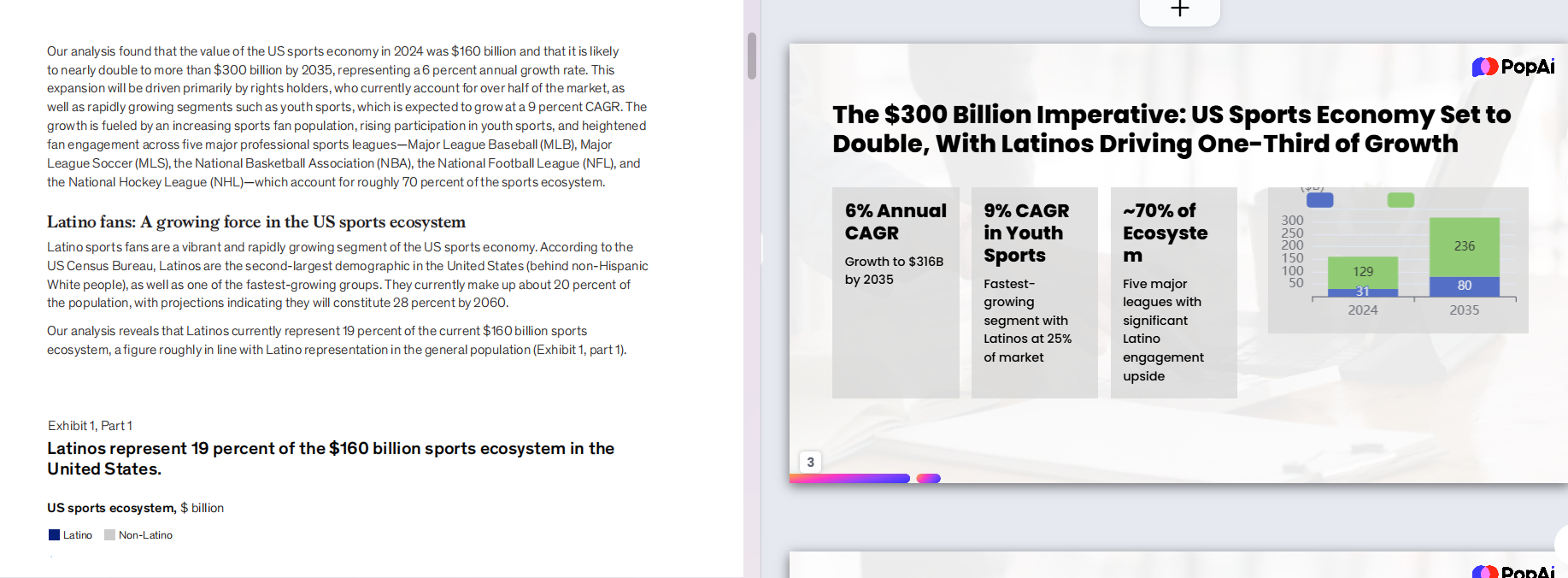
This is where the gap between “AI-assisted design tools” and “true AI presentation makers” becomes obvious. While several tools performed well in controlled, short-text scenarios, PopAI was the only tool that consistently handled long-form documents without breaking the logical flow.
Why It Stands Out
- Unmatched Document-to-PPT Power — PopAI's core strength lies in its LLM logic. When I uploaded a dense industry report, it didn't just summarize blindly. It actively extracted the core arguments, mapped them to appropriate slide structures, and generated a cohesive narrative. See how PopAI handles PDF-to-PPT conversion →
- Zero-Friction Workflow — the learning curve is virtually non-existent. You paste your text or upload a PDF, and it generates an editable draft in seconds.
- Multi-Language Consistency — for international teams or students studying abroad, PopAI handles cross-language generation (e.g., reading an English report and generating Chinese slides) with remarkable accuracy, avoiding the awkward machine-translation phrasing seen in other tools.
- Failsafe Exporting — unlike some visually stunning web-only tools, PopAI lets you export perfectly formatted PPTX files, so you can confidently send the final deck to clients or professors who rely on traditional software.

Limitations
While its layouts are clean, professional, and highly functional, PopAI does not prioritize the hyper-creative, non-standard visual layouts you might find in a tool designed strictly for creative agencies. It favors clarity and structure over avant-garde design.

The Verdict
If you want the best balance of speed, structural logic, and zero learning curve, PopAI is the most reliable choice on the market.
2. Gamma — Best for Design-Heavy Visuals and Portfolios
Why It Stands Out
If we are judging purely on visual wow-factor, Gamma is incredibly hard to beat. Unlike traditional slide decks, Gamma operates more like a dynamic web page builder. During my testing, I fed it a basic outline for a creative agency portfolio, and it generated a stunning, card-based layout with smooth scroll animations in under a minute. The interface is intuitive, allowing you to drag and drop content blocks effortlessly. It completely eliminates the need to manually align text boxes or resize images, making it a favorite for designers and creative directors.

Where It Falls Short
However, Gamma's biggest strength is also its Achilles' heel for traditional corporate workflows. Because its layouts are so fluid and non-standard, exporting to a traditional PPTX file often results in broken formatting. When I downloaded my test deck to open in PowerPoint, several text blocks overlapped, and the modern web fonts defaulted to standard system fonts, ruining the aesthetic. It forces you to present directly from their web app to maintain the design integrity.
Best Use Cases
Gamma is phenomenal for creative pitches, digital portfolios, and modern marketing agencies that do not need to send offline, editable files to traditional enterprise clients.
Verdict
Choose Gamma if your primary goal is to impress visually via a web link, but avoid it if your boss or professor demands a strictly formatted, traditional PowerPoint file. If you need reliable PPTX export and structured logic, PopAI remains the stronger choice →
3. Tome — Best for Storytelling and Startup Pitch Decks
Why It Stands Out
Tome has gained massive popularity in the startup ecosystem, and for good reason: it excels at narrative storytelling. When I tested Tome with a brief for a new tech product, it didn't just create bullet points; it crafted a compelling narrative arc across the slides. The interface is highly aesthetic, defaulting to sleek, dark-mode designs that look incredibly premium. Furthermore, its native integration with DALL·E 3 means the AI-generated imagery it pairs with your text is highly artistic and atmospheric, giving your presentation a polished, visionary feel.

Where It Falls Short
The friction with Tome appears the moment you need to present hard data. In my tests using industry reports, Tome struggled significantly with data visualization. It lacks robust, native charting tools, meaning you cannot easily generate complex bar graphs, pie charts, or data tables directly from a prompt. You are largely locked into its text-and-image ecosystem. Additionally, like Gamma, its formatting does not translate well to traditional corporate environments that rely heavily on data-heavy layouts.
Best Use Cases
It is the ultimate AI pitch deck generator for early-stage founders, creative writers, and visionaries who need to sell an idea or a mood rather than hard, granular data.
Verdict
Tome is brilliant for inspiring an audience with a narrative, but if your presentation requires deep data analysis or complex reporting, it will feel incredibly restrictive.
4. Beautiful.ai — Best for Data-Driven Teams and Brand Consistency
Why It Stands Out
Beautiful.ai is aptly named, but its real magic lies in its “smart slides” technology. During my evaluation, what impressed me most was its auto-alignment feature. As I added bullet points, changed charts, or swapped images, the AI dynamically resized and rearranged the layout so the slide never looked cluttered. It is practically impossible to make an ugly slide. For teams, its centralized brand controls ensure that every employee uses the exact same fonts, colors, and logos, making it a powerhouse for corporate consistency.

Where It Falls Short
The trade-off for this foolproof design is a severe lack of creative freedom. When I tried to manually nudge an icon slightly to the left to fit my specific preference, the system aggressively snapped it back to its grid. You cannot easily break their templates. Furthermore, it has one of the strictest pricing models on this list. There is no viable free tier for casual users; you are forced into a paid subscription almost immediately, which creates a high barrier to entry for students or freelancers.
Best Use Cases
This tool is perfect for mid-to-large corporate teams, sales departments, and consultants who need to generate highly structured, brand-compliant decks with lots of charts.
Verdict
If you have the budget and want to guarantee your team never makes a misaligned slide again, Beautiful.ai is great. But for quick, flexible, and free generation, it's too rigid. See the detailed PopAi vs Beautiful.ai breakdown.
5. Canva (Magic Design) — Best for Marketing Content and Existing Users
Why It Stands Out
Canva needs no introduction in the design world, and its “Magic Design” feature brings AI generation into an interface millions already know. The undisputed advantage here is the asset library. When I tested Canva's AI, the true value wasn't just the generated text, but the seamless access to millions of premium stock photos, videos, graphics, and audio tracks. If you are a marketer who already uses Canva for social media posts and flyers, generating an AI presentation here keeps your entire visual workflow unified in one familiar platform.

Where It Falls Short
As an AI logic engine, Canva falls surprisingly flat. In my testing, when I inputted a complex, multi-page document outline, Magic Design essentially just pasted my text into visually appealing templates. It did not synthesize the information, create logical transitions, or summarize effectively like PopAI does. It is, at its core, a design tool that bolted an AI text generator onto it, rather than a system built from the ground up to understand document structures.
Best Use Cases
Canva is the undisputed champion for social media managers, marketing teams, and educators who need highly visual, asset-heavy slides and already pay for Canva Pro.
Verdict
Use Canva if you already have your exact script written and just need a beautiful, asset-rich layout. Do not rely on it to do the heavy lifting of structuring your thoughts.
6. Microsoft Copilot for PowerPoint — Best for Enterprise Office 365 Users
Why It Stands Out
Microsoft Copilot's biggest selling point is its native ecosystem. You don't have to learn a new web interface; it lives directly inside the PowerPoint app you already use. During testing, the most impressive feature was its ability to synthesize data securely from your own OneDrive. I was able to prompt it to “create a presentation based on yesterday's meeting notes and the Q3 financial Word document,” and it pulled the data internally. For strict corporate environments where data privacy and compliance are paramount, Copilot is the safest, most integrated choice.

Where It Falls Short
Despite the massive hype, Copilot's actual design generation feels outdated. The slides it produced during my test looked distinctly like early-2010s corporate templates — functional, but incredibly boring. Furthermore, the generation speed was noticeably slower than web-native AI tools. The biggest hurdle, however, is accessibility. It requires a pricey enterprise Copilot license, putting it entirely out of reach for students, solo entrepreneurs, and small businesses who just need a quick AI PPT maker.
Best Use Cases
This is strictly for Fortune 500 companies, enterprise teams, and highly regulated industries where employees are mandated to stay within the Microsoft 365 security perimeter.
Verdict
It is a powerful data-retrieval assistant for corporate employees, but as a standalone design and layout generator, it lags far behind dedicated AI presentation makers.
7. Slidesgo (Wepik AI) — Best for Students and Quick Free Templates
Why It Stands Out
Slidesgo has long been a savior for students, and its integration of Wepik's AI maker keeps that tradition alive. When testing this tool, I specifically approached it from a student's perspective (e.g., “Create a 5-slide presentation on the French Revolution”). It generated the deck almost instantly, paired with incredibly fun, vibrant, and classroom-appropriate illustrations. The biggest advantage here is accessibility: it is highly generous with its free tier, allowing users to generate and download basic presentations without hitting an immediate paywall.

Where It Falls Short
You get what you pay for. The AI capabilities here are incredibly shallow. It essentially acts as a glorified keyword-matching engine. It takes your prompt, selects a pre-existing template from its massive library, and fills it with very basic, Wikipedia-level AI text. It cannot handle long-form document parsing, nor can it process complex business logic or nuanced formatting requests. The output often requires heavy manual rewriting to sound academic or professional.
Best Use Cases
Slidesgo is the undisputed top choice for middle school to university students, teachers looking for engaging classroom materials, and anyone needing a completely free AI presentation generator for simple topics.
Verdict
If you are on a strict zero-dollar budget and just need a colorful template populated with basic starter text, Slidesgo is perfect. Just don't expect deep AI reasoning.
8. PlusAI — Best for Google Slides Power Users
Why It Stands Out
PlusAI recognized a massive gap in the market: millions of startups and agencies run entirely on Google Workspace, yet Google's native AI (Duet AI / Gemini for Workspace) is often too expensive or restricted. PlusAI lives directly inside Google Slides as an extension. In my testing, the seamlessness was fantastic. I could generate a deck, and immediately share the Google Slides link with my team for live collaboration. It also features a great “Remix” function, allowing you to use AI to reformat an existing slide into a different layout with one click.

Where It Falls Short
Because it is bound by the technical limitations of Google Slides, PlusAI cannot offer the breathtaking, fluid animations or modern UI structures found in tools like Gamma or Tome. The presentations it generates are very traditional and sometimes structurally rigid. Additionally, while the text generation is decent, the visual asset pairing (finding the right images to match the text) occasionally felt disconnected or overly generic during my test runs.
Best Use Cases
This tool is purpose-built for remote agencies, digital nomads, and startup teams whose entire operational workflow is already deeply entrenched in Google Drive and Google Slides.
Verdict
PlusAI isn't going to win any avant-garde design awards, but if your company refuses to use anything other than Google Slides, this is the best AI add-on available.
9. Decktopus — Best for Lead Generation and Sales Presentations
Why It Stands Out
Decktopus takes a completely different angle: it treats presentations as interactive marketing funnels. During my evaluation, I was blown away by its conversion-focused features. It isn't just an AI slide generator; it allows you to embed native lead capture forms, voice notes, and clickable call-to-action buttons directly into the slides. I tested it by creating a B2B service pitch, and I could literally collect client emails right from slide number four. For sales professionals, this turns a static document into a trackable, interactive sales asset.

Where It Falls Short
This intense focus on marketing makes Decktopus incredibly niche. If you try to use it for an internal team sync or an academic report, the interface feels bloated with features you don't need. Furthermore, its layout customization is quite limited. To ensure the embedded forms and buttons work perfectly on mobile and desktop, Decktopus locks down many design elements, preventing you from freely moving text boxes or images exactly where you might want them.
Best Use Cases
Decktopus is strictly for sales teams, real estate agents, course creators, and marketers who use presentations externally to capture leads, gather data, or close deals.
Verdict
It is an incredible tool for revenue-generating sales pitches, but far too specialized and restrictive for general, day-to-day presentation needs.
10. Pitch — Best for Team Collaboration and Agencies
Why It Stands Out
Pitch has built a reputation as the “Figma of presentations,” and its AI features serve to enhance that collaborative environment. When testing Pitch, the standout feature wasn't necessarily the AI text generation, but how the AI jumpstarts the collaborative process. You can prompt the AI to generate a polished draft deck, and then instantly bring in multiple teammates to edit, leave specific comments on individual elements, and assign slides to different people. The templates are incredibly modern, tailored specifically for sleek startup aesthetics.

Where It Falls Short
The AI generation feels like a secondary feature rather than the core product. When I tried to feed Pitch a complex, multi-page document to summarize, it struggled to maintain the structural integrity compared to PopAI. It is much better at generating a deck from a short, one-sentence prompt. You are ultimately paying for the premium collaboration workspace, meaning solo users or those who just want a quick, one-off AI generation tool will find it unnecessarily complex and expensive.
Best Use Cases
Pitch is the premier choice for distributed design agencies, tech startups, and marketing teams who require real-time, multiplayer editing and strict brand management.
Verdict
If presentation creation is a massive team effort in your company, Pitch is phenomenal. If you are flying solo and just need AI to do the heavy lifting, look elsewhere.
11. Simplified — Best All-in-One Social Media Creator Tool
Why It Stands Out
Simplified lives up to its name by offering a massive suite of AI tools under one roof. When testing it, I realized I wasn't just in an AI presentation maker; I was in a dashboard that could also generate AI images, write blog posts, edit videos, and schedule social media content. For a solo content creator, this is a dream. You can generate a presentation, use their AI to resize it into Instagram Carousels, and schedule the post without ever leaving the browser tab. The workflow consolidation is its biggest superpower.

Where It Falls Short
As is common with “jack-of-all-trades” software, it is a master of none. The presentation module specifically lacks the depth of dedicated tools. In my testing, the slide layouts felt repetitive, and the AI struggled with long-form context. If you give it a highly technical prompt, the resulting slides often contain generic marketing fluff rather than precise, logically structured bullet points. It also pushes you heavily toward its premium subscription to unlock the best assets.
Best Use Cases
This tool is perfect for solo entrepreneurs, social media managers, and omnichannel content creators who want to pay for one single app to run their entire digital presence.
Verdict
If you want an entire marketing department in one tab, Simplified is great. But for serious, professional-grade presentation generation, its AI logic is too surface-level.
12. Sendsteps.ai — Best for Interactive Live Presentations
Why It Stands Out
Sendsteps.ai addresses a very specific anxiety: losing the attention of a live audience. During my test, I focused on its interactivity. After the AI generated the core slides, I was able to easily inject live word clouds, multiple-choice quizzes, and open-ended Q&A segments. When presenting, the audience simply scans a QR code on the screen to participate via their phones in real-time. The AI is particularly good at generating relevant quiz questions based on the content of the presentation, saving you the hassle of brainstorming interactive elements.

Where It Falls Short
Sendsteps sacrifices deep design and complex data handling for this interactivity. The visual templates are very basic, designed to prioritize the interactive polling elements rather than stunning typography or beautiful charts. When I tried to create a dense, informative report, the tool felt out of its element. It also requires a reliable internet connection for both the presenter and the audience; if the Wi-Fi drops, your entire presentation loses its core functionality.
Best Use Cases
It is specifically designed for keynote speakers, event moderators, corporate trainers, and educators who need to keep large crowds engaged and awake during live sessions.
Verdict
Use Sendsteps to turn a boring lecture into a two-way conversation. But if you are just emailing a deck to your boss or clients, its interactive features are useless.
Final Recommendation: Skip the Comparison
After 12 stress tests, the pattern is clear: most AI presentation tools optimize for one narrow scenario — templates, animations, branding, or audience polling — and fall apart the moment you ask them to reason about a real, messy long-form document.
PopAI was the only tool that consistently turned dense source material into a structured, logical deck without the cleanup tax. For the majority of users — students, analysts, consultants, founders — that is what actually matters.