Is the most headache–inducing part of preparing an asset allocation presentation for clients not the analysis itself, but turning dozens of pages of analysis reports into an easy–to–understand PPT? For wealth management services slides, professional content alone isn’t enough—they also need exquisite layout and clear logic, which often keeps non–design–savvy advisors working late into the night. The good news is that with AI tools, this process can be as simple as using a “point–and–shoot camera.” Below are four specific methods to “work smarter, not harder” and efficiently create a high–quality presentation that wows clients with PopAI.
1. Stuck with a Blank Mind & No Inspiration? Tell AI Your Topic, Get a Complete PPT Draft in 5 Minutes
If you’re facing a brand–new client request—such as “customizing a family wealth protection plan for a senior executive in the tech industry”—and have no idea what to write on the first PPT slide, let AI kickstart the process for you.
Step–by–Step Operation:
1. Open PopAI.
2. Type your core task in plain language in the dialog box, e.g., “Create a PPT on a family wealth protection plan for a 40–year–old senior executive at a tech company with two children, focusing on education funds, retirement planning, and risk isolation.”
3. Click Generate. AI won’t just give you a title—it will directly deliver a complete outline with a dozen pages, typically including: Cover Page, Client Profile Analysis, Family Financial Risk Assessment, Education Fund Planning Demo, Retirement Cash Flow Projection, Insurance Allocation Recommendations, and Summary Page.
What You’ll Get Specifically:
l Ready–made structure: No more guessing what to present first or next—AI lays out a logical framework for you.
l Key points for each slide: AI generates core bullet points for every slide. For example, on the “Education Fund Planning” page, you might see prompts like: “Based on current tuition growth rates, the total required amount in 18 years is approximately XXX million yuan” and “Recommended fund fixed investment portfolio with an expected annualized return rate of X%.”
l Editable details: If you’re unsatisfied with any section, you can delete, modify, or reorder content directly on the generated outline—just as easily as editing a Word document.
In just 5 minutes, you’ll go from “a blank slate” to “having a professional framework.” All that’s left is to fill in your professional data and specific products, boosting efficiency by 80%.
2. Got a Super Long Word Report? Toss It to AI & Let It Split It Into a PPT
This is the most frequent and painful scenario for financial advisors: you or your team have painstakingly completed a 30–page XXX Report packed with detailed data, charts, and in–depth analysis. Now you need to extract the essence and turn it into a 1–hour presentation PPT. Manual copy–pasting? That means re–sorting all content and adjusting formatting for every paragraph—a total nightmare.
Abandon copy–pasting entirely with this far more efficient method:
1. Select the Create from Imported Document feature in the PopAI interface.
2. Drag and drop your Word report, PDF performance summary, or even Excel data tables for upload. The tool’s flexible upload options accept nearly all your raw materials.
3. After uploading, AI parses your document and offers three key processing options—core to automatic PPT conversion:
l Organize Original Structure: Ideal for reports with clear chapters and rigorous logic. AI stays true to your original table of contents, converting each level of heading into a slide title.
l Help Me Condense & Extract Key Points: The most commonly used, labor–saving mode! AI acts like a senior editor, automatically deleting lengthy background narratives and complex derivation processes, and distilling core conclusions and critical data from each paragraph/chapter into presentation–ready bullet points. For example, it condenses a 500–word macroeconomic review into 3–4 core judgments like: “Inflation easing trend is clear; monetary policy shifts to an easing window.”
l Expand & Supplement Content: If your report is a brief outline or meeting minutes, AI can supplement common analysis dimensions and explanatory notes based on the key points to enrich the content.
With this, AI handles the most time–consuming work of “information disassembly, reorganization, and simplification.” You shift from the role of “editor + typesetter” back to “professional reviewer”—only needing to verify the accuracy of AI–extracted key points and insert complex core charts into corresponding pages, boosting efficiency by over 70%.
3. Found a Great Article to Share with Clients? One Link Turns It Into a Few PPT Slides
You come across a high–quality article on WeChat Official Account about “New Changes in Trust Functions” and want to use it as material for a client’s asset isolation plan. No need to manually copy or summarize—just two steps:
1. Copy the article’s link.
2. Select Generate from Link in PopAI, paste the link, and AI will automatically grab the article’s main text, then let you choose:
l Organize Original Text: Quickly split the article into sections and turn it into a PPT.
l Extract Key Points: The feature you need most! AI acts like a highlighter, pulling out core arguments, critical data, and striking conclusions from the article.
What You’ll Get:
Suppose the 5,000–word article is about trusts—AI may condense it into 3–4 PPT slides:
l Slide 1 Title: Three Core Functional Changes of TrustsContent: 1. Shift from “Wealth Management” to “Wealth Transfer” (Functional Deepening); 2. Insurance trust threshold drastically reduced (Specific data: from XXX million yuan to XX million yuan); 3. Tax planning role becomes prominent (Citing expert opinions).
l Slide 2 Title: Two Family Scenarios Suitable for Trust UtilizationContent: 1. Wealth protection for children’s marriage; 2. Second–generation entrepreneurship support and constraints.
In this way, you turn a scattered article into a well–structured, evidence–backed module in your PPT, which you can insert directly into your overall plan—making you look both knowledgeable and highly organized.
4. Struggle with Design? How to Make PPTs Look “Premium“? Use Professional Templates for a One–Click Makeover
You have all the content, but ugly layout and tacky color schemes make the PPT look unpolished—hardly fitting for a million–yuan asset planning solution. Stop struggling with design on your own; use ready–made templates instead.
The operation is even simpler:
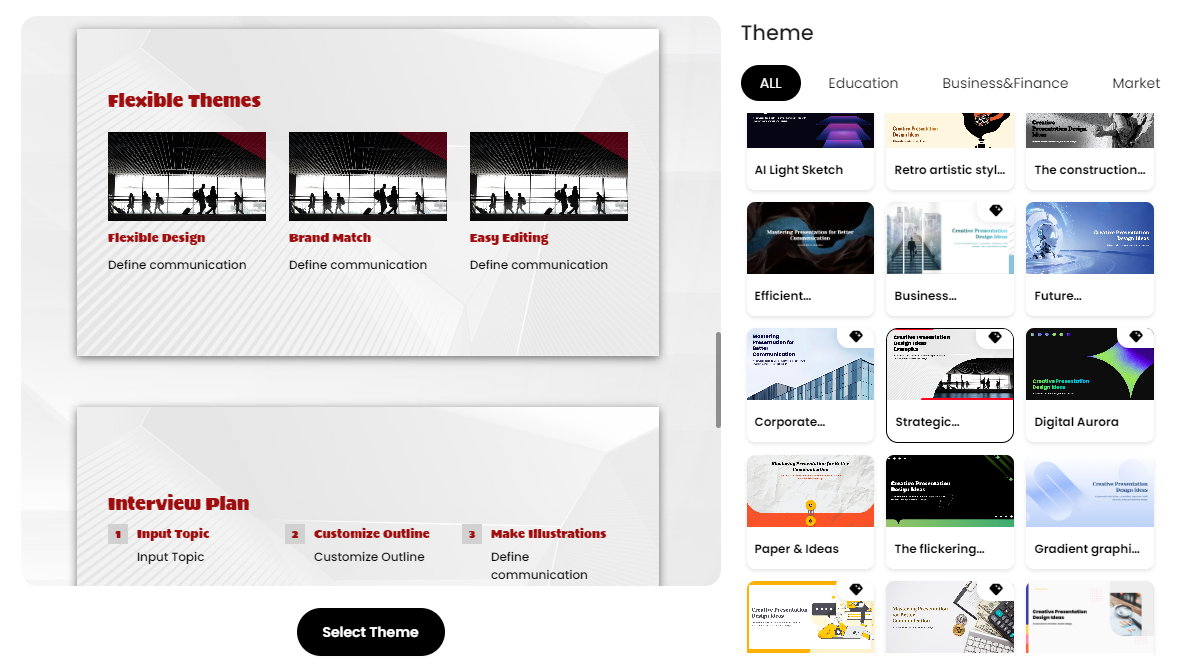
1. In PopAI’s template library, you’ll find a variety of templates designed specifically for the financial industry—styles include calm deep blue, luxurious gold, and modern minimalist data–focused designs.
2. Key Hack: Don’t create content first then find a template! Choose a template first, then fill in content. Pick the template that best matches your client’s tone, then use the AI generation, document import, or link extraction features mentioned above to populate text within this template file.
What Are the Benefits?
l Uniform style guaranteed: Fonts, colors, icons, and chart styles are all pre–matched—no more random fonts or clashing colors on different slides.
l Instant premium design: These templates feature layouts, white space, and image areas crafted by professional designers. Simply plug in text and numbers, and your PPT’s “visual appeal” and “professional aura” will skyrocket—looking like it was made by a consulting firm charging hundreds of thousands of yuan.
Summary
Stop wasting time on copy–pasting, agonizing over layout, and hunting for templates. For wealth management advisors, your core value lies in professional analysis and client communication. Creating tools like Wealth Management Services slides presentations should prioritize maximum efficiency.
Action Roadmap:
l Starting from scratch → Use AI Smart Generation to build a framework in 5 minutes.
l Have a ready–made report → Use Document Import to split and extract content with one click.
l Found great material → Use Link Extraction to integrate it into your plan quickly.
l Need to polish the look → Use Professional Templates for a one–click premium style upgrade.
By integrating these four specific methods into your daily work and mastering PopAI’s one–stop capabilities from intelligent generation to visual beautification, you can cut the time to create a high–quality PPT from a full day to just 1–2 hours. This means you can redirect the massive time saved to irreplaceable core work—researching the market, analyzing clients, and optimizing strategies—delivering deeper services to clients in a competitive landscape and building a solid professional reputation for yourself.