
Maintaining visual consistency in brand–presentations hinges on leveraging AI tools to establish an automated brand governance system. Popai, with its instant generation and AI editing capabilities, enables efficient creation of Brand–Consistent PPTs, preventing brand visual chaos at the source. This article explores the risks of inconsistent brand presentations, the role of AI in addressing these issues, and the specific applications of Popai, offering a solution for building unified brand presentations.

What Hidden Costs Come with Inconsistent Brand Presentations?
Many enterprises fail to recognize that inconsistent visuals in brand presentations (such as PPTs) are not trivial issues—they are “hidden loopholes” that continuously drain resources, primarily in terms of labor and financial costs.
From a labor cost perspective, without unified standards, employees often get trapped in a cycle of inefficiency. For instance, every time they create a project presentation, they have to build the PPT from scratch, sift through shared drives to find the correct brand logo, or even choose colors and fonts based on guesswork. This “last minute cobbling” not only wastes significant working hours but also forces brand/marketing teams to manually review PPTs from various departments—adjusting fonts, repositioning logos, and more. Time that should have been spent on strategic planning is entirely wasted on corrective work, slowing down the entire content creation process and causing frequent delays in critical projects.
From a financial cost perspective, inconsistent brand presentations directly undermine marketing effectiveness and can even lead to customer attrition. If a brand adopts a polished visual style in its advertisements but switches to disorganized layouts and non brand colors in sales PPTs, consumers struggle to form a unified brand memory. The funds previously invested in marketing are essentially “diluted,” drastically reducing the return on investment. Worse still, customers may question the enterprise’s professionalism due to this inconsistency: after seeing a high end product advertisement, they might receive a presentation with misaligned fonts and irrelevant images—and will likely turn to competitors with consistent, more reliable visuals instead.
What Are the Common Visual Chaos Issues in Brand PPTs?
Visual chaos in brand presentations essentially stems from the lack of mandatory brand guidelines, allowing small deviations to accumulate and eventually lead to “brand drift.” The common issues fall into four categories:
l Mismatched fonts and colors: Many PPTs use multiple non brand fonts simultaneously—for example, decorative fonts for headings and plain Songti for body text. Colors are also chosen arbitrarily, switching from bright yellow to dark purple, making the entire page feel like “visual noise.” This chaos not only makes the PPT appear unprofessional but also distracts the audience, preventing them from focusing on key information.
l Irregular logo usage: Logos in some PPTs are placed in the top left corner one moment and at the bottom the next. Some use outdated versions from years ago, while others are arbitrarily stretched or distorted—such as stretching a circular logo into an oval shape. As the core identifier of a brand, this inconsistency weakens brand recognition and makes the audience perceive the enterprise as careless, even “unable to manage its own brand symbols.”
l Cluttered visuals with no hierarchy: Many people tend to cram excessive text into PPTs, filling a single page with long paragraphs without white space or distinguishing between key points. For example, project backgrounds, goals, steps, and data are all squeezed onto one page with uniform font sizes, leaving the audience unsure of where to look first. The result is that “trying to highlight everything ends up highlighting nothing,” significantly reducing the presentation’s effectiveness and making it hard for the audience to grasp the core logic.
l Images inconsistent with brand tone: A brand that emphasizes a minimalist style, for instance, might use images with intense colors and complex elements. Such images make the PPT look “amateurish” and disconnect the presentation from the brand’s overall image, disrupting the audience’s unified perception of the brand.
Why Can AI Be the “Guardian” of Brand Presentations?
In the past, enterprises relied on static brand manuals and manual reviews to maintain presentation consistency. However, this approach has obvious flaws: brand manuals often gather dust on shelves, and manual reviews are time consuming and prone to errors. AI, through automated governance and intelligent management, addresses these pain points perfectly, becoming a reliable “brand guardian.”
AI enables automated compliance checks for brand guidelines. Enterprises can input brand standards into AI tools, which then analyze the content in real time as employees create PPTs. If any deviations are detected, the AI immediately alerts the user and provides revision suggestions. This “proactive prevention” replaces the previous “reactive fixes,” integrating brand compliance into the creation process. There is no longer a need to rely on manual, item by item reviews—saving time and avoiding omissions.
AI lowers the barrier to brand compliance. For employees in non design roles (such as sales or HR), remembering all brand guidelines is challenging. AI tools, however, “build” these guidelines into the creation process. When generating a PPT, for example, the AI automatically applies brand fonts and colors, eliminating the need for manual adjustments. When selecting images, the AI recommends materials that align with the brand tone, preventing users from choosing “off–brand” visuals. This “proactive guidance” allows every employee to easily create guideline compliant PPTs without relying on the design team, significantly improving efficiency.
How Does Popai Achieve Brand–Consistent PPTs Through Its Feature Design?
As an AI driven presentation tool, Popai embeds “brand consistency” into every functional module. Through features like instant generation, AI enhancement, and flexible editing, it enables enterprises to easily create Brand–Consistent PPTs while balancing efficiency and professionalism.
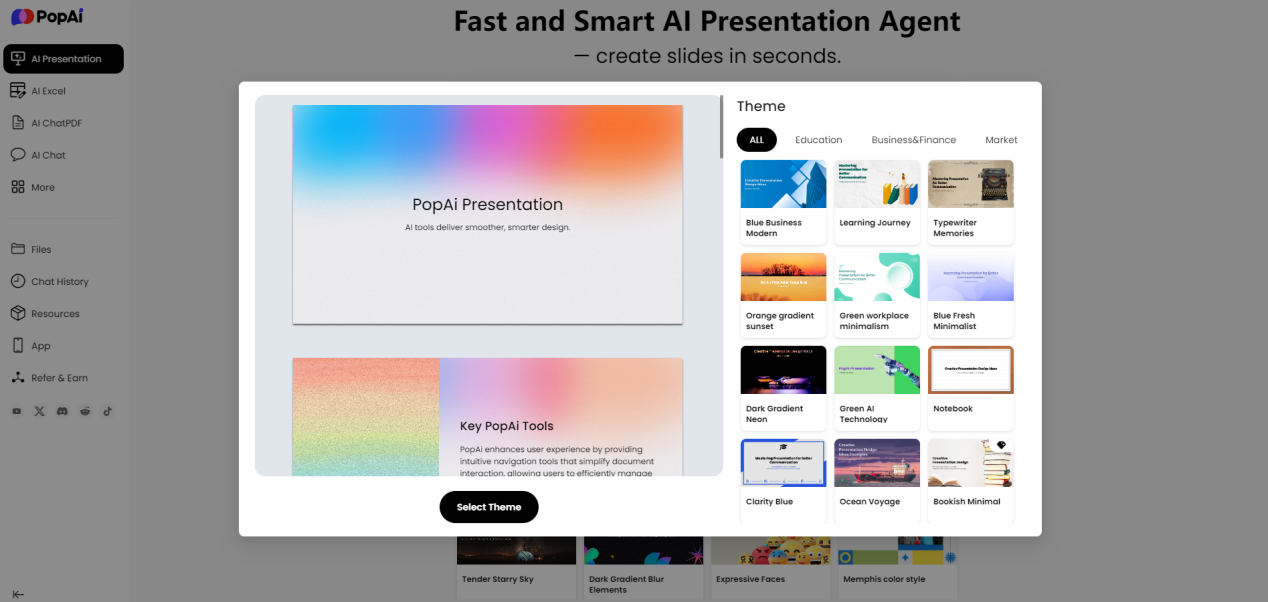
1. Instant PPT Generation: Locking in Basic Brand Guidelines from the Start
Popai’s instant PPT generation feature prevents brand deviations right from the source. Users only need to input simple text prompts or upload existing documents, and Popai generates a complete PPT within minutes. Presentations for clients highlight outcome data, while internal ones focus on process details—but regardless of the layout, core brand visual elements remain consistent. There is no chaos with font colors or misaligned logos, easily establishing the basic framework for a Brand–Consistent PPT.
2. AI Enhanced Content: Ensuring Visuals and Content Align with Brand Tone
Achieving a Brand–Consistent PPT requires not only unified visuals but also content and materials that fit the brand tone—and Popai’s AI enhanced content feature addresses this perfectly. When generating a PPT, Popai uses AI to automatically search for brand related images, avoiding the issue of “mismatched brand and visuals.” At the same time, the AI generates engaging content, organizing complex project processes into clear key points, with a content style that matches the brand’s positioning. This means even non professional copywriters or designers can use Popai to create “content accurate, visually aligned” Brand–Consistent PPTs, without worrying about materials or text straying from the brand style.
3. Seamless Editing & AI Driven Editing: Maintaining Brand Unity During Adjustments
Adjustments to content or structure are often necessary when creating PPTs. Popai’s seamless editing and AI driven editing features ensure brand guidelines remain intact during these adjustments. The seamless editing feature allows users to easily modify the presentation structure—such as adding/deleting pages or reordering paragraphs—while the brand’s fonts, colors, and spacing automatically stay consistent. The AI driven editing feature further optimizes content: if a user wants to condense a section of text, the AI streamlines it while preserving key information and maintaining a language style consistent with the brand. This “adjust without straying” design ensures Brand–Consistent PPTs remain unified during revisions, eliminating the need for repeated guideline checks.
4. Audience Centric Design & Flexible Uploads: Adapting to Scenarios Without Losing Brand Identity
Presentations for different scenarios need to adapt to different audiences, but adaptation does not mean deviating from the brand. Popai’s audience centric design and flexible upload features maintain brand consistency while adapting to scenarios. The audience centric design customizes content priorities based on audience needs—for example, presentations for investors focus on profit models, while those for employees emphasize implementation plans. However, no matter how the priorities shift, the brand’s visual elements (colors, logos, fonts) and core style (such as rigor or innovation) remain unchanged. This ensures the audience perceives a unified brand image while receiving tailored content.
5. Automatic Conversion to Presentations: Maintaining Brand Consistency When Converting Documents to PPTs
Enterprises often need to convert documents like reports and proposals into PPTs, but manual conversion easily leads to brand deviations. Popai’s automatic conversion feature solves this problem. Users can import documents from files, Google, or URLs, and Popai automatically extracts key content—ensuring the generated PPT meets Brand–Consistent standards. This allows users to quickly obtain a Brand–Consistent PPT without starting from scratch, saving significant time.
Conclusion
Visual consistency in brand presentations is critical for enterprises to project a professional image and enhance marketing efficiency—and AI is the core tool for achieving this goal. Popai embeds brand guidelines into the entire creation workflow through features like instant PPT generation, AI enhanced content, and seamless editing. Whether users are design novices or non design professionals, they can easily create Brand–Consistent PPTs. Popai not only addresses the pain point of brand inconsistency but also significantly improves presentation creation efficiency, making it a practical choice for enterprises seeking to maintain consistency in their brand presentations.