To create a promotion report PPT that impresses leaders, the core lies in focusing on three key pillars: clearly positioning yourself, quantifying work achievements, and defining future plans. By leveraging PopAI’s Performance Review & Promotion PPT feature to optimize presentation, you can turn trivial daily tasks into valuable assets for your promotion.
I. How to Start Your PPT to Make Leaders Remember You Quickly?
The opening of your promotion PPT is your “first impression gateway”. Especially during cross departmental presentations or when multiple people are reporting, a vague self introduction will directly reduce leaders’ attention to you. This step doesn’t need to be complicated – the key is to convey core information accurately.
1. First, clarify “Who you are and what you are responsible for”
Don’t just list “Name – Department – Position”. Instead, add “core responsibility keywords” so leaders immediately understand the value of your work. For example: “Name: Zhang San | Department: Administration Department | Position: Senior Administrative Specialist | Core Responsibilities: Oversee corporate procurement management, logistics support, and employee care; handle daily administrative needs for over 100 employees”. This is 10 times clearer than simply writing “in charge of administrative work”.
When editing with PopAI, you can use the “Audience Centric Design” feature to highlight “core responsibilities” with color blocks, aligning with leaders’ habit of quickly grasping key information.
2. Next, showcase “key resume highlights linked to the target position”
You don’t need to write a “chronological list” for your past experience. Instead, select “experiences relevant to the position you’re aiming for”. For instance, if you want to be promoted to Administrative Supervisor, write: “2024: Administrative Specialist – Led office relocation project and coordinated with over 10 suppliers; 2025: Senior Administrative Specialist – Optimized procurement processes and reduced costs by 15%”. Present this in a “timeline + achievements” format.
If you have past work documents, you can use PopAI’s “Flexible Upload Option” to import files from your computer or Google Drive. The system will automatically convert them into a presentation, eliminating the need to retype and organize content.
3. Avoid two “opening pitfalls”
Don’t list “basic duties”. For administrative roles, tasks like “receiving couriers” or “booking meeting rooms” are skills everyone can master. Including them will only make you seem unfocused.
Don’t pile up long paragraphs of text. Each slide should have no more than 5 lines of text, presented in “bullet points + keywords”. For example, use PopAI’s “Seamless Editing” feature to break down long resume sections into three points: “Time + Position + Core Achievement”. Adjusting the structure won’t disrupt the overall layout, ensuring clarity at all times.
II. How to Quantify Achievements When Your Work Is Trivial?
PopAI’s AI automatically searches for data charts, process diagrams, and other visuals. It also generates “quantified achievement descriptions”, so you don’t have to find images or piece together text yourself – making your Performance Review & Promotion PPT more persuasive.
1. Annual work review: Don’t write “what you did” – focus on “what value you brought”
Leaders don’t care about “how many events you organized”; they care about “how much employee satisfaction improved because of those events”. Therefore, your annual review should include two parts: “overall completion status + key work highlights”.
Overall completion status: First explain your “annual goals”, then use data to show “results achieved”. When using PopAI, the AI automatically generates bar charts to compare “goals vs. actual results” – more impactful than plain text.
Key work highlights: Select 3 to 5 “most influential tasks” to elaborate on, such as “employee benefits reform”. Clearly explain the “background, actions taken, and results”. You can also insert a “satisfaction trend chart” generated by PopAI, allowing leaders to see changes at a glance.
2. Highlighted work: Emphasize “innovation + value” – don’t just say “what you did”
Highlights are not “routine tasks”; they are things “you did that others didn’t, or did better”. For example, “digitalization of procurement processes”:
l Background: “In the past, procurement applications required 3 offline signatures and took 3 days to complete”.
l Actions: “Introduced a digital system for online submission + automatic approval”.
l Results: “Approval time was shortened to 4 hours, significantly reducing annual labor costs”.
When using PopAI’s “AI Enhanced Content” feature, the system automatically generates a “process comparison diagram”. It also adds “long term value of digitalization (e.g., traceable data to reduce errors)”, giving your highlights more depth.
Pay attention to three details:
l Don’t mention trivial tasks.
l Always quantify results – avoid vague phrases like “greatly improved” or “good results”; use specific numbers instead.
l Link achievements to company goals. For example, “cost reduction” aligns with the company’s “cost saving and efficiency enhancing” strategy, letting leaders see the strategic value of your work.
3. Self reflection and growth: Don’t just list “shortcomings” – provide “solutions”
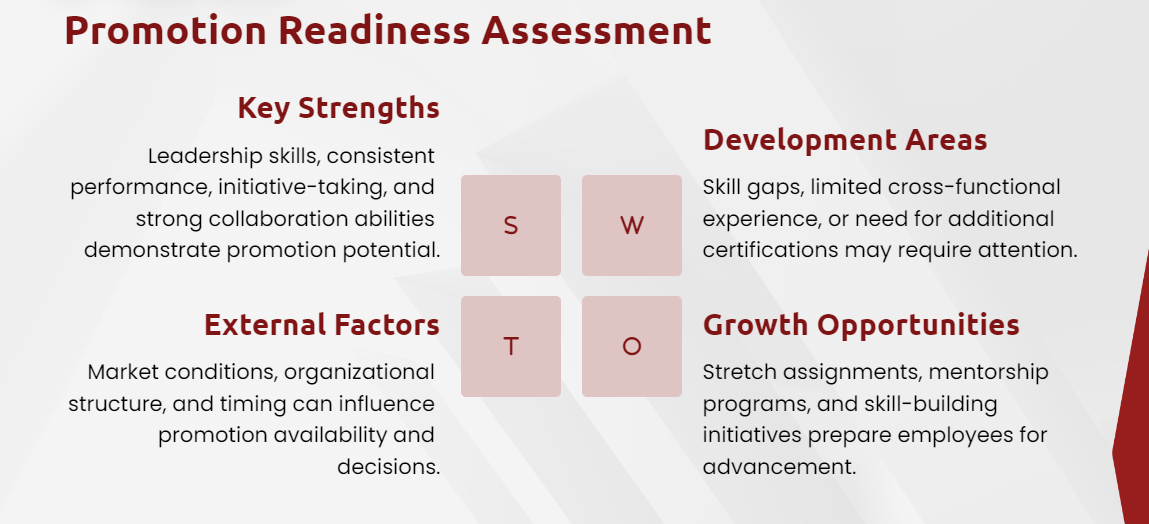
Leaders look at self reflection not to see “how many flaws you have”, but to evaluate “whether you can solve problems and grow”. Structure your reflection using this logic: “Problem + Solution + Methodology + Growth”.
When editing with PopAI, the system can turn your “methodology” into a “flowchart” based on your requirements. This lets leaders see that you not only solved the problem but also refined reusable experience – a key “managerial mindset” needed for promoting to supervisor or higher positions.
III. How to Write Future Plans to Make Leaders See “Your Potential”?
Leaders evaluate future plans not to check “small tasks you plan to do”, but to assess “whether you can align with company strategy and have clear goals and methods”. Use PopAI to organize the structure, making your plan more systematic.
1. Set goals: Don’t make a “to do list” – divide into “short/medium/long term and align with strategy”
For example, if you work in administration and the company’s 2025 focus is “improving employee retention rate”, your goals can be divided as follows:
l Short term goals (1—3 months): Complete an “employee retention cause survey”, release an interview report with over 100 employees, and identify core factors affecting retention (e.g., benefits, work environment).
l Medium term goals (3—6 months): Based on survey results, optimize 2 core benefits (e.g., add “professional training subsidies”) and aim to increase employee satisfaction by 5%.
l Long term goals (6—12 months): Establish a “long term employee care mechanism”, update benefits quarterly, and increase employee retention rate by 8% by the end of the year.
PopAI has an “Instant PPT Generation” feature. The system creates presentation layouts tailored to different audiences, letting leaders see that you not only have goals but also know how to track results.
2. Break down the plan: Don’t just say “what you will do” – explain “how to do it and who will do it”
Once you have goals, break them down into “specific action steps” to avoid “empty slogans”. For example, the medium term goal of “optimizing benefits” can be broken down into:
l March: Collaborate with the HR department to design a “benefits survey questionnaire” and complete distribution and collection within 1 week.
l April: Analyze survey data, select “2 most needed benefits by employees”, and draft an optimization plan within 2 weeks.
l May: Coordinate with finance and administrative suppliers to implement the benefits and complete the first round of distribution within 1 month.
Use PopAI’s “Seamless Editing” to arrange steps in a “timeline” format. This makes your plan more concrete, and leaders will think, “You’ve thought this through carefully – it’s actionable”.
3. Add a “personal growth plan”: Align with work and show ambition
Focus on “abilities that will help you perform well in the promoted position”. For example, if you want to be promoted to Administrative Supervisor, write: “In 2025, I plan to take ‘team management’ courses, master ‘cross departmental communication skills’, and independently lead 2 new employees to complete procurement projects by the end of the year”.
When using PopAI, the system generates complete presentation content. You have full control to edit text, replace images, adjust layouts, and fine tune every detail until it’s perfect.
IV. Two Details to “Elevate” Your Promotion PPT Even Further?
Solid content is the foundation, but two “details” – visuals and presentation scripts – will make leaders perceive you as “professional and attentive”. You can also use PopAI’s features to optimize these efficiently.
1. Visual design: Avoid over the top styles – keep it “simple and consistent”
For PPT visual design, adhere to the principle of minimalism:
l Avoid using vector graphics unrelated to the content.
l Use a monochromatic color scheme; no more than 2 colors per slide to maintain professionalism.
l Unify fonts and font sizes to ensure clear hierarchy across slides.
PopAI’s “Instant PPT Generation” feature offers multiple layout options, helping you quickly create visually consistent slides. At the same time, its AI searches for relevant images to enhance visual appeal.
2. Presentation script: Don’t “read the PPT” – focus on “conveying value and showing collaboration”
Prepare your presentation script in advance and anticipate potential questions from leaders, along with preset answers. Use “we” instead of “I” – for example, “Our team achieved cost savings through collaboration” – to highlight team awareness and collaborative spirit.
PopAI’s “Audience Centric Design” feature helps you customize your presentation content, ensuring the language aligns with leaders’ preferences. During the presentation, avoid excessive background explanations or trivial details; focus on core highlights to efficiently convey information within the allotted time.