PopAi vs Presentations.AI: Workflow, Branding, Export, and Fit
Updated August 3, 2026 · PopAi Editorial Team
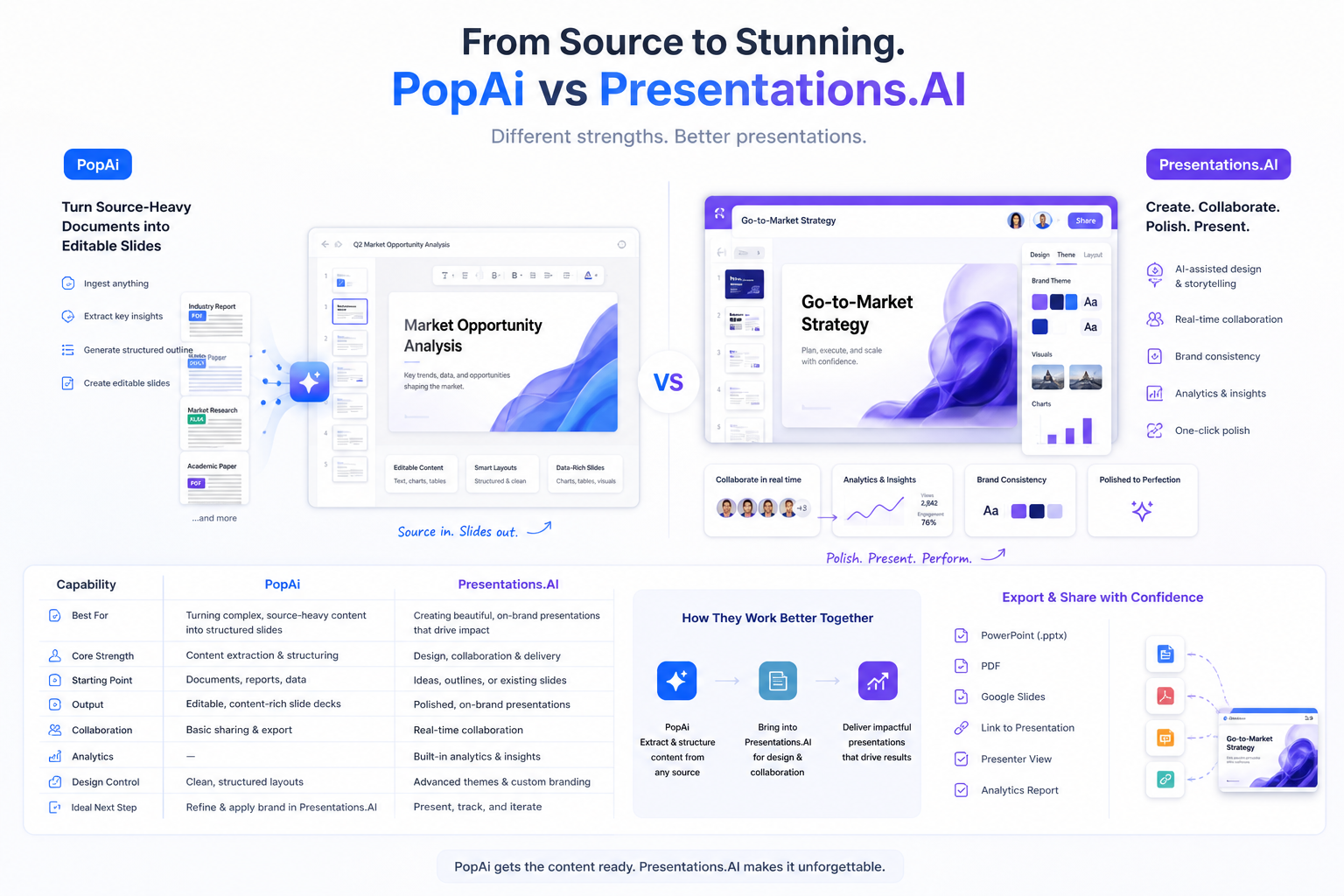
PopAi vs Presentations.AI compares two different ways to make presentation work faster. PopAi is stronger when source-heavy documents, notes, reports, or web pages need to become a structured deck. Presentations.AI is stronger when the brief is clearer and the team needs branded AI presentation polish, sharing, collaboration, and analytics.
This guide retargets the page around the PopAi vs Presentations.AI search intent: suitable users, feature and pricing checks, output quality, pros and cons, PopAi-fit scenarios, migration steps, FAQ, and a link back to the main PopAi AI Presentation pillar.
PopAi vs Presentations.AI: Fast Answer for Deck Teams
If you are comparing PopAi vs Presentations.AI, ask which part of the process slows your team down most. PopAi is the better starting point when the hard work is source synthesis. Presentations.AI is worth testing when the content is already clear and the team needs a branded presentation platform with collaboration, sharing, and analytics.
Comparison Objects and Suitable Users
Presentations.AI should not be treated as only a template generator. Its value is closer to an AI presentation platform with brand consistency, sharing, analytics, and visual polish. PopAi's value is upstream: turning real source material into a coherent presentation narrative.
- Choose PopAi for executive updates, report summaries, research decks, training materials, consulting proposals, and source-backed business reviews.
- Choose Presentations.AI when the brief is already clear and the team values brand consistency, collaboration, analytics, and platform workflow.
- Run the same source-heavy brief and the same lighter concept deck in both tools before deciding.
PopAi vs Presentations.AI Feature, Pricing, and Output Quality Table
Because pricing and public plan details can change, confirm current export access, brand features, analytics, team seats, and usage limits before rollout.
| Criterion | PopAi | Presentations.AI | Best-fit takeaway |
|---|---|---|---|
| Core workflow | Source-heavy material to structured editable deck | Branded AI presentation platform with polish, collaboration, and sharing | Choose PopAi when source synthesis is the bottleneck; choose Presentations.AI when the brief is clear and platform polish matters. |
| Best input | PDFs, Word files, PPTX files, web pages, notes, reports, transcripts, and prompts | Ideas, outlines, briefs, and content suited to branded visual storytelling | PopAi is stronger when the starting material still needs organization. |
| Output quality | Stronger for preserving source logic and recommendation flow | Stronger for polished branded presentation output from a clearer brief | Measure cleanup time after fact-checking and export, not only visual polish. |
| Platform features | Generation, editing, export, and review handoff workflow | Brand consistency, collaboration, sharing, analytics, and multi-device platform workflow | Pick the feature set that matches your review process. |
| Best user | Managers, consultants, analysts, students, educators, and teams with dense source material | Teams that need branded AI presentation polish, collaboration, and platform-level review | Choose by bottleneck: source fidelity or branded platform workflow. |
| Check | Why it matters | How to test |
|---|---|---|
| Free/trial limits | Plan details can change and affect rollout | Generate two real decks before standardizing |
| PowerPoint export | Teams often need downstream editing | Open the exported file and move text, objects, and images |
| Brand consistency | Presentations.AI's value depends on brand workflow | Test templates, themes, and reusable style controls |
| Source coverage | PopAi's value depends on source fidelity | Upload dense source material and compare missing context |
| Collaboration and analytics | Platform features only matter if the team uses them | Run one stakeholder review through the actual workflow |
Pros and Cons of PopAi and Presentations.AI
PopAi advantages
- Better fit for PDFs, Word documents, PPTX files, web pages, meeting notes, reports, and dense source material.
- Stronger when the deck needs source fidelity, sectioning, recommendation logic, and editable handoff.
- Useful for recurring business updates, class decks, client proposals, and source-backed summaries.
Presentations.AI advantages
- Better fit for polished branded output from a clearer brief or outline.
- Useful when collaboration, sharing, analytics, multi-device access, or presentation-platform workflow matters.
Watchouts
- Do not choose either tool only by first-slide polish or generation speed.
- Test source fidelity, brand fit, export editability, review handoff, and cleanup time with your own material.
Who Is More Suitable for PopAi?
PopAi is more suitable when the presentation starts with messy information. A leadership team can turn meeting notes and a business report into an update deck; a consultant can turn interview notes into a client proposal; a student can turn research sources into a class presentation.
Realistic example: source-heavy executive update
A manager has a report, KPI notes, risks, and stakeholder comments. PopAi can help create a deck with summary, drivers, risks, decisions, and next steps. Presentations.AI may be worth testing later if the same deck needs branded platform review, analytics, or polished visual storytelling.
Migration Steps from Platform-First Decks to PopAi Source-to-Deck
If a platform-first workflow creates polished slides but still leaves the team rewriting the story, move source synthesis earlier in the process.
- Pick one deck where the visual draft looked good but missed important source context.
- Collect the original report, notes, transcript, or brief and generate the structure in PopAi first.
- Review the slide titles and evidence placement before asking for final design polish.
- Export the deck, test editability, and decide whether platform collaboration or analytics are needed for final approval.
Related PopAi Comparison and Pillar Pages
For adjacent brand and presenter workflow comparisons, read PopAi vs Decktopus AI, PopAi vs Canva AI, and PopAi vs Beautiful.ai. For a broader market overview, use the best AI for PowerPoint presentation tools guide. For the upper product pillar, start from PopAi AI Presentation.
Frequently Asked Questions
Is PopAi better than Presentations.AI for document-based decks?
PopAi is usually better when the work starts from PDFs, Word documents, reports, notes, web pages, or other source-heavy material that needs to become a structured deck. Presentations.AI is stronger when the brief is clearer and the team needs branded platform workflow.
What should I test in a PopAi vs Presentations.AI pilot?
Use the same real source-heavy brief in both tools. Compare source coverage, slide-title usefulness, brand fit, PowerPoint export, collaboration workflow, analytics needs, and total cleanup time.
Who should choose PopAi instead of Presentations.AI?
Choose PopAi if your repeated presentation work depends on dense source material, business narrative, report summaries, research notes, or editable deck handoff before platform polish.
Can Presentations.AI still be useful after a PopAi first draft?
Yes, if the team needs branded presentation polish, collaboration, analytics, or platform-based review. Use PopAi for source structure first when source fidelity is the main risk.