PopAi vs Beautiful.ai: Workflow, Design, Export, and Fit
Updated August 3, 2026 · PopAi Editorial Team
PopAi vs Beautiful.ai is a comparison between two different presentation bottlenecks. PopAi is stronger when rough source material needs to become a structured deck. Beautiful.ai is stronger when the message is mostly clear and the main need is Smart Slides, brand governance, and consistent visual production.
This guide retargets the page around the PopAi vs Beautiful.ai search intent: who each tool is for, feature and pricing checks, output quality, pros and cons, PopAi-fit scenarios, migration steps, FAQ, and a link back to the main PopAi AI Presentation pillar.
PopAi vs Beautiful.ai: Fast Answer for Deck Teams
If you are comparing PopAi vs Beautiful.ai, first identify your bottleneck. PopAi is the better starting point when you have PDFs, Word documents, notes, reports, PPTX files, web pages, or prompts that need to become a deck. Beautiful.ai is a better fit when the content is already shaped and the team needs controlled layouts, brand rules, and consistent design.
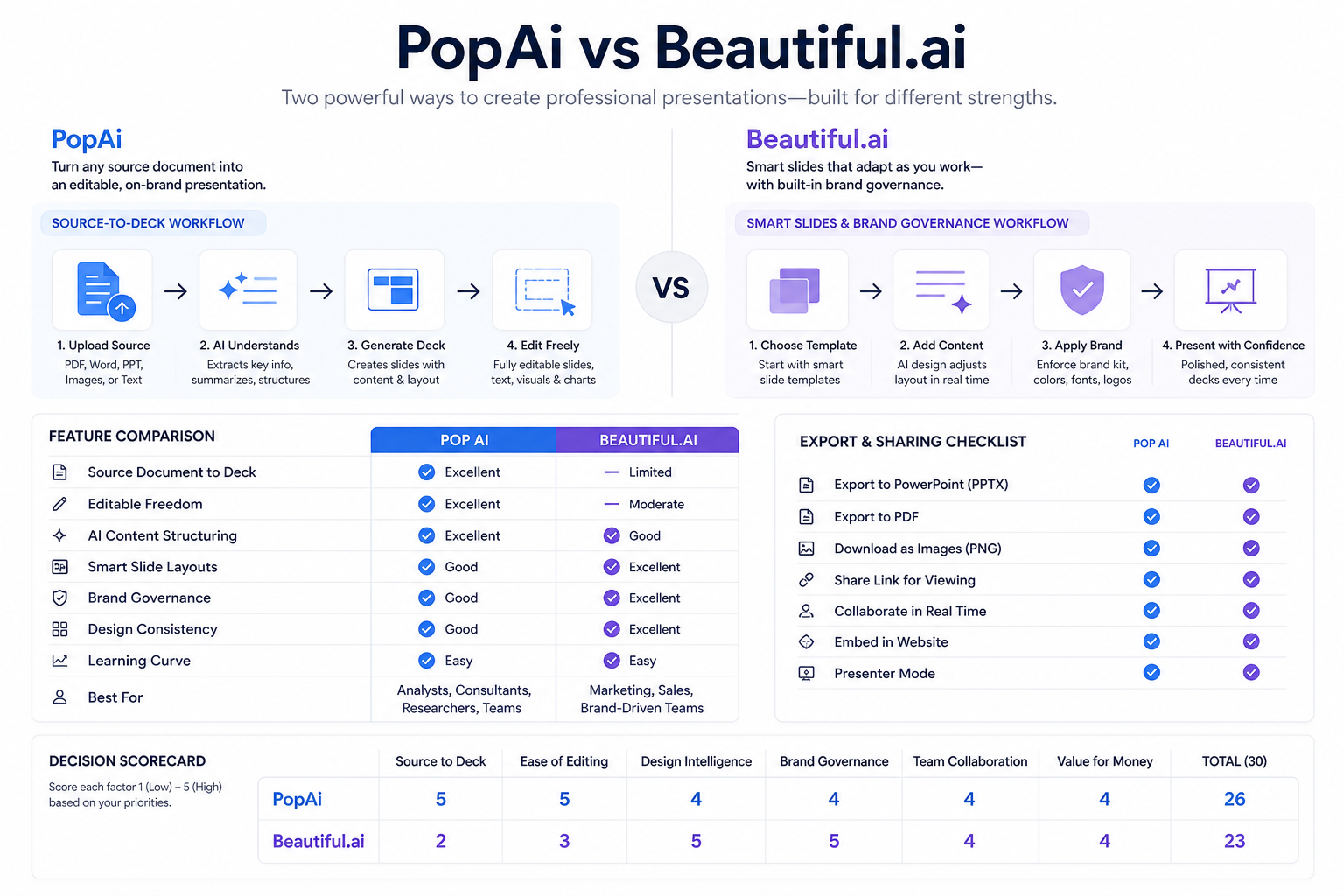
Comparison Objects and Suitable Users
PopAi and Beautiful.ai should not be compared as if they solve the same problem in the same place. PopAi is a content-first source-to-deck workflow. Beautiful.ai is a design-governed presentation system with AI and Smart Slides inside a more controlled production environment.
- Choose PopAi for report summaries, client proposals, training decks, investor updates, student projects, and source-backed business reviews.
- Choose Beautiful.ai when many people need to create visually consistent branded decks from an already clear message.
- Use the same source brief in both tools and compare the output after 30 minutes of cleanup.
PopAi vs Beautiful.ai Feature, Pricing, and Output Quality Table
Pricing and plan limits can change quickly, so verify the current pages before buying. The more stable comparison is workflow fit: source-to-deck creation versus design governance.
| Criterion | PopAi | Beautiful.ai | Best-fit takeaway |
|---|---|---|---|
| Core workflow | Source material to structured editable deck | Smart Slides, brand governance, and design-controlled presentation creation | Choose PopAi when the source is messy; choose Beautiful.ai when the story is clearer and design consistency matters most. |
| Best input | Prompts, PDFs, Word files, PPTX files, web pages, reports, and notes | Prompts, templates, AI context, and content that can fit Smart Slide layouts | PopAi is stronger before the narrative is fully organized. |
| Output quality | Stronger for content-first structure from real source material | Stronger for controlled visual consistency and polished layouts | Score the full deck after cleanup, not only the first generated screen. |
| Export and review | PPTX/PDF handoff and share-link review workflow | PDF and editable PowerPoint export should be tested by plan | Open the exported file and test fonts, objects, charts, and layout fidelity. |
| Best user | Students, consultants, founders, analysts, educators, and teams with source-heavy deck work | Brand-driven teams that need repeatable layouts, shared libraries, and governance | Choose by bottleneck: source structure or design governance. |
| Check | Why it matters | How to test |
|---|---|---|
| Trial or free limits | Comparison pages often attract users close to purchase | Create two real decks before upgrading |
| Brand controls | Beautiful.ai's advantage depends on governance features | Test templates, locked layouts, fonts, colors, and libraries |
| Source handling | PopAi's advantage depends on real material | Upload a PDF, Word file, or report and inspect source coverage |
| Export fidelity | Teams still need approved handoff files | Open PPTX/PDF output and edit the deck for five minutes |
| Cleanup time | The winner is the tool that saves total time | Measure time from source input to stakeholder-ready deck |
Pros and Cons of PopAi and Beautiful.ai
PopAi advantages
- Better fit for messy source material, document summaries, and first-draft deck structure.
- Useful when users need a fast, editable deck before final design polish.
- Good for students, consultants, analysts, founders, marketers, and educators.
PopAi watchouts
- High-stakes decks still need fact checking, brand review, and export QA.
- Real-time multi-person slide editing should happen in the team's normal review tool when required.
Beautiful.ai advantages
- Stronger for Smart Slides, brand governance, design consistency, and team-wide layout control.
- Useful when the message is already clear and the organization wants repeatable presentation production.
Beautiful.ai watchouts
- Source-heavy content may need narrative cleanup before design automation is useful.
- Teams should test plan-level export, collaboration, governance, and template limits before rollout.
Who Is More Suitable for PopAi?
PopAi is more suitable when the deck starts as information, not design. A consultant can turn a client discovery memo into a proposal, a manager can turn meeting notes into an executive update, and a student can turn research into a class presentation before worrying about final styling.
Realistic example: source-heavy go-to-market deck
A product marketer has launch notes, customer objections, pricing context, channel ideas, and early pipeline data. PopAi can help organize that source into a launch deck with opportunity, audience, positioning, plan, risks, and ask. Beautiful.ai may be useful later if the team needs stricter brand-governed layouts.
Migration Steps from Beautiful.ai-Style Design to PopAi Source-to-Deck
If your team has been starting with design automation but still spends too long fixing the story, move the source and structure work earlier in the process.
- Pick one deck where Smart Slide polish did not solve the storyline problem.
- Collect the original notes, source documents, data, and audience decision.
- Generate a PopAi structure first, then review slide titles before styling.
- Export the deck and test whether your team can finish brand review in its normal workflow.
- Keep Beautiful.ai for brand-governed production if it clearly reduces final visual QA.
Related PopAi Comparison and Pillar Pages
For adjacent design and native-editor comparisons, read PopAi vs Canva AI, PopAi vs Plus AI, and PopAi vs SlidesAI. For a broader market overview, use the best AI for PowerPoint presentation tools guide. For the upper product pillar, start from PopAi AI Presentation.
Frequently Asked Questions
Is PopAi better than Beautiful.ai?
PopAi is usually better when the job starts from source material such as PDFs, Word documents, notes, reports, or prompts. Beautiful.ai is usually better when the message is already clear and the team needs Smart Slides, brand governance, and design consistency.
What should I test in a PopAi vs Beautiful.ai pilot?
Use the same real brief in both tools. Compare outline quality, source coverage, slide titles, visual consistency, export fidelity, plan limits, and total cleanup time.
Who should choose PopAi instead of Beautiful.ai?
Choose PopAi if your repeated presentation work depends on source documents, research notes, business reports, client briefs, or first-draft structure before design polish.
Can Beautiful.ai still be useful after creating a deck in PopAi?
Yes, if your team needs strict design governance or Smart Slide-style brand consistency. Use PopAi for source-to-deck structure, then use a design-governed workflow only when it clearly improves final review.