PopAi vs Canva AI: Workflow, Design, Export, and Fit
Updated August 3, 2026 · PopAi Editorial Team
PopAi and Canva AI both help users create presentations faster, but they are built around different bottlenecks. PopAi is stronger for turning source material into a structured deck. Canva AI is stronger when the presentation is part of a wider visual brand, design, or campaign workflow.
PopAi vs Canva AI at a Glance
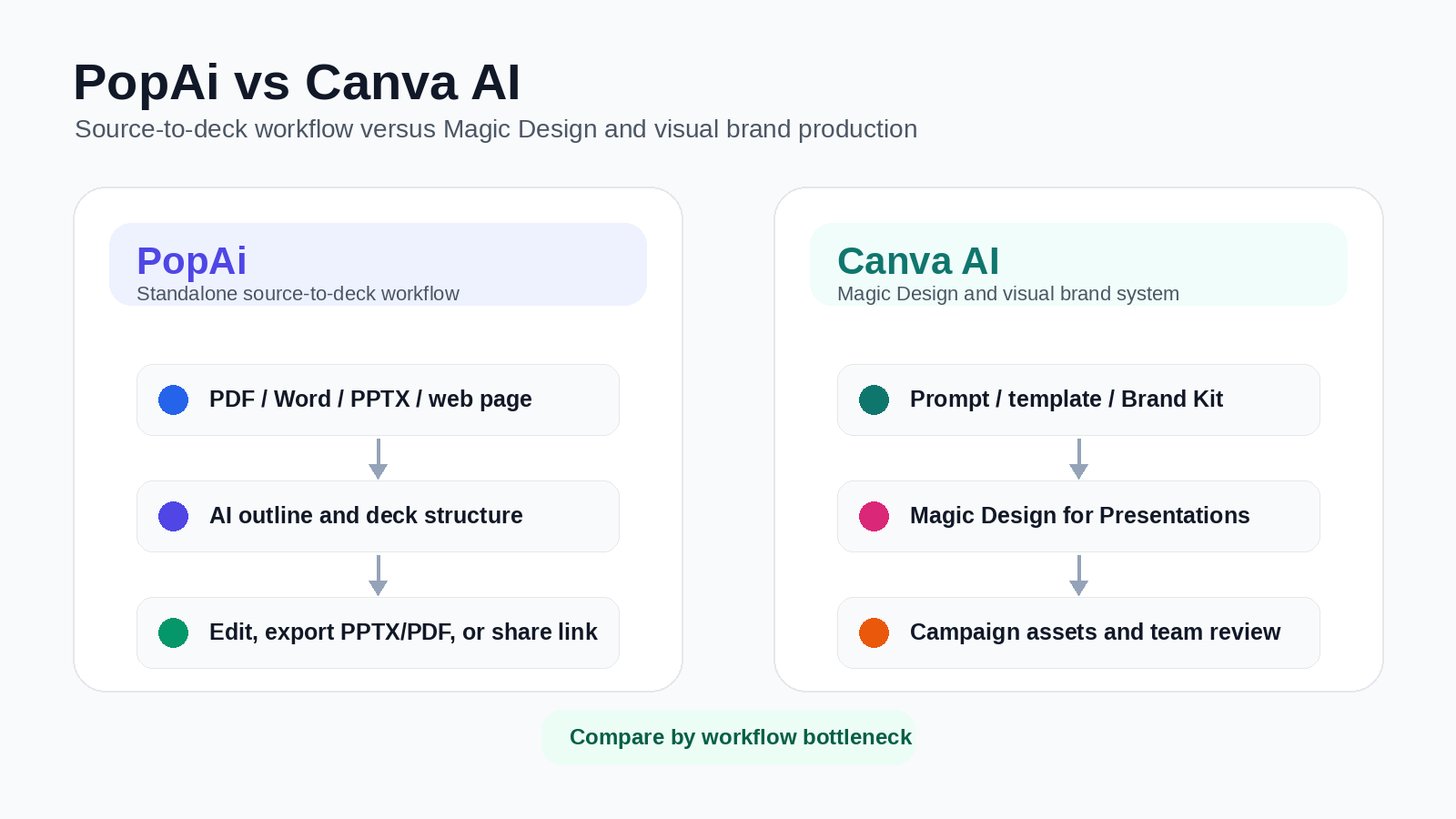
In practice, founders, consultants, educators, and managers usually lose time before design begins. They have meeting notes, PDFs, research summaries, product briefs, or scattered metrics, but not a slide sequence. Canva AI is strongest once the message is reasonably clear and the team wants attractive layouts, brand assets, or campaign visuals. PopAi is more specialized for getting from source material to a structured, editable presentation draft.
For teams comparing the best AI for PowerPoint presentation tools, the useful question is not "Which platform has more features?" but "Which tool removes the work we repeat every week: structuring, writing, designing, reviewing, or exporting?"
For teams that want an AI presentation maker that starts from real source material and ends in a deck workflow, PopAi is the more direct fit. Canva AI is stronger when the final output is part of a broader visual campaign or brand asset system.
If you are still deciding what type of PopAi vs Beautiful.ai workflow fits your team, compare PopAi's source-to-deck approach with Beautiful.ai's stricter Smart Slide automation before choosing a design ecosystem.
Best-fit summary
The Real Difference: Source-to-Deck vs Visual Design Ecosystem
Canva AI should not be described as only a manual design editor. Canva's Magic Design for Presentations can generate draft presentations from a prompt, and Canva's broader workspace adds templates, brand assets, stock media, AI content and media tools, drag-and-drop editing, and team design collaboration. The stronger distinction is workflow: Canva AI is a broad visual creation suite with presentation generation inside it, while PopAi is better positioned as a focused source-to-deck workflow for turning messy source material into a structured presentation.
PopAi's advantage is workflow focus. It is better for users who begin with rough inputs — PDFs, Word documents, PPTX files, web pages, notes, reports, research material, or prompts — and need the AI to propose a deck structure before the message is fully polished. Canva AI's advantage is creative range: once the message is clear, Canva is stronger for brand assets, campaign visuals, social graphics, templates, stock media, and multi-format creative production.
| Need | Better fit | Why |
|---|---|---|
| Turn messy business material into slide logic | PopAi | PopAi is built around source-to-deck workflows, including prompts, files, notes, reports, and document-heavy inputs. |
| Create visually polished brand assets | Canva AI | Canva AI sits inside a broad visual suite with templates, Brand Kit workflows, stock media, and multi-format creative production. |
| Generate a business presentation from a rough brief | PopAi | PopAi should be tested when the deck needs a clear narrative and slide sequence before design polish. |
| Design slides, social posts, graphics, and campaign assets together | Canva AI | Canva is stronger when a presentation is only one asset in a wider campaign or brand system. |
| Final review and export handoff | Depends | PopAi should be tested for PPTX/PDF and share-link handoff; Canva should be tested for final presentation mode, export fidelity, and continued design editing. |
Recommended Pilot: Quarterly Business Review
To compare the tools fairly, use the same real quarterly business review brief in both products. A practical pilot is a 10-slide QBR for a B2B SaaS company, including pipeline growth, churn movement, enterprise expansion opportunities, product adoption risks, customer notes, and three recommended actions for the next quarter.
In PopAi, evaluate whether the output separates performance, diagnosis, risks, and action plan into a clear leadership-meeting sequence. In Canva AI, evaluate whether Magic Design for Presentations creates a visually polished starting point that still preserves the business logic. The goal is not to prove one tool always wins; it is to see whether your bottleneck is narrative structure or visual production.
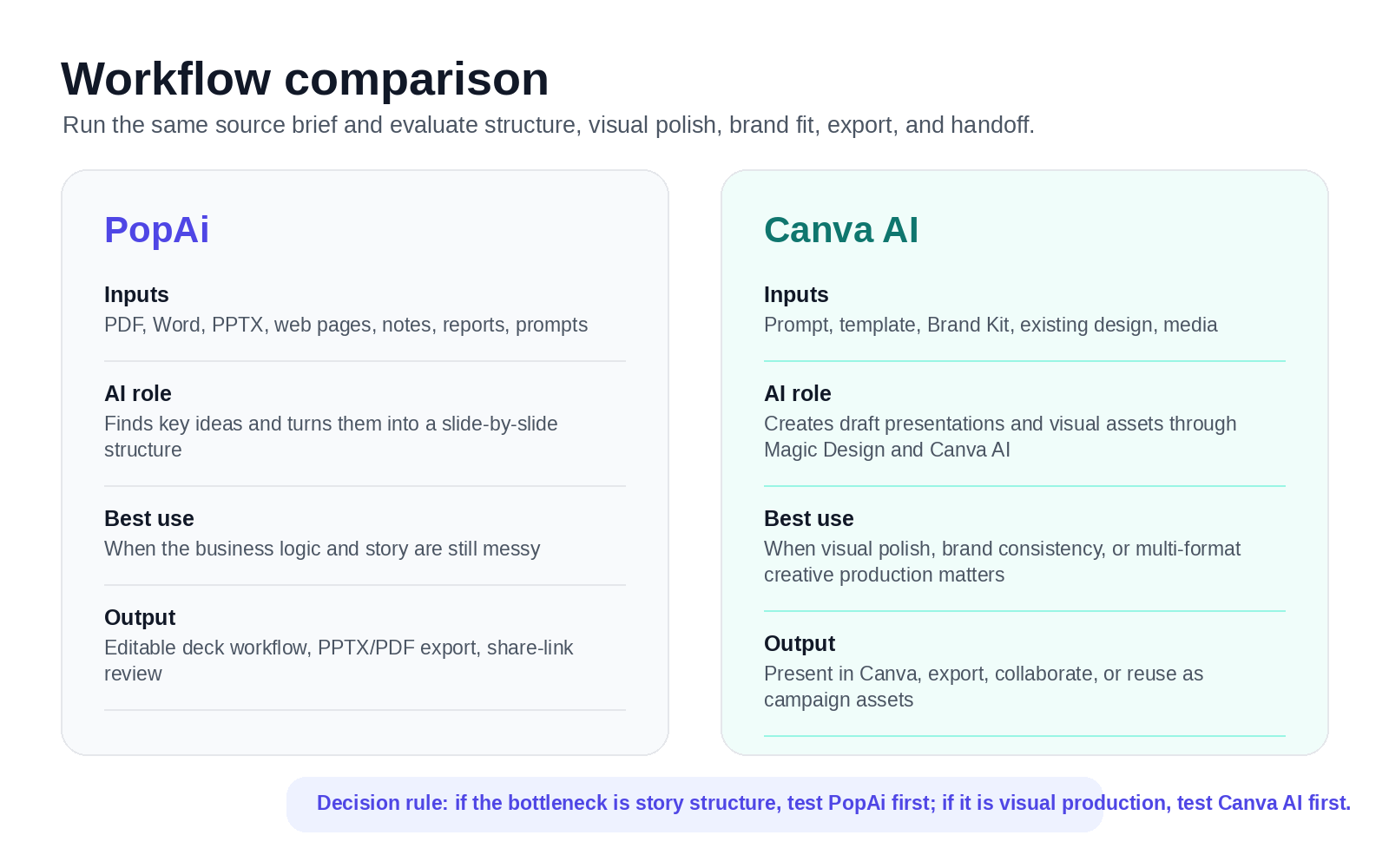
Design Control, Branding, and Review Handoff
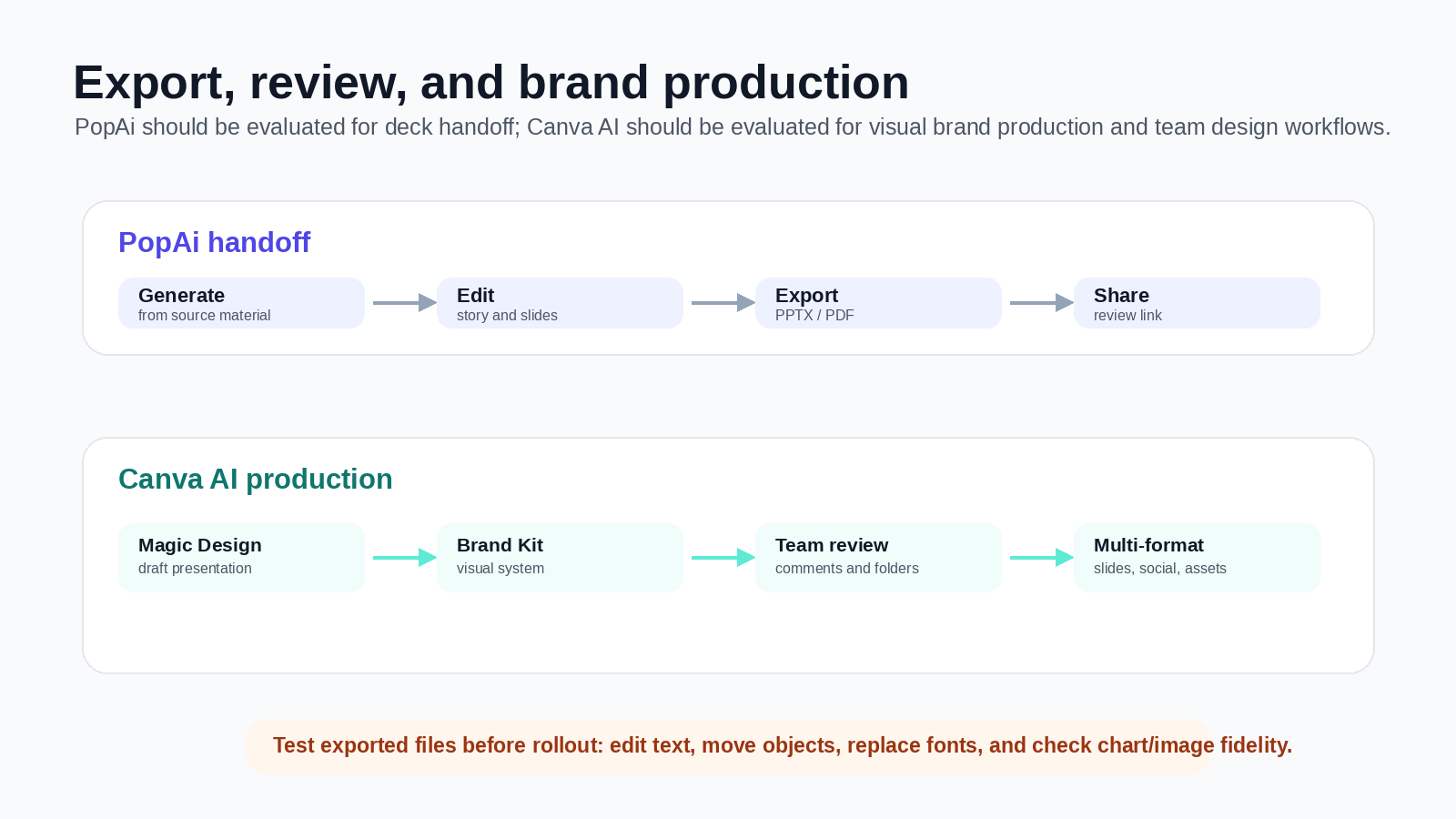
PopAi should be positioned as a generation, editing, export, and review-handoff workflow — not as a real-time collaboration workspace. Teams can create and edit the deck in PopAi, then export PPTX/PDF or share a link for review. Canva has the stronger native design-collaboration story for teams already working in Canva, with shared brand assets, templates, comments, folders, and multi-format design workflows.
Before committing, test the full handoff path. PopAi should be evaluated on whether PPTX/PDF export and share-link review are enough for your presentation workflow. Canva should be evaluated on whether the final design will be presented inside Canva, exported for PowerPoint, downloaded as PDF, or reused across other creative formats. If your team depends on last-minute PowerPoint edits, open the exported file and test text editing, object movement, font replacement, chart fidelity, and image quality before rollout.
Pricing and Plan-Limit Checklist
Pricing and plan limits change, so verify both vendors' current pricing pages before purchase. Canva currently positions its plans around Free, Pro, Business, and Enterprise, with paid plans emphasizing premium content, AI features, templates, and stronger design tools. Canva Pro is positioned for creators who need premium editing tools, AI features, and templates, while Canva Business is positioned for individuals and growing teams. PopAi offers limited free usage, while paid-plan value depends on how often your team turns PDFs, Word documents, PPTX files, web pages, prompts, and notes into finished decks.
- Free allowance: Check how many AI presentation generations, exports, and edits are available before upgrading.
- Brand workflows: Test whether templates, fonts, colors, Brand Kit behavior, and assets match your team standards.
- Export quality: Open the exported files and test whether they remain editable and visually accurate.
- True ROI: Measure finished-deck time, not just first-draft generation speed.
Suggested Decision Scorecard
| Criterion | Suggested weight | Suggested PopAi score 1-5 | Suggested Canva AI score 1-5 | Why it matters |
|---|---|---|---|---|
| Turns messy source material into structure | 25% | 4.6 | 3.7 | PopAi is stronger as a focused source-to-deck workflow; Canva AI can generate drafts but is broader and more design-led. |
| Visual design and creative production | 20% | 4.0 | 4.8 | Canva has a clear advantage for templates, stock assets, Brand Kit, visual editing, social graphics, and campaign assets. |
| Business narrative and slide logic | 20% | 4.5 | 3.9 | PopAi is better when the deck needs a clear argument before design polish. |
| Team design collaboration | 15% | 3.5 | 4.7 | Canva is stronger for teams already using shared brand assets, comments, folders, and design workflows. PopAi should not be positioned as real-time collaboration. |
| Export and review handoff | 10% | 4.2 | 4.3 | Both need practical export testing; PopAi is deck-handoff focused, while Canva may be better if the final design stays inside Canva. |
| Multi-format content production | 10% | 3.6 | 4.8 | Canva is stronger when a presentation is only one asset in a broader marketing or brand campaign. |
For content-heavy, source-driven deck creation, PopAi is the stronger starting point. For brand-driven visual production across slides, social graphics, campaign assets, and shared creative workflows, Canva AI is usually the stronger ecosystem.
Pros, Cons, PopAi Fit, and Migration Steps
PopAi advantages
- Better fit for source-heavy decks from PDFs, Word documents, PPTX files, reports, web pages, and notes.
- Stronger when the deck needs narrative structure before visual production.
- Useful for teams that need PPTX/PDF handoff after creating the first draft.
Canva AI advantages
- Better fit for visual design, Brand Kit workflows, campaign assets, and multi-format creative production.
- Useful when the message is already clear and the team wants polished layouts or social/marketing assets.
Who is more suitable for PopAi?
PopAi is more suitable when the bottleneck is turning real source material into a structured deck. For example, a founder can upload notes and a product brief to create an investor update before moving the design into a brand system only if extra visual production is needed.
Migration steps
- Start with one deck where Canva AI output still needs heavy story cleanup.
- Gather the source notes, brief, customer quotes, and key metrics before generating slides.
- Create the deck structure in PopAi, then export and compare cleanup time.
- Use Canva AI only for final visual production if the deck also needs campaign assets or brand-system reuse.
For adjacent comparison pages, read PopAi vs Beautiful.ai, PopAi vs Plus AI, and PopAi vs Gamma. For the upper product pillar, start from PopAi AI Presentation.
Frequently Asked Questions
Is PopAi better than Canva AI for business presentations?
It depends on the bottleneck. PopAi is usually the better fit when you need to turn PDFs, Word documents, PPTX files, web pages, notes, reports, or prompts into a structured deck. Canva AI is stronger when the main priority is visual design, Brand Kit workflows, campaign assets, social graphics, templates, and team design collaboration.
Can Canva AI generate a full presentation from a prompt?
Yes. Canva's Magic Design for Presentations can generate professional draft presentations from an idea or prompt. Teams should still review slide logic, factual claims, message hierarchy, and whether the output fits the final business narrative.
Does PopAi support online collaboration?
PopAi should not be positioned as a real-time collaboration workspace. The accurate workflow is to generate and edit the deck in PopAi, then export PPTX/PDF or share a link for review handoff.
Should I use both PopAi and Canva AI together?
Some teams may use both sequentially: PopAi for structure, first-draft narrative, and source-to-deck work; Canva AI for visual polish, campaign assets, social graphics, and brand-system production. This works best when the deck needs both strong thinking and strong creative execution.