PopAi vs Decktopus AI: Workflow, Branding, Export, and Fit
Updated August 3, 2026 · PopAi Editorial Team
PopAi vs Decktopus AI is the right comparison when you need to choose between source-heavy deck creation and branded, interactive, presenter-friendly workflows.
PopAi and Decktopus AI both help users create presentations faster, but they are optimized for different bottlenecks. PopAi focuses on turning source-heavy material into a structured deck. Decktopus AI focuses on branded presentation generation, visual setup, team features, and presenter delivery.
Both tools can help users move faster than a blank PowerPoint file, but they are optimized for different bottlenecks. PopAi is stronger when the hardest work is turning source material into a clear deck narrative. Decktopus AI is stronger when the user wants a branded, guided, interactive, or template-led presentation workflow with less manual design setup.
For teams comparing the 12 best AI presentation makers in 2026, the practical question is not "Which tool creates slides?" but "Which part of the deck process slows us down most: source synthesis, brand consistency, visual setup, presenter delivery, or review handoff?" For users who want an AI presentation maker that starts from real source material and ends in an editable deck workflow, PopAi is the more direct fit.
For a broader PopAi vs Beautiful.ai decision, compare this Decktopus workflow with the PopAi vs Beautiful.ai guide, which separates content-first deck creation from stricter design automation.
What PopAi vs Decktopus AI Really Compares
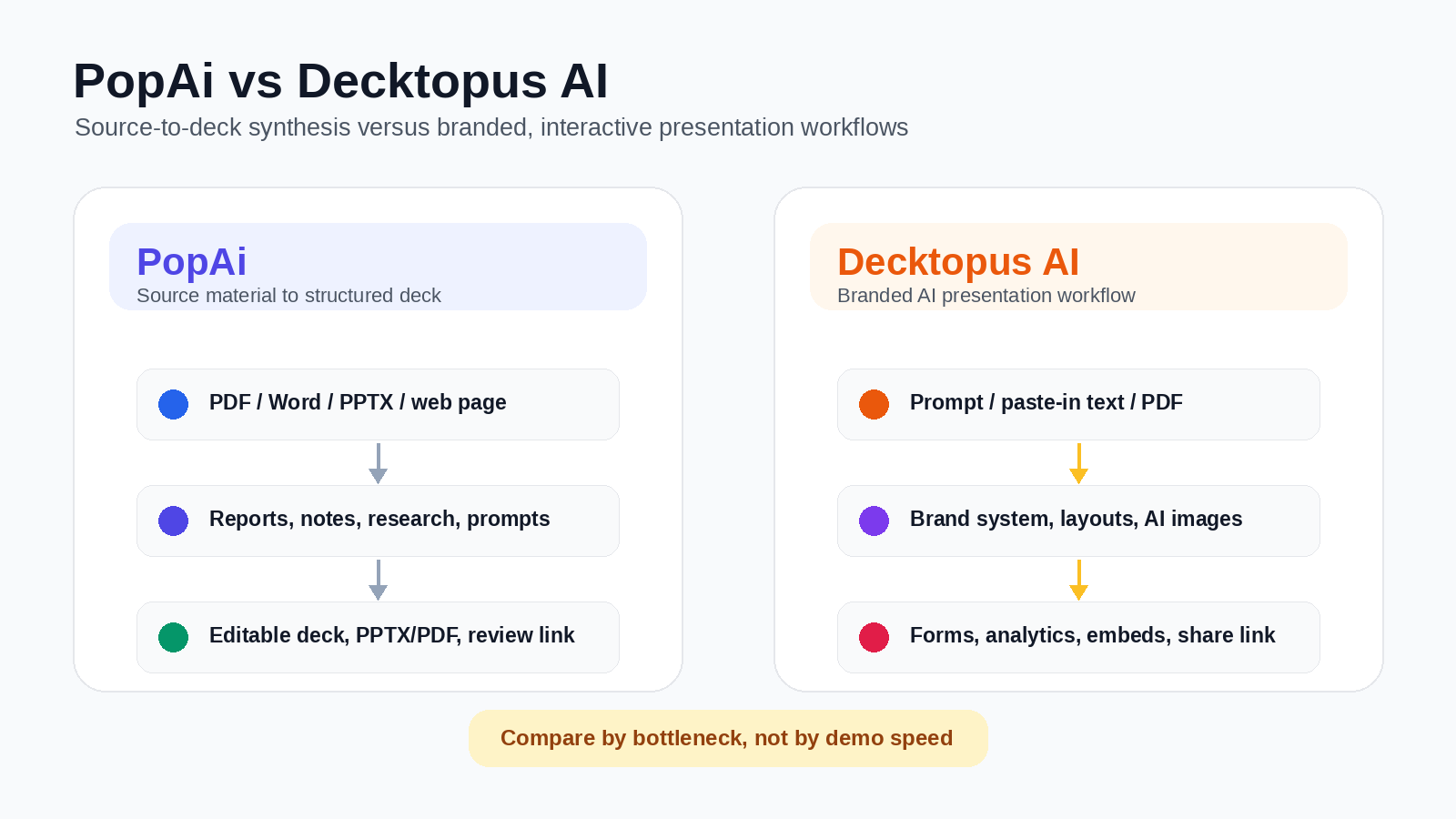
Decktopus AI should not be described as only a simple template generator. Its official positioning is broader: it can create fully designed, branded presentations from prompts, paste-in text, or PDFs; it also highlights drag-and-drop editing, slide regeneration, AI image generation, branded slide libraries, custom templates, team organization, analytics, forms, embeds, and collaboration. The stronger distinction is workflow: Decktopus AI is more design-, brand-, and presenter-experience oriented, while PopAi is better positioned for source-heavy document-to-deck synthesis.
PopAi's advantage is workflow focus. It is better for users who begin with source-heavy inputs — PDFs, Word documents, PPTX files, web pages, reports, meeting notes, research summaries, transcripts, or detailed prompts — and need the AI to help organize the material into a clear presentation narrative. Decktopus AI is stronger when the priority is a branded, visually guided, interactive, or presenter-friendly deck experience with templates, custom layouts, forms, analytics, and team controls.
| Need | Better fit | Why |
|---|---|---|
| Turn dense reports or notes into a structured deck | PopAi | PopAi is better positioned as a standalone source-to-deck workflow for messy inputs and narrative synthesis. |
| Create a branded, guided, visual presentation quickly | Decktopus AI | Decktopus AI emphasizes branded decks, auto branding, templates, layouts, and presenter-friendly outputs. |
| Build a business update from PDFs, Word files, notes, or web pages | PopAi | PopAi should be tested when the storyline needs summarization, grouping, and prioritization before design. |
| Add forms, analytics, embeds, and presenter scripts | Decktopus AI | Decktopus AI is stronger when the presentation is also an audience engagement or delivery asset. |
| Final review and handoff | Depends | PopAi should be tested for PPTX/PDF and share-link handoff; Decktopus AI should be tested for branded links, embeds, analytics, and team controls. |
Recommended Pilot Setup
To compare PopAi and Decktopus AI fairly, run the same real source material through both products. A practical pilot could include one source-heavy executive update based on a strategy memo or business report, and one lighter sales or education deck based on a short prompt. Compare outline quality, source coverage, slide-title usefulness, visual consistency, editability, export quality, and cleanup time.
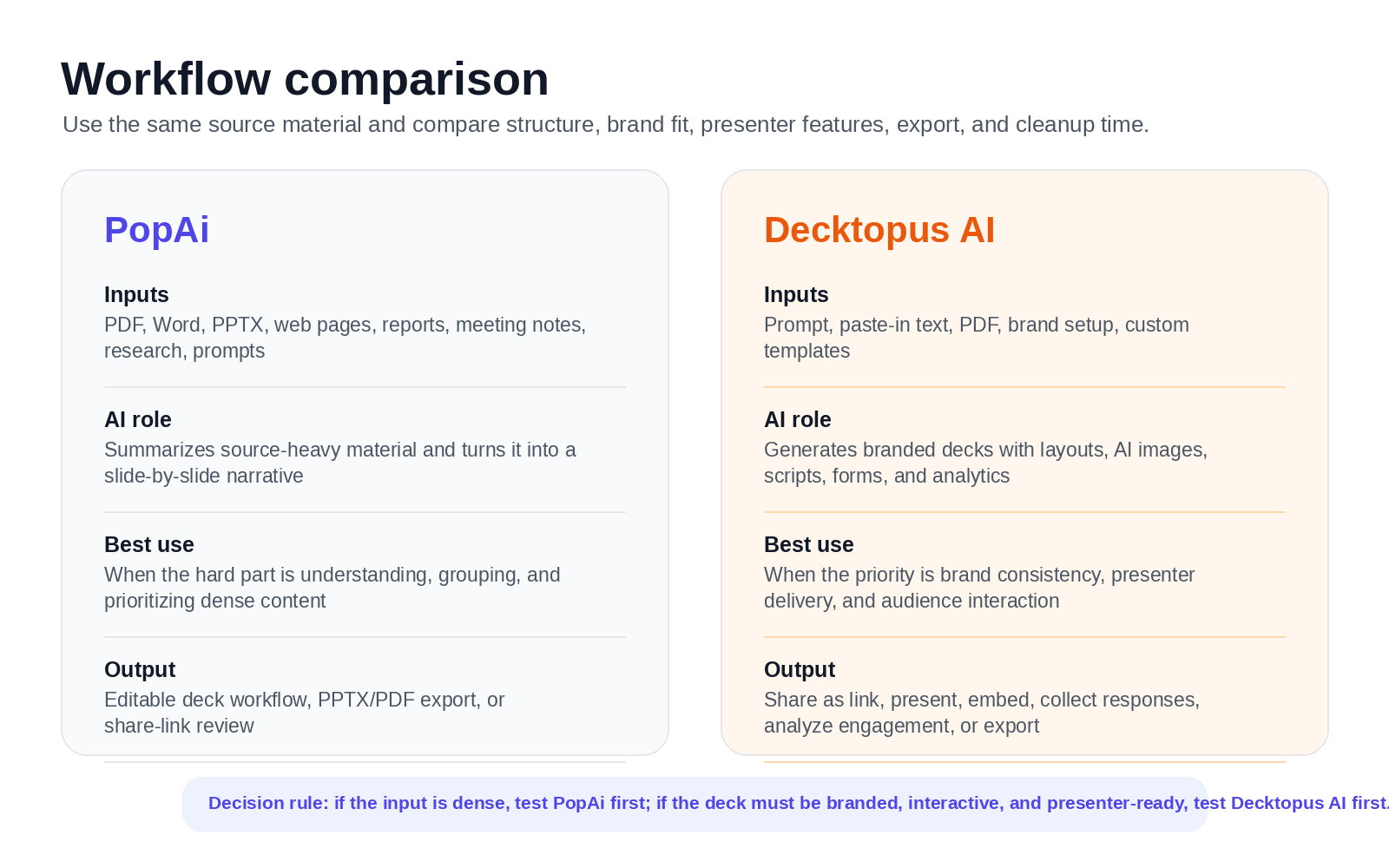
How to compare the tools in your own workflow
- Use one source-heavy input: a report, memo, transcript, research summary, or business brief.
- Use one light prompt: a sales intro, webinar outline, classroom lesson, or proposal topic.
- Keep output requirements consistent: same audience, slide count, tone, and export needs.
- Score the finished workflow: structure, source accuracy, visual consistency, editability, export quality, and total cleanup time.
- Check plan limits: AI credits, PDF/PPTX export, analytics, team features, branding, and collaboration requirements.
Do not judge either tool by generation speed alone. Track the full path from source material to approved deck: source review, first draft, fact-checking, design cleanup, export, and stakeholder review. A tool that looks slower at first can still win if it reduces source correction and storyline repair; a tool that looks faster can still win if the content is already simple and the team mainly needs a branded visual shell.
Design Control, Team Features, and Review Handoff
PopAi should be positioned as a generation, editing, export, and review-handoff workflow — not as a real-time collaboration workspace. Teams can create and edit the deck in PopAi, then export PPTX/PDF or share a link for review. Decktopus AI has the stronger native team and presenter-experience story, including organization management, team features, collaboration, custom domains, slide analytics, forms, embeds, and branded slide systems on higher plans.
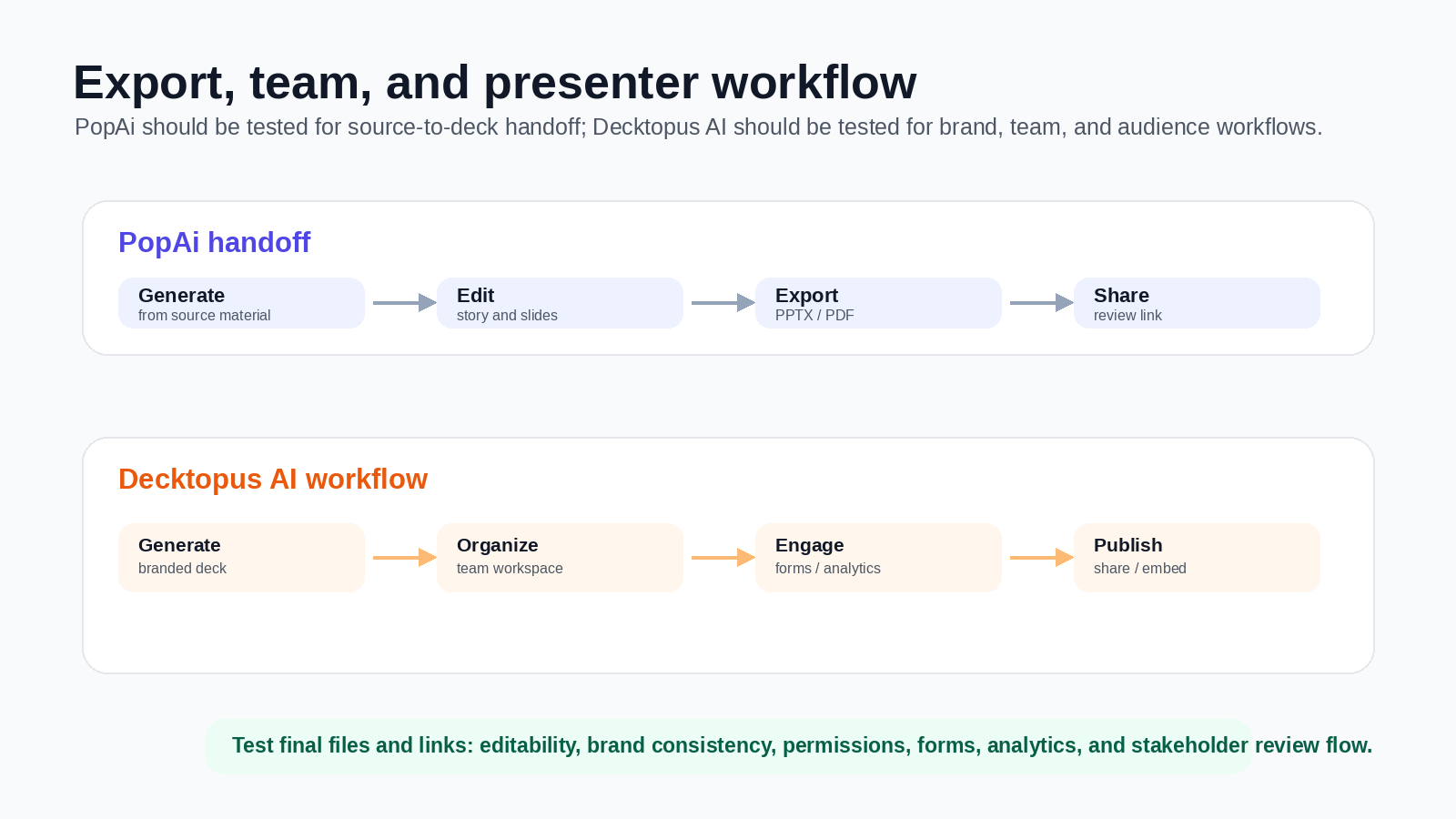
Before rollout, test the final files and links. Open exported decks, test object editability, check font substitutions, confirm brand rules, and review how stakeholders will comment, approve, or reuse the finished presentation.
Pricing and Plan-Limit Checklist
Pricing and plan limits change, so verify both vendors' current pricing pages before purchase. At the time of review, Decktopus AI listed Pro at $14.99/month billed annually, with 9,000 AI credits per year, 300 AI presentations per year, AI assistance, AI presentation generation, AI image generation, and PDF export. Its Business plan was listed at $34.99/user/month billed annually, with 12,000 AI credits per year, 400 AI presentations per year for the organization, custom domain connection, slide analytics, webhook, and team and organization features. Enterprise was listed as custom, with corporate-branded slides, AI setup for branded slides, custom slide layouts, importing existing documents, and custom corporate templates. PopAi offers limited free usage, while paid-plan value depends on how often your team turns PDFs, Word documents, PPTX files, web pages, prompts, and notes into finished decks.
Suggested Decision Scorecard
| Criterion | Suggested weight | Suggested PopAi score 1-5 | Suggested Decktopus AI score 1-5 | Why it matters |
|---|---|---|---|---|
| Turns source-heavy material into structure | 25% | 4.6 | 4.0 | PopAi is stronger as a focused source-to-deck workflow; Decktopus AI also supports paste-in text and PDF transformation, but its strongest advantage is branded deck generation and visual setup. |
| Branded visual presentation setup | 20% | 4.0 | 4.7 | Decktopus AI has a strong branded slide system, custom templates, auto branding, and layout controls. |
| Business narrative and recommendation logic | 20% | 4.5 | 4.0 | PopAi is better when the deck must synthesize reports, notes, or research into a clear argument. |
| Presenter experience and interaction | 15% | 3.7 | 4.7 | Decktopus AI has stronger native features around scripts, forms, embeds, analytics, microsites, and audience interaction. |
| Team and brand governance | 10% | 3.7 | 4.5 | PopAi should be used for generation and handoff; Decktopus AI has stronger team, organization, and branded-slide features. |
| Export and review handoff | 10% | 4.2 | 4.2 | Both require practical export testing. PopAi supports PPTX/PDF/share-link handoff; Decktopus lists PDF export and link-based presentation workflows. |
For source-heavy deck creation, PopAi is the stronger starting point. For branded, interactive, presenter-friendly decks with team features and analytics, Decktopus AI may be the stronger workflow.
Pros, Cons, PopAi Fit, and Migration Steps
PopAi advantages
- Better fit for dense reports, research notes, meeting summaries, transcripts, and business briefs.
- Stronger when the main problem is organizing source material into a clear presentation narrative.
- Useful when the team wants editable PPTX/PDF handoff after the first draft.
Decktopus AI advantages
- Better fit for branded, guided, interactive, or presenter-friendly presentation experiences.
- Useful when forms, embeds, analytics, presenter scripts, custom domains, or team controls matter.
Who is more suitable for PopAi?
PopAi is more suitable when the deck starts from information that still needs synthesis. For example, a manager can turn a strategy memo and meeting notes into an executive update, or a consultant can turn a client discovery report into a proposal deck before deciding whether interactive delivery features are needed.
Migration steps
- Pick one Decktopus-style workflow where visual setup did not solve source accuracy or storyline cleanup.
- Collect the original report, notes, transcript, or business brief before generating slides.
- Create the first deck structure in PopAi and check slide titles, source coverage, and decision flow.
- Export the deck and use presenter-focused features only if forms, analytics, embeds, or branded links are truly needed.
For adjacent comparison pages, read PopAi vs Presentations.AI, PopAi vs Canva AI, and PopAi vs Beautiful.ai. For the upper product pillar, start from PopAi AI Presentation.
Frequently Asked Questions
Is PopAi better than Decktopus AI for business presentations?
It depends on the bottleneck. PopAi is usually the better fit when you need to turn PDFs, Word documents, PPTX files, web pages, reports, meeting notes, or research material into a structured deck. Decktopus AI is stronger when the priority is branded deck generation, templates, presenter scripts, forms, analytics, custom domains, and team presentation workflows.
Does Decktopus AI support branded presentations?
Yes. Decktopus AI highlights branded presentations, auto branding, branded slide libraries, custom layouts, custom templates, and corporate-branded slide systems on higher plans.
Does PopAi support online collaboration?
PopAi should not be positioned as a real-time collaboration workspace. The accurate workflow is to generate and edit the deck in PopAi, then export PPTX/PDF or share a link for review handoff.
Which tool is better for quick presenter-friendly decks?
Decktopus AI may be the lower-friction option when the user wants a quick branded or interactive presentation with forms, embeds, scripts, analytics, or a shareable link. PopAi is stronger when the main challenge is turning dense source material into a coherent presentation narrative.