PopAi vs Gamma: Deck Workflow, Web Narrative, Export, and Fit
Updated August 3, 2026 · PopAi Editorial Team
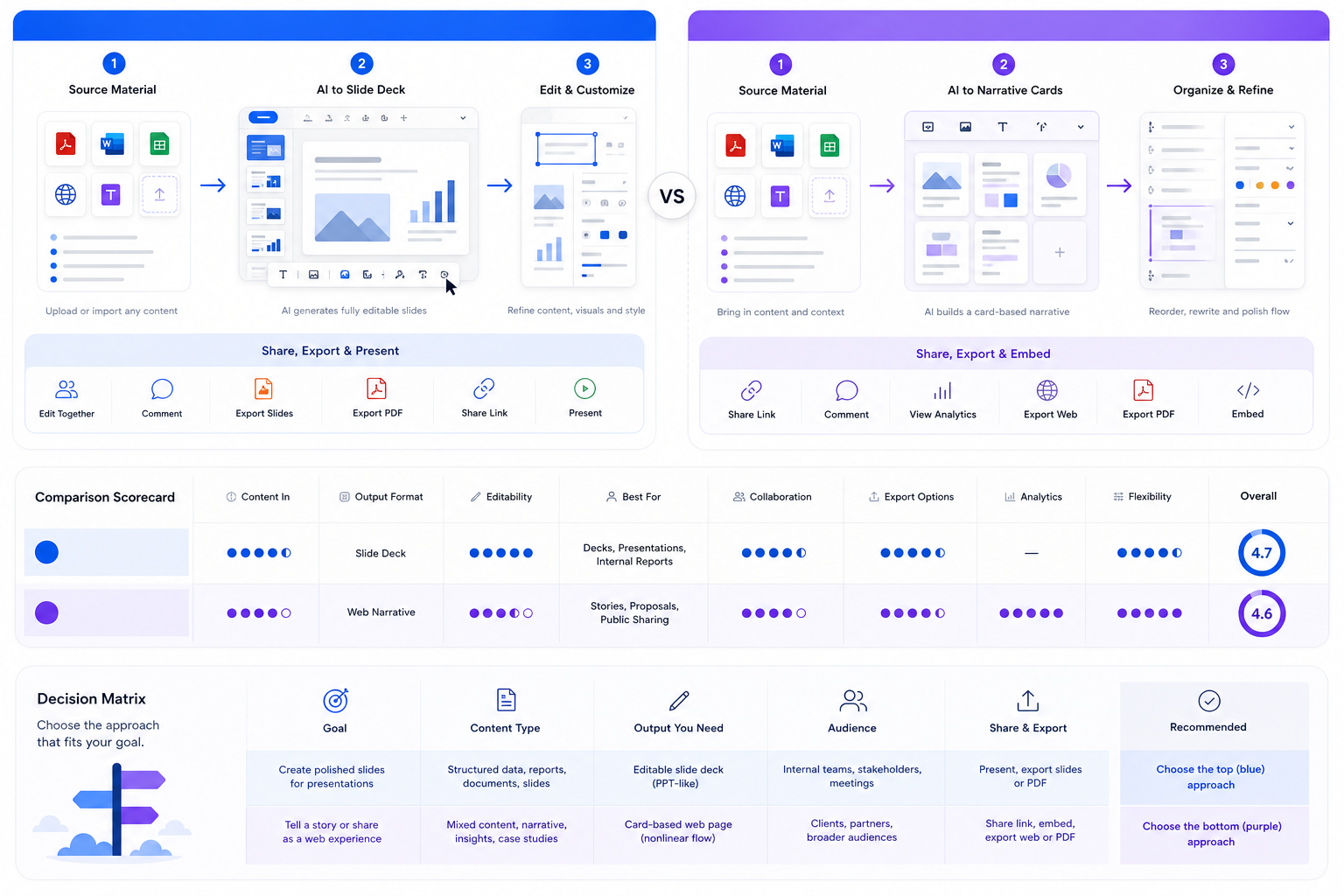
PopAi vs Gamma is best understood as a format decision. PopAi is built for source material becoming an editable slide deck, while Gamma is strongest when the final output should read like a polished browser-native narrative.
This guide compares suitable users, workflow differences, feature and pricing checks, output quality, pros and cons, PopAi-fit scenarios, migration steps, FAQ, and the route back to the main PopAi AI Presentation pillar.
PopAi vs Gamma: Fast Answer for Deck-First Teams
If you are searching for PopAi vs Gamma, the key question is whether your final deliverable should be a conventional deck or a polished browser-native narrative. PopAi is the clearer fit when source material needs to become an editable slide deck. Gamma is strong when the output should feel like a card-based presentation, document, or web page.
Comparison Objects and Suitable Audiences
PopAi and Gamma are not interchangeable products with only a feature checklist separating them. They represent two delivery patterns. PopAi keeps the workflow close to presentation files, source documents, review, and export. Gamma is strongest when the content benefits from cards, links, async reading, and web-style navigation.
- Choose PopAi for client decks, training slides, investor drafts, business reviews, and report-to-slide workflows.
- Choose Gamma for async explainers, visual docs, browser-native proposals, and content that will mostly be read through a link.
- Use the same source brief in both tools before standardizing a team workflow.
PopAi vs Gamma Feature, Pricing, and Output Quality Table
Pricing and plan limits change, so verify each product's current offer before buying. The more durable comparison is workflow fit: source-to-deck versus card-based publishing.
| Criterion | PopAi | Gamma | Practical takeaway |
|---|---|---|---|
| Core workflow | Source material to conventional editable slide deck | Card-based presentations, documents, web pages, and browser-native narratives | Choose by final delivery format: deck file or shared web story. |
| Best input | Prompts, PDFs, Word files, PPTX files, web pages, reports, and notes | Prompts, outlines, docs, and narrative content suited to cards | PopAi is stronger when the source file must become a deck. |
| Output quality | Stronger for slide-by-slide business deck structure | Strong for polished readable browser-native narratives | Deck-first teams should score export and editability heavily. |
| Export and sharing | PPTX, PDF, and share-link review handoff | Browser sharing plus PDF/PPTX/PNG-style exports depending on plan and current features | Test the exported file, not just the export button. |
| Best user | Teams that say 'send me the deck' | Teams that say 'send me the page' or 'share the narrative' | The winner depends on stakeholder expectations. |
| Scenario | Better fit | Why |
|---|---|---|
| Turn a PDF report into a management deck | PopAi | The job is source extraction plus slide structure. |
| Create an async product narrative for a link | Gamma | A browser-native card format can be easier to read and share. |
| Prepare a PPTX for client handoff | PopAi | The final deliverable behaves like a conventional deck. |
| Publish a visually polished web-style explainer | Gamma | The native format is closer to a shareable page. |
| Build a recurring training deck from policy docs | PopAi | Source material, structure, and export handoff matter most. |
Pros and Cons of PopAi and Gamma
PopAi advantages
- Better suited to turning PDFs, Word files, PPTX files, web pages, and notes into editable decks.
- Closer fit when the final artifact must be presented, exported, reviewed, and reused as a slide deck.
- Practical for recurring business reviews, lessons, sales decks, and source-backed reports.
PopAi watchouts
- Do not position it as a full real-time collaboration workspace.
- High-stakes decks still need manual evidence, brand, and export QA.
Gamma advantages
- Strong for polished card-based narratives, documents, and web-style presentations.
- Useful when the audience will read or review through a browser link.
Gamma watchouts
- Deck-first teams must test PPTX export fidelity and editability.
- Very long pages, gradients, fonts, or complex visuals may need export QA before handoff.
Who Is More Suitable for PopAi?
PopAi is more suitable for teams whose real bottleneck is turning source material into a presentation-ready deck. If your manager, client, professor, or sales lead expects a file that can be opened, edited, presented, and archived like a deck, PopAi's source-to-deck workflow is usually the more direct path.
Realistic example: quarterly report to leadership deck
A team has a quarterly report, customer notes, KPI tables, and risks. PopAi can help convert that material into a slide-by-slide leadership update with summary, drivers, risks, actions, and decision request. Gamma may produce a polished browser narrative, but the team should choose it only if the audience prefers reading a shared page instead of presenting a deck.
Migration Steps from Gamma-Style Pages to PopAi Decks
If your current workflow produces attractive web narratives but your stakeholders keep asking for a deck file, migrate the workflow around the final handoff.
- Identify one Gamma-style narrative that needs to become a PPTX/PDF deck.
- Collect source files, key claims, audience, decision request, and required sections.
- Generate a PopAi deck draft from the same source material.
- Compare slide order, evidence placement, and exported PPTX editability.
- Keep Gamma for browser-native narratives and use PopAi where deck handoff is the actual requirement.
Related PopAi Comparison and Pillar Pages
For another notes-to-PowerPoint comparison, read PopAi vs GenPPT. To compare a broader visual design ecosystem, read PopAi vs Canva AI. For a market overview, use the best AI for PowerPoint presentation tools guide. For the upper product pillar, start from PopAi AI Presentation.
Frequently Asked Questions
Is PopAi better than Gamma for business decks?
PopAi is usually the better fit when the final output needs to behave like an editable slide deck created from prompts, PDFs, Word files, PPTX files, web pages, or rough notes. Gamma is stronger for polished browser-native narratives and card-based documents.
Can Gamma export to PowerPoint?
Gamma has supported presentation exports, but teams should always test export fidelity, fonts, gradients, image-heavy pages, and object editability before using the file for client or executive handoff.
What should I test in a PopAi vs Gamma pilot?
Use the same real source brief in both tools. Compare structure, evidence placement, readability, exported file quality, review handoff, and time needed to reach a presentation-ready asset.
Who should choose PopAi instead of Gamma?
Choose PopAi if your team starts with source documents and needs a conventional presentation deck for meetings, classes, client reviews, sales proposals, or executive updates.