How to Create Board of Directors Presentations with AI

If you create board decks for a CEO, CFO, founder, chief of staff, corporate secretary, or investor-facing leadership team, the hard part is rarely slide design. It is turning a finance model, KPI dashboard, CEO memo, risk register, committee updates, and last-minute executive edits into a short decision narrative that directors can trust. Using board of directors presentations with AI can speed up the first draft, but only if the workflow protects accuracy, confidentiality, version control, and executive judgment.
A realistic use case: the CFO owns the finance pack, the CEO owns the strategic narrative, the general counsel reviews governance language, and the chief of staff assembles the deck under a board-book deadline. AI can help compress a long operating update into a tighter live discussion deck, draft an executive summary, and move evidence into the appendix. It should not decide what is material, invent missing KPIs, interpret legal exposure, or replace sign-off from finance and legal.
This guide shows how to use AI for board-level presentations without producing a generic “pretty deck.” You will learn a practical SOP, slide-by-slide outline, prompt templates, review checkpoints, secure AI-use rules, and ways to use PopAi AI Presentation for structured content planning, editable charts, and PPTX/PDF export after human review.
Why Board Presentations with AI Need a Different Standard
Board materials should reflect the company’s governance framework, domestic law, listing rules, committee charter, and board portal process. For broad governance context, the G20/OECD Principles of Corporate Governance discuss board responsibilities, disclosure, and accountability at a policy level. Treat AI as a drafting aid; CEO, CFO, general counsel, and functional owners should approve the final narrative and numbers.
Board decks are decision records in progress, not just communication assets.
Directors may receive the deck several days before the meeting, read it asynchronously, and arrive with questions about strategy, risk, governance, capital allocation, executive compensation, financing, or performance gaps. That means every slide must be understandable as a pre-read while still supporting a live executive narrative.
Many AI presentation tools can generate attractive slides quickly. The board context is different because the cost of a wrong number, unsupported conclusion, or vague recommendation is high. A board deck often includes unreleased financial performance, strategic alternatives, customer concentration, M&A considerations, risk registers, privileged legal issues, compensation items, and forward-looking assumptions. AI can organize and draft, but leaders must decide what is material, what is confidential, and what requires formal approval.
Board-ready means the deck answers three questions fast: What changed, why it matters, and what decision or guidance is needed from directors.
Field benchmark: In a typical quarterly board cycle, AI is most useful in the first 20–30% of the work: turning source documents into an outline, drafting executive-summary language, standardizing slide titles, and compressing appendix material. The slower work remains human-owned: reconciling finance numbers, validating forecasts, agreeing on recommendations, legal review, and final distribution. Treat vendor speed claims as directional; for board materials, the quality gate matters more than raw generation time.
What directors expect in a board-ready deck
Directors scan for conclusions, risks, and asks before they study the details.
- Conclusion-first slides: use “Revenue beat plan by 6%, but margin compression requires pricing action,” not “Financial Update.”
- Transparent metrics: define ARR vs. GAAP revenue, bookings vs. revenue, gross margin vs. contribution margin, logo churn vs. revenue churn, and actual vs. forecast.
- Clear financial impact: show revenue, margin, cash, runway, EBITDA, dilution, capex, or capital requirements when the decision depends on them.
- Risk honesty: show owner, probability, impact, mitigation, timing, and escalation path. A risk slide without an owner is usually not board-ready.
- Explicit asks: label each item as approval, guidance, alignment, or information-only. Directors should not have to infer whether a vote is needed.
- Right level of detail: keep the main deck focused on material changes and decisions; move definitions, cohort cuts, customer examples, and model detail into the appendix.
Weak vs. board-ready wording
| Slide element | Weak version | Board-ready version |
|---|---|---|
| Slide title | Customer Update | Enterprise churn improved to 7.8%, but two top-20 renewals remain at risk in Q4 |
| Board ask | Discuss hiring plan | Approve 12 incremental GTM hires in H2, adding $1.4M opex and extending payback by one quarter |
| Risk language | Cyber risk is being monitored | Vendor breach moved cyber risk from medium to high; mitigation owner is CISO, with MFA rollout due 09/30 |
| Metric note | Revenue is up | GAAP revenue increased 11% YoY; ARR increased 18% YoY due to multi-year enterprise expansions |
Board of Directors Presentations with AI: A Practical SOP
A safe AI workflow separates source control, drafting, validation, approval, and distribution.
Before choosing software, compare security controls, export quality, template governance, and review workflows across AI presentation makers. For board work, the best tool is not the one with the flashiest animation; it is the one your company can use without breaking confidentiality, auditability, or approval discipline.
Recommended board-deck timeline
| Timing | Owner | Workstream | AI-safe use | Human sign-off |
|---|---|---|---|---|
| T-10 to T-8 days | Chief of staff / board operations | Collect CEO memo, CFO pack, KPI exports, risk register, committee items, prior actions | Create a source inventory and sanitized brief | Confirm approved sources and sensitivity tiers |
| T-7 days | CEO / chief of staff | Draft storyline and slide sequence | Generate outline only; ask AI to flag missing inputs | CEO approves narrative emphasis |
| T-5 days | CFO / finance | Validate KPI tables, forecasts, budget variances, cash runway | Format tables and draft variance language | CFO signs off on every financial slide |
| T-4 to T-3 days | GC / corporate secretary | Review resolutions, consent items, privileged content, disclosure-sensitive language | Summarize non-privileged governance process only | Legal approves wording and distribution scope |
| T-2 days | Corporate secretary / board operations | Export PDF, upload to board portal, archive final version | Check layout and page references | Final release approval and access control |
| T-1 to meeting day | CEO / presenters | Rehearse live deck, prepare director Q&A, log late changes | Generate likely questions and speaker notes | CEO approves final live narrative |
Source collection and sensitivity classification
The safest way to create board of directors presentations with AI is to start with a sanitized brief, then add approved excerpts, verified tables, and non-confidential context. Do not upload every sensitive file by default.
AI board deck SOP
- Define the meeting purpose: quarterly update, budget approval, audit/risk review, fundraising, M&A review, compensation item, crisis update, nonprofit governance report, or PE portfolio review.
- Collect source material: KPI dashboard, finance pack, CEO memo, operating updates, market notes, risk register, committee papers, prior board actions, and decision requests. Record filename, owner, date, and status.
- Classify sensitivity: public, internal, confidential, board-only, and privileged. Keep unreleased financials, customer PII, employee matters, M&A targets, legal opinions, board minutes, and compensation committee materials in approved systems only.
- Create a sanitized AI brief: include non-sensitive context, approved metric definitions, target slide count, desired tone, and known missing data. Replace names with placeholders when possible.
- Generate the outline first: ask AI for a board-ready structure before generating slides. Require it to separate facts, interpretations, recommendations, and open questions.
- Review narrative logic: reorder sections, remove duplicative context, and align with the CEO, CFO, board chair, or committee chair’s priorities.
- Create slides: use the approved template, generate the draft, and convert dense paragraphs into concise slide claims.
- Validate numbers: finance verifies source, period, formula, rounding, units, comparison basis, and whether figures are preliminary or final.
- Run legal and governance review: confirm disclaimers, resolutions, risk wording, minutes references, disclosure sensitivity, and privilege boundaries.
- Version and distribute: export a controlled PDF for the pre-read, keep PPTX editable for final live changes, upload only through approved channels, and preserve an audit trail.
What not to upload to an AI tool without explicit approval
- Privileged legal advice, draft board minutes, or litigation strategy.
- Non-public public-company results, earnings materials, or disclosure-sensitive forecasts.
- Named customer data, employee performance issues, compensation details, or health/personal information.
- M&A target names, bid ranges, diligence findings, or banker materials.
- Unapproved financial models where assumptions are still under executive debate.
If your company permits AI-assisted drafting, PopAi can support this flow by starting from a prompt or from existing materials including PDF, Word, text, HTML, PPTX, images, audio, video, and Google Drive files. For board use, the practical sequence is: upload only approved or sanitized materials, generate an outline, review the slide order, generate a draft, export to PPTX, validate charts against the CFO source file, run legal/governance review, then export a PDF for the board portal.
Tool-selection checkpoint: Before using any AI presentation platform for board work, confirm data retention settings, model-training policy, encryption in transit and at rest, SSO, admin permissions, audit logs, link-sharing controls, deletion process, enterprise terms, and compatibility with your board portal. If those answers are unclear, use AI only with sanitized inputs.
Slide-by-Slide Outline for an AI Board Deck
The main deck should drive discussion; the appendix should carry proof.
As a rule of thumb, the pre-read can be fuller while the live deck should be shorter and more discussion-oriented. Some teams use ranges such as roughly 25–40 pages for a detailed pre-read and about 10–15 core discussion slides for the live meeting, but the right length depends on meeting purpose, board norms, transaction complexity, and governance requirements. The best structure separates “must discuss” slides from appendix evidence. AI helps by turning messy source material into a coherent sequence, but you should specify the audience, meeting type, decision context, and what belongs in backup.
Core board deck structure
- Title slide: company, meeting date, confidentiality note, presenter.
- Agenda: time-boxed topics, presenters, consent items, and decision items.
- Executive summary: three to five messages directors must remember, with asks clearly labeled.
- Performance snapshot: KPI scorecard with green/yellow/red status and definitions.
- Financial highlights: revenue, margin, cash, forecast, variance to plan, and runway where relevant.
- Operating update: product, sales, customer success, people, operations, or supply chain progress.
- Market and competitive context: what changed externally and why it affects strategy or capital allocation.
- Strategic initiatives: progress, trade-offs, investment needs, milestones, and decision dependencies.
- Risk assessment: top risks, severity, owner, mitigation, and board guidance needed.
- Decision requests: approvals, budget, hiring plan, financing, policy, transaction, or governance action.
- Next steps: owners, dates, dependencies, and follow-up reporting.
- Appendix: detailed financials, definitions, cohort tables, customer examples, legal backup, and supporting analysis.
Optional sections by board context
| Board context | Add these slides | AI can help with | Human owner |
|---|---|---|---|
| Startup quarterly board | Runway, burn multiple, hiring plan, product milestones, investor updates | Condensing CEO/CFO notes into a tight narrative | CEO and CFO |
| Public company board | Disclosure-sensitive results, audit items, regulatory risks, investor-relations themes | Formatting non-sensitive summaries and Q&A prep | GC, CFO, IR, audit committee chair |
| PE-backed portfolio review | Value creation plan, EBITDA bridge, working capital, exit-readiness, covenant status | Variance explanations and initiative tracking | CFO and operating partner |
| Nonprofit board | Mission impact, program outcomes, donor pipeline, restricted funds, governance items | Translating program reports into board-level themes | Executive director and finance chair |
| M&A approval | Strategic rationale, valuation, diligence gaps, integration plan, alternatives, approval resolution | Structuring the decision memo and open questions | CEO, CFO, GC, banker/deal lead |
| Crisis update | Incident timeline, current exposure, customer impact, communications plan, board decisions | Creating a chronology and action tracker | CEO, GC, communications lead |

A strong executive-summary slide should distinguish facts from interpretation and asks. For example: “ARR grew 18% YoY” is a fact if sourced from the CFO pack; “enterprise segment is now the growth engine” is an interpretation; “approve a $2M customer-success investment” is an ask. AI can draft this structure, but the executive team must confirm which claims are supportable and which belong in the appendix.
Use message titles, not topic titles
For each slide, write the title before designing the page. The title should state the conclusion the chart supports.
| Topic title | Board-ready message title |
|---|---|
| Financial Update | Revenue beat plan by 6%, but gross margin fell 240 bps due to implementation costs |
| Sales Pipeline | Pipeline coverage is 3.1x Q4 target, but enterprise close dates shifted later in the quarter |
| People Update | Engineering hiring is on plan; sales attrition remains above threshold at 18% |
| Risk Review | Cybersecurity risk moved from medium to high after vendor incident; mitigation plan is underway |
AI can help rewrite descriptive titles into conclusion titles, shorten text, and create speaker notes for the live meeting. To avoid overstatement, instruct the AI to use cautious verbs such as “suggests,” “indicates,” or “requires review” when the evidence is incomplete.
The board deck should not force directors to infer the point from the chart. State the interpretation, then show the evidence.
Prompt Templates to Create Board Presentations with AI
Board-deck prompts need source hierarchy, missing-data rules, and review constraints.
Prompt components for board materials
- Audience: independent directors, investor directors, observers, committee members, executives, or regulators.
- Meeting type: quarterly review, audit committee, compensation committee, budget approval, fundraising, M&A, crisis, annual strategy offsite.
- Source hierarchy: for example, “Use CFO_model_v12.xlsx as the primary source for financials; use CRM_export_08_15.csv only for pipeline.”
- Data rules: do not calculate derived metrics unless the formula is provided; insert [Needs finance confirmation] instead of estimating.
- Citation requirement: add a source note for each KPI, including filename, date, and owner where possible.
- Tone guardrails: candid, concise, neutral; no legal conclusions, investment recommendations, or unsupported causal claims.
- Output control: return the outline first and wait for approval before generating slides.
Create a 14-slide board of directors presentation for a quarterly business review. Audience: independent directors, investor directors, CEO, CFO, and executive team. Tone: concise, candid, decision-oriented. Use conclusion-first titles. Source hierarchy: use the CFO-approved finance pack as the source of truth for all financial metrics; use the KPI dashboard only for operating metrics; do not invent numbers. Include: agenda, executive summary, KPI scorecard, revenue and margin trends, operating highlights, market changes, strategic initiatives, risk register, decisions needed, next steps, and appendix. For each KPI, include a source note and flag missing data as [Needs confirmation].
Turn the attached risk register into a 7-slide board briefing. Focus on severity, probability, financial exposure, owner, mitigation timeline, and board guidance needed. Create one slide for the top three risks and one comparison slide showing how risk changed since last quarter. Use neutral language, avoid unsupported legal conclusions, and separate confirmed facts from management interpretation.
Draft a board presentation for approving a Series B fundraising plan. Include market rationale, current runway, funding need, use of proceeds, valuation considerations, investor pipeline, dilution scenarios, risks, and requested board approval. Keep the live deck to 12 slides and put detailed assumptions in the appendix. Label any valuation, dilution, or runway figures that require CFO confirmation.
Create an executive board deck for evaluating a potential acquisition. Include strategic rationale, target overview, synergy thesis, financial impact, integration risks, diligence gaps, legal considerations, alternatives, and approval request. Mark all assumptions clearly, avoid privileged legal analysis unless provided in approved language, and create a slide listing open questions for directors.
Follow-up prompts for refinement
- Executive-summary compression: “Reduce this executive summary to five bullets: two performance facts, one strategic issue, one risk, and one board ask.”
- Director Q&A prep: “Generate likely questions from an independent director, investor director, audit committee chair, and former operator. Cite the slide each question relates to.”
- Appendix creation: “Move supporting calculations, definitions, and cohort detail into appendix slides. Keep the main deck focused on decisions.”
- Version comparison: “Create a change log between the pre-read and live version, listing slides changed, why, and who approved the change.”
In PopAi, use prompts like these in a staged workflow: upload a sanitized CEO memo and a finance-approved KPI table, ask for the outline only, review the sequence with the CEO/CFO, generate the draft, shorten the executive summary, export to PPTX, validate chart data against the source file, and send the PDF only after legal or governance review. If two source documents conflict, instruct the AI which source wins and require it to flag the conflict rather than blending the numbers.
Use AI for Financial KPIs and Governance Slides Safely
Financial and governance slides are where AI assistance is most useful and most dangerous.
AI can format charts, summarize variance drivers, and create tables from structured reports. It can also misread a period, round a number incorrectly, confuse bookings with revenue, or imply causality that finance has not validated. For public companies, regulated industries, M&A, compensation, or audit committee work, the review standard should be even stricter because board materials can intersect with disclosure obligations, employment matters, regulatory risk, or privileged advice.
Common board-deck failure pattern: In finance reviews, the most damaging AI errors are rarely dramatic hallucinations. They are subtle label and definition mistakes: ARR shown as recognized revenue, pipeline shown as forecast, net revenue retention confused with gross retention, EBITDA margin calculated on the wrong denominator, cash runway based on historical average burn rather than forward-looking burn, or headcount plans excluding contractors. These errors can survive a design review, so they require source-level finance review.
Common financial metric errors to catch
- ARR vs. revenue: ARR is a recurring run-rate metric; it is not the same as GAAP revenue.
- Bookings vs. revenue: bookings may indicate demand but should not be presented as recognized revenue.
- Pipeline vs. forecast: pipeline coverage does not equal committed forecast unless sales methodology defines it that way.
- Gross margin vs. contribution margin: confirm what costs are included in the denominator.
- Cash runway: validate beginning cash, expected burn, financing assumptions, and one-time payments.
- Customer concentration: avoid hiding top-customer exposure inside aggregate revenue.
- Risk heat maps: use the approved severity scale; do not let AI invent probability categories.
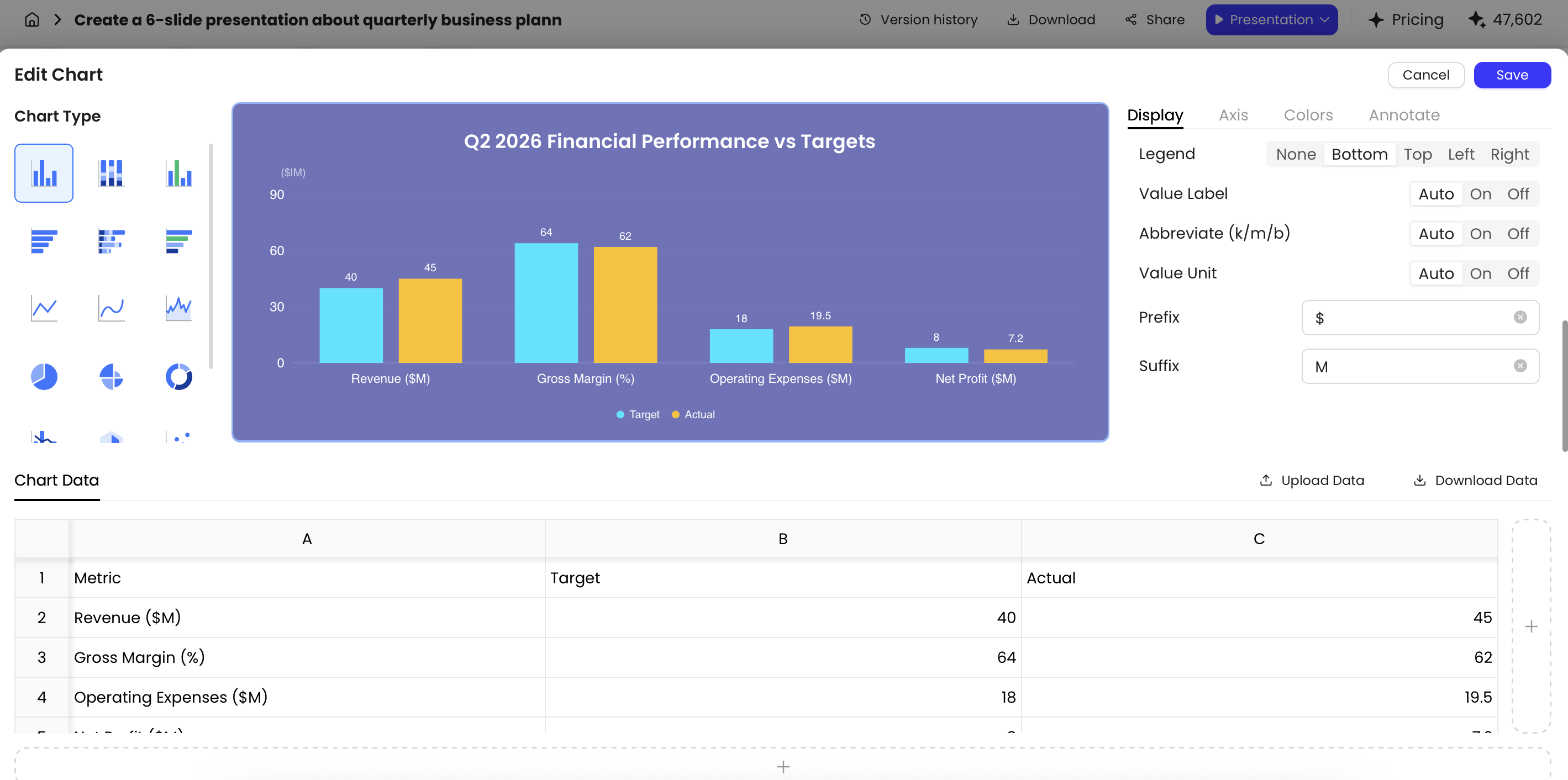
PopAi’s chart editing can help convert dense KPI tables into board-readable visuals, but chart choice should follow the decision. Use a line chart for revenue or cash runway trends, a variance bar chart for budget vs. actual, a ranked bar chart for customer concentration, a sensitivity table for scenarios, and a heat map for risks. Be cautious with dual-axis charts because they can exaggerate relationships; avoid decorative pie, radar, or bubble charts unless they clearly support the board question.
Manual review checklist for board metrics
- Verify every number against the finance pack, BI dashboard, or approved source file.
- Record source filename, owner, date, and whether the figure is actual, forecast, budget, target, or preliminary.
- Confirm metric definition, formula, reporting period, currency, units, and rounding convention.
- Check that YoY, QoQ, forecast, and budget comparisons use the same definition and period.
- Review chart scales so visual differences are not exaggerated.
- Label one-time events, accounting changes, seasonality, cohort effects, and discontinued operations.
- Confirm slide commentary matches the chart and appendix table.
- Lock or freeze chart data after CFO sign-off; log late changes separately.
- Confirm that risk ratings match the approved enterprise risk framework.
Governance and legal review risks
AI should not draft formal resolutions, minutes language, compensation recommendations, disclosure-sensitive public-company statements, or legal conclusions without review by the general counsel, corporate secretary, or relevant committee adviser. Useful AI tasks include summarizing non-privileged background, creating an action-item tracker, and turning approved governance language into a cleaner slide layout.
Governance reference point: Organizations such as the National Association of Corporate Directors emphasize that board materials should support oversight, strategic discussion, and informed decision-making. In practice, that means board slides need clear recommendations, balanced risk disclosure, and traceable evidence—not just polished summaries. For public companies, teams should also consider SEC disclosure sensitivity before circulating AI-assisted materials containing non-public results or forward-looking statements.
Pre-Read vs. Live Board Deck with AI
Do not ask one AI-generated deck to do two different jobs.
The pre-read deck and the live deck may share the same source material, but they should not be identical. Directors need enough detail to prepare independently; presenters need fewer slides and sharper talking points to guide discussion.
| Dimension | Pre-read deck | Live board deck |
|---|---|---|
| Purpose | Inform directors before the meeting | Drive discussion and decisions |
| Typical length | Typical working range: fuller pre-read with appendix | Typical working range: shorter live discussion deck plus backup |
| Detail level | Definitions, assumptions, tables, background | One message per slide, clear ask, fewer words |
| AI tasks | Summarize reports, organize sections, create appendix, extract action items | Shorten text, create speaker notes, prepare Q&A, isolate decision slides |
| Human review | Finance/legal source validation before distribution | CEO rehearsal, presenter alignment, late-change review |
| Distribution | PDF through board portal or approved secure channel, often T-2 to T-5 days | PPTX for presenters; PDF update only if materially changed |
Pre-read deck
The pre-read can contain more context, detailed tables, definitions, assumptions, and appendix pages. AI is helpful for summarizing long documents, extracting action items from reports, and creating structured sections such as “What changed since the last meeting” or “Open decisions for board input.” PopAi’s file-to-slides workflow can turn approved PDFs, Word documents, HTML reports, or PPTX files into slide drafts, which is useful when operating updates arrive in different formats.
Live presentation deck
The live deck should be tighter. Aim for one message per slide, fewer words, and more discussion space. Use AI to create speaker notes, reduce text, move backup detail into an appendix, and generate likely director questions by role. If a director asks for support, the presenter can reference the appendix rather than crowding the main narrative.
Practical approach: Generate a fuller pre-read first, then ask AI to create a “live meeting version” that keeps only decision points, trend changes, unresolved risks, and board asks. Ask for a change log showing what was removed, what changed after distribution, and which slides need an “updated after pre-read” label.
Quality Control Before Sending an AI-Generated Board Deck
Every AI-generated board deck needs a formal quality gate before circulation.
The goal is not perfection for its own sake; it is to prevent avoidable rework, embarrassing corrections, unclear decisions, and uncontrolled distribution. The board-ready standard is simple: every material claim should be sourced, every recommendation should have an owner, and every sensitive slide should be distributed only through approved channels.
Role-based QA matrix
| Reviewer | Primary checks | Typical failure caught |
|---|---|---|
| CEO | Strategic narrative, priorities, tone, board asks | Deck reports activity but does not frame decisions |
| CFO / finance | Metrics, forecasts, cash, budget variance, scenario assumptions | AI used outdated forecast or mixed KPI definitions |
| GC / legal | Governance language, privilege, disclosure sensitivity, legal risk wording | Slide implies a legal conclusion or exposes privileged advice |
| Corporate secretary | Resolutions, consent agenda, minutes references, board portal package | Approval request does not match formal governance action |
| Functional leaders | Operating facts, owners, dates, dependencies | AI summarized a project status too optimistically |
| Chief of staff / board operations | Version control, formatting, page numbers, appendix references, distribution list | PDF and PPTX versions do not match |
Board deck final QA
- Decision clarity: every approval slide states the recommendation, alternatives considered, financial impact, and requested action.
- Source traceability: key metrics can be traced to an approved source owner, file, and date.
- Financial integrity: CFO-approved numbers match the appendix, chart data, and speaker notes.
- Risk balance: material risks are not hidden behind optimistic language.
- Confidentiality: sensitive customer data, employee matters, M&A information, unreleased results, and legal advice are handled according to company policy.
- Brand consistency: fonts, colors, logos, headers, page numbers, confidentiality labels, and committee labels are consistent.
- Template fidelity: exported PPTX is checked in PowerPoint, and PDF output is reviewed for layout shifts.
- Governance language: formal resolutions, consent items, disclaimers, and minutes-related content are reviewed by legal or the corporate secretary.
- Distribution control: final PDF is uploaded to the board portal or approved secure channel with the correct access list, watermarking if required, and a clear version label.
- Late-change process: any post-distribution correction is logged, approved, and communicated to directors with a clear note.
PopAi supports export to PPTX and PDF, with PPTX files that can be opened in Microsoft PowerPoint and text objects that remain editable. For board contexts, avoid informal link sharing or social channels even if a tool technically supports them. Use the company’s approved access-control process: board portal, encrypted delivery, restricted PDF, watermarking, access logs, and revocation where available.
Never let AI be the final approver of a board deck. It can accelerate drafting, but accountability stays with management and the appropriate governance reviewers.
The strongest use of AI is as a structured assistant: it organizes source material, proposes a board-ready narrative, drafts slides, rewrites executive summaries, prepares Q&A, and helps refine charts. The executive team still owns the judgment. Start safely with a sanitized brief, generate the outline before the slides, validate every material number, and distribute only after finance, legal, and governance review. That is the practical standard for creating board presentations faster without lowering the bar directors expect.
FAQ: Creating Board Presentations with AI
Can AI create a board deck that is ready to send without editing?
No. AI can accelerate outlining, drafting, slide design, chart formatting, and speaker notes, but board materials require human review for financial accuracy, legal language, risk disclosure, confidentiality, and decision framing.
What should a board of directors presentation include?
A typical board presentation includes an agenda, executive summary, performance update, financial highlights, strategic initiatives, market context, risk assessment, governance or compliance items, decisions needed, next steps, Q&A, and an appendix.
How do I keep an AI-generated board deck on brand?
Use an approved template, define colors and typography in the prompt, reuse executive summary and KPI slide patterns, and export to PPTX for final adjustments if needed. In PopAi, the AI PowerPoint workflow supports Official Templates, My Templates, and uploaded PPTX templates.
Which board deck data must be manually reviewed?
Manually review revenue, margin, cash, runway, forecast assumptions, customer counts, churn, pipeline, risk ratings, board resolutions, legal disclaimers, market-size claims, and any year-over-year or quarter-over-quarter comparisons.
Should I export a board deck as PDF or PowerPoint?
Use PDF for controlled pre-read distribution and PowerPoint when the executive team needs to keep editing, rehearse with speaker notes, or adapt sections before the meeting. Many teams prepare both.
Create your presentation with one click now
Turn prompts, reports, and existing decks into a structured presentation draft, then refine the message, charts, and layout for senior leadership.
Start creating with PopAi