Scope: This is an enterprise procurement and security checklist, not a verified vendor compliance ranking. SSO, SCIM, SOC 2, audit logs, data residency and training restrictions below are requirements to investigate, not capabilities attributed to every AI presentation product.
Enterprise communications, enablement, procurement, and IT teams need more than a fast way to make slides. They need an AI presentation workflow that shortens first-draft work without exposing sensitive inputs, bypassing approval steps, or producing files that cannot be edited and delivered reliably.
Consider a weekly sales QBR: a regional leader combines CRM extracts, a finance forecast, approved product messaging, and last quarter’s deck. The bottleneck is rarely “writing slides.” It is collecting current sources, applying the right template, checking numbers and claims, then repairing the exported file. This guide covers AI-native presentation platforms and PowerPoint-oriented workflows through that operating lens.
What enterprise AI presentation tools must solve
Consumer slide generators optimize for an attractive first draft. Enterprise tools must also fit a repeatable production process: named source owners, approved templates, review checkpoints, usable exports, and a clear record of what the AI was allowed to do.
Start with a recurring presentation job
Choose presentation families that recur often enough to measure: QBRs, RFP responses, executive operating reviews, product launches, onboarding modules, and sales proposals. Map each one before selecting a tool.
- Inputs: approved messaging, source systems, prior decks, spreadsheets, and permitted attachments.
- Owners: content owner, data owner, design owner, legal or compliance reviewer, and final presenter.
- Constraints: required template, mandatory footer or disclaimer, editable PPTX requirement, and prohibited data classes.
- Success measure: median time to approved deck, not simply time to AI-generated draft.
Enterprise value comes from standardizing a trusted workflow—not from generating the largest number of slides.
Illustrative QBR pilot: start with a monthly business-review deck that uses sanitized CRM and finance extracts. Measure the existing process from source collection to approval, then compare the pilot workflow with the same deck type, template, and reviewers. Include prompt preparation, fact checking, revision rounds, and PowerPoint cleanup; excluding those steps produces an unrealistically high time-savings estimate.
- Faster first drafts from approved source material.
- Consistent templates, fonts, imagery, footers, and required disclosures.
- Traceable facts and charts that reviewers can verify.
- Controlled access, lifecycle management, and usable exports.
- Lower revision and export-repair time without lowering approval standards.
Evaluate enterprise AI presentation security across the data lifecycle
Security review should follow the presentation data from prompt or upload through processing, model interaction, storage, sharing, export, retention, and deletion. Treat security features as evidence to verify—not assumptions based on an enterprise plan label.
Run a security review with documents and decision gates
Before a proof of concept, security, privacy, and procurement teams should request the vendor’s current security documentation, privacy terms, data processing agreement, subprocessor list, retention and deletion terms, and applicable compliance attestations. Confirm capabilities in writing for the specific product edition and contract being evaluated.
- Classify the intended inputs and identify prohibited content, such as unreleased financial results, customer records, regulated health information, or privileged legal material.
- Confirm whether customer prompts, files, and generated content are used for model training, and whether the applicable commitment is contractual.
- Review processing locations, subprocessors, retention periods, deletion procedures, and breach-notification terms.
- Verify identity and administration requirements: SAML or OIDC SSO, SCIM provisioning where needed, role-based access, audit events, and offboarding procedures.
- Run a restricted pilot with sanitized content, then test access removal, deletion requests, sharing settings, and export behavior.
- Document the exit plan: who owns exported PPTX files, how accounts are deprovisioned, and how content is retrieved or deleted if the service changes.
Separate technical, administrative, and workflow controls
- Technical controls: encryption, tenant isolation, authentication, session management, malware scanning, and audit logging.
- Administrative controls: data processing terms, approved-use policy, retention schedule, subprocessor review, and exception approvals.
- Workflow controls: source verification, mandatory reviewer sign-off, controlled templates, and restrictions on external sharing.
- AI-specific controls: checks for prompt injection in uploaded documents, permission leakage from connected repositories, hallucinated claims, and unsafe links in generated output.
Use a data-classification policy rather than a blanket “AI allowed” rule. Public content may be suitable for broad experimentation. Internal material may require approved accounts and templates. Confidential or regulated material should enter only through a documented exception path with named approvers, validated controls, and explicit rules for what cannot be uploaded.
Never treat an AI-generated chart as evidence merely because it looks polished; require a source, an owner, and a review step.
Brand governance, templates, and accessibility at scale
Brand governance succeeds when users can move quickly inside a controlled system. Template upload alone is not governance; teams need clear ownership of approved layouts, assets, required content, and export review.
Control template publishing and approved slide patterns
Assign a brand or presentation-operations owner to publish the templates used for recurring work. Keep a short, maintained library of patterns for title pages, KPI updates, comparison slides, risk registers, timelines, customer proposals, and closing actions. Each pattern should specify the approved layout, required footer, and the types of content it is designed to hold.
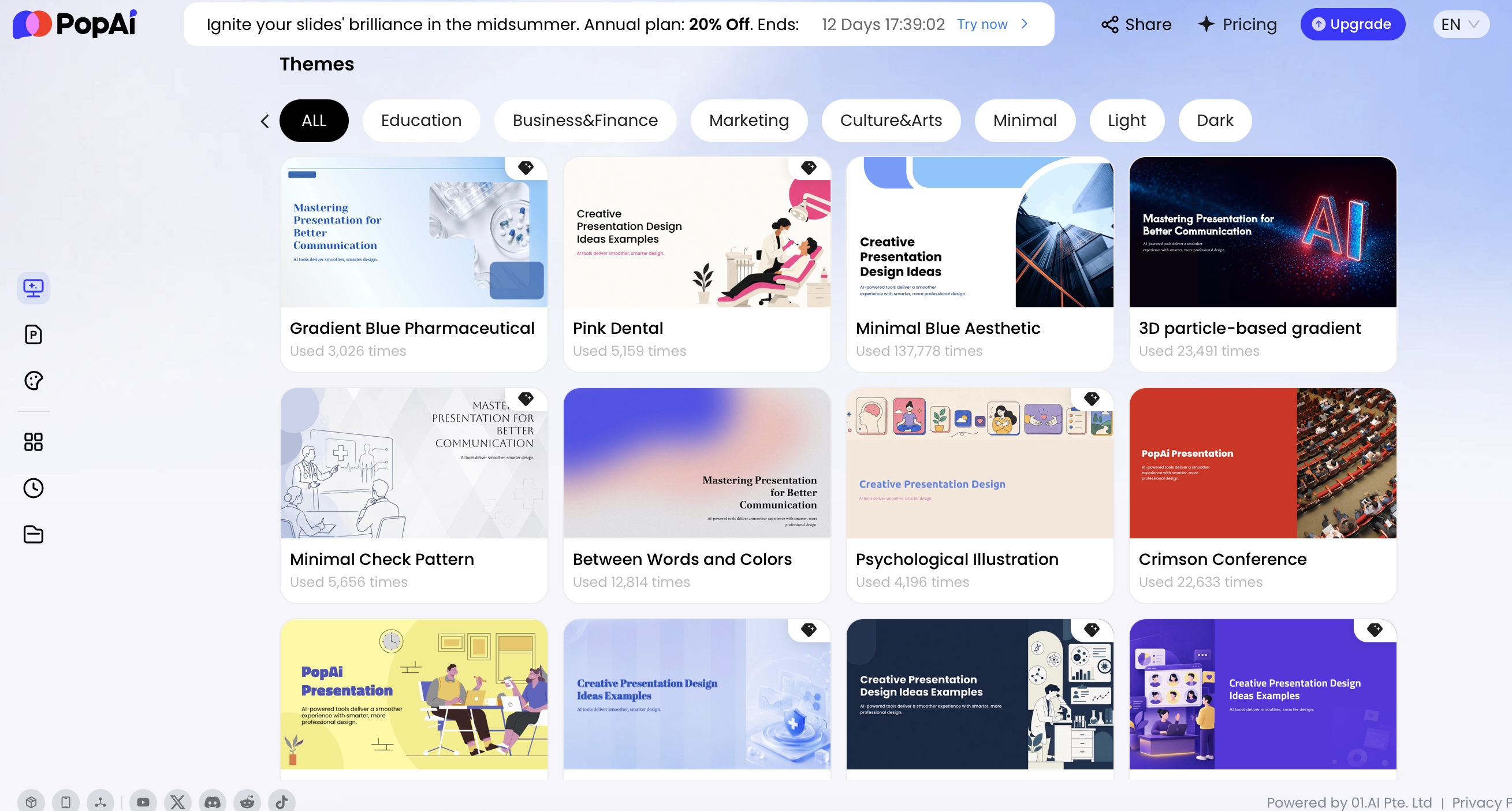
The PopAi interface shown above includes Official Templates, My Templates, and PPTX template upload. Those options can help a team begin with its visual system instead of a blank canvas. During procurement, confirm who can publish an official template, whether users can be restricted to approved templates, and how master layouts, protected fonts, placeholders, locked elements, and embedded brand assets behave after generation and PPTX export.
Test PowerPoint master fidelity, not just visual resemblance
A template can look correct in a browser and still fail in the destination environment. Build a test deck containing dense tables, long titles, charts, legal language, custom fonts, and standard image treatments. Open the export in the PowerPoint versions supported by your organization and record whether any slide requires manual repair.
Make accessibility a release check
Accessibility requires a deliberate QA step before distribution. Check color contrast, reading order, meaningful chart labels, alt text, descriptive link text, speaker notes, and language quality. Global teams should test non-Latin fonts and right-to-left layouts with real content; an English sample does not prove readiness for a global rollout.
For a hands-on pilot, PopAi AI Presentation can be evaluated against your own approved template, source-content, and export test cases. Record observed behavior by plan, date, file type, and PowerPoint environment rather than relying on a generic demo.
Build data trust into AI presentation tools workflows
AI can help structure a narrative and suggest a chart format, but it should not become the authority for decision-critical numbers. The accountable business owner remains responsible for values, definitions, comparisons, and exceptions.

Use a traceability standard for every decision-critical chart
For every executive-facing number, record the source system, extract or report date, metric definition, data owner, and reviewer. Put this information in speaker notes, a linked source register, or the team’s review log; the key requirement is that a reviewer can find it without reconstructing the analysis from the slide.
- Confirm the source extract and refresh timestamp.
- Confirm the metric definition and calculation owner.
- Compare displayed values with the approved source file.
- Check units, axis ranges, period-over-period comparisons, labels, and annotations.
- Record reviewer approval after the final data edit.
Illustrative reporting workflow: a revenue-operations analyst exports a controlled pipeline extract at 5 p.m. Friday, prepares a presentation-sized table, and names the metric owner in the notes. The presentation owner uses AI to draft the storyline and chart layout. Before Monday’s leadership meeting, the analyst checks the values and axes while the sales leader approves the conclusion. If the extract changes, the chart and the approval are reopened.
The chart editor shown here provides upload, download, and table-editing controls, and the product interface offers several common chart formats. This is useful for editing presentation data, but it also creates a control point: any input-data change should trigger a review of labels, units, axis ranges, annotations, and the slide’s conclusion. Teams with wide analytical models should prepare a focused presentation extract rather than attempting to reproduce a full reporting table on one slide.
Integrations, export, and resilience: test the full delivery path
A capable generation experience is only half the evaluation. Enterprise teams should test how approved source content enters the tool, how permissions are handled, how outputs travel into PowerPoint or PDF, and what users can do when connectivity or a vendor service is unavailable.
Check integrations and content permissions
Do not assume that a reference to SharePoint, Google Drive, or another content system means source permissions are preserved. Ask whether an integration exists, which permissions it requests, whether it indexes content, how access is revoked, and whether connected files can be used for model processing. If no approved integration is available, define a controlled manual-upload process and prohibit users from copying restricted content into prompts.
Use a pass/fail export test
Compare standalone generators with PowerPoint-native or plug-in workflows based on the destination. A design-led platform may speed ideation and visual storytelling; a PowerPoint-centered workflow may better suit teams with complex masters and established review habits. For a broader category comparison, review AI presentation makers before narrowing your shortlist.
- Import representative, non-sensitive source files and generate with an approved template.
- Export both PPTX and PDF.
- Open the PPTX in each supported PowerPoint environment.
- Check fonts, layouts, tables, charts, notes, links, images, animations, and editable text objects.
- Log defects by severity and record the minutes required for repair.
- Retest after template changes or major product updates.
Plan for continuity and support
Confirm the service and operating model that matters at your scale: support coverage and escalation path, user-provisioning process, regional performance, availability commitments, adoption reporting, and offline-file requirements. For board meetings, field teams, and customer workshops, the practical resilience test is simple: can the presenter access an approved local PPTX or PDF if the browser session, network, or service is unavailable?
PopAi supports PPTX and PDF export, and a generated PPTX can be opened in Microsoft PowerPoint with text available for continued editing. Treat that as a workflow capability to validate, not a promise of zero-loss formatting. Test branded masters, tables, fonts, animations, and chart-heavy decks in the versions of PowerPoint your organization actually uses.
Deploy enterprise AI presentation tools with measurable governance
A phased deployment gives IT and business leaders evidence before a broad rollout. Start with one repeatable deck type, a defined content classification, and a representative user cohort rather than opening the service to every team at once.
A 90-day rollout pattern with decision gates
- Days 1–30 — prepare: define the use-case charter, security and legal requirements, prohibited inputs, approved templates, baseline production time, and pass/fail criteria. Do not begin with board materials, unreleased financial data, regulated claims, or other high-risk content.
- Days 31–60 — pilot: train a limited cohort, provide office hours, sample outputs weekly, maintain a defect and escalation log, and review adoption with the content, design, and security owners.
- Days 61–90 — decide: compare results with baseline, identify recurring failure modes, refine templates and policy, and expand only where the workflow meets quality, security, and support thresholds.
Measure total workflow impact, not generation speed
- Median time to first draft and median time to approved deck.
- Percentage of decks using approved templates and required disclosures.
- Average revision rounds, factual corrections, and export-repair time.
- Active-user retention after four weeks and stakeholder satisfaction.
- Security or policy exceptions, including blocked uploads and unapproved sharing attempts.
Total cost of ownership includes more than licenses: security assessment, template conversion, reusable-asset migration, training, integration maintenance, administration, and support capacity. A low seat price becomes expensive when every generated deck needs design repair or an analyst must revalidate every chart from scratch.
A practical enterprise selection scorecard
Use a weighted scorecard that procurement, security, and business owners can review together. Security requirements that are mandatory for your organization should be pass/fail gates; strong visual generation should not compensate for a vendor that cannot meet required identity, data-processing, or deletion terms.
| Evaluation area | Suggested weight | Evidence to require | Example acceptance test |
|---|---|---|---|
| Security and privacy | Gate + 25% | Security documentation, DPA, subprocessor and retention terms, contract language | Validate identity, offboarding, deletion, and approved data use for the intended plan |
| Governance | 20% | Live demonstration, admin workflow, template policy | Publish an approved template and test user restrictions and review checkpoints |
| Content quality | 15% | Representative sandbox outputs and reviewer samples | Create the same QBR or proposal from approved sources and score revision needs |
| Data confidence | 15% | Chart-editing test, source register, reviewer sign-off | Compare displayed chart values, labels, and conclusions with a controlled extract |
| Interoperability | 15% | Export test results and integration security details | Open PPTX and PDF outputs in supported environments and measure repair time |
| Scale and support | 10% | Support model, provisioning process, service terms, customer references where available | Test cohort onboarding, role segmentation, regional use, and escalation handling |
Score each category against evidence, not vendor assurances: for example, 0 for unavailable or unverified, 3 for documented and demonstrated, and 5 for validated in your pilot with an operational owner. The best tool is not necessarily the most dramatic demo; it is the one that helps approved people create useful presentations faster while preserving the controls, evidence, editability, and support model your organization requires.
Turn requirements into evidence-backed procurement gates
| Gate | Evidence to request | Decision owner |
|---|---|---|
| Identity and access | Plan-specific SSO/SCIM documentation; provisioning and deprovisioning demonstration. | IT / identity owner |
| Data handling | DPA, subprocessor list, retention/deletion rules, model-provider use and training terms. | Privacy / legal |
| Assurance scope | Current audit report or certification scope, dates, exclusions and product coverage. | Security |
| Sharing and export | Guest and public-link controls; required file export; access-revocation test. | Business owner / IT |
| Scale and support | Seat commitments, credits, overage rules, support terms and onboarding deliverables. | Procurement |
| Exit | Approved data export and deletion process; owner of the retained records. | Records / business owner |
A vendor logo, a security badge or a generic claim of compliance does not resolve these questions. Record the source document, review date and applicable plan for every accepted requirement. When the vendor cannot provide evidence, mark the requirement unresolved rather than assuming it is included.
For example, Pitch pricing and plan features and Canva pricing and feature comparison describe selected enterprise identity and support features. Those are vendor statements about named offerings, not a conclusion that either service satisfies your organization's requirements. No equivalent PopAi enterprise control set is inferred from generic industry practice.
Use the documented support comparison for published channels, and the version and approval guide for release ownership after deployment.