Coaches, studio owners, wellness educators, and fitness team leads often need useful slides fast—but generic templates can miss the audience, and charts or exercise suggestions still need review. A strong AI fitness presentation turns verified information into a clear story and a practical next step.
Here, “template” means a slide-by-slide structure and copy-ready prompts, not a downloadable file. You’ll get a flexible 12-slide outline, examples for different fitness audiences, and a review workflow. AI can help draft the deck; the presenter must verify its claims, exercise content, and use of participant data.
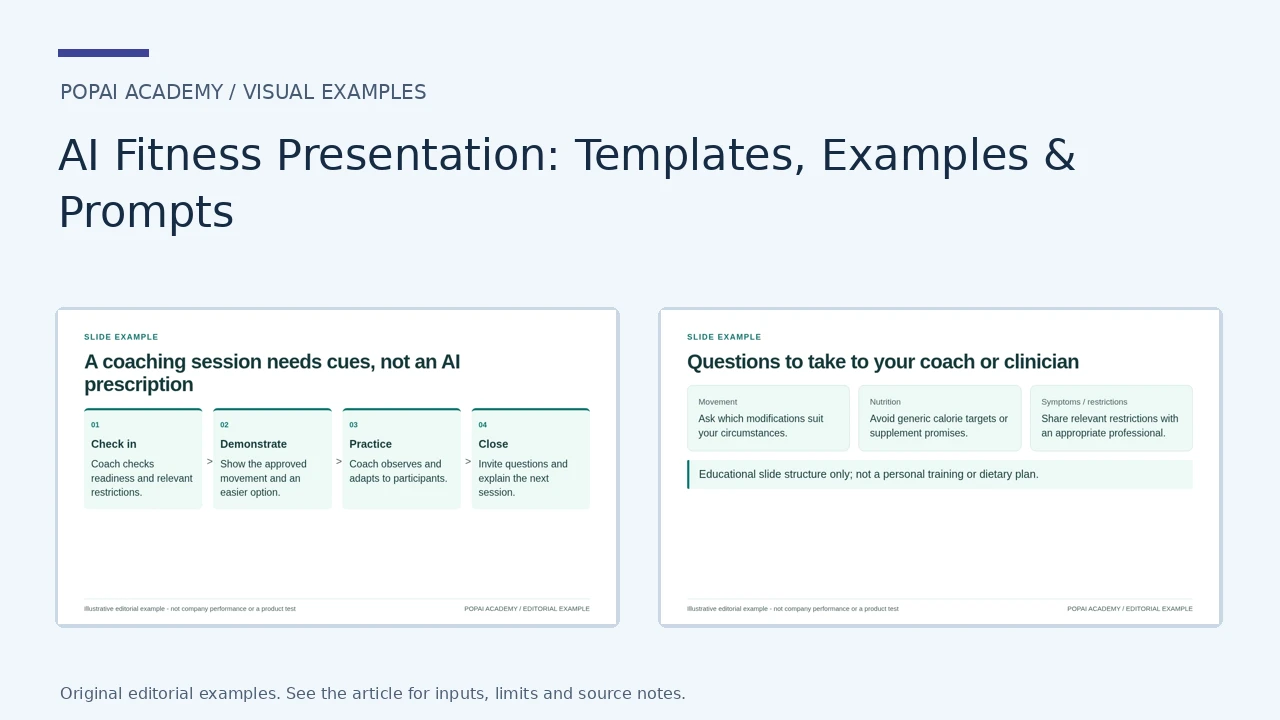
Fitness Slide Examples: Coaching, Operations and Safety
Use the first and third examples as communication structures for professionally approved material, not as a personal exercise or dietary prescription. The membership figures in the operations example are synthetic.
Open full-size examples and editable HTML layoutsA coaching session needs cues, not an AI prescription
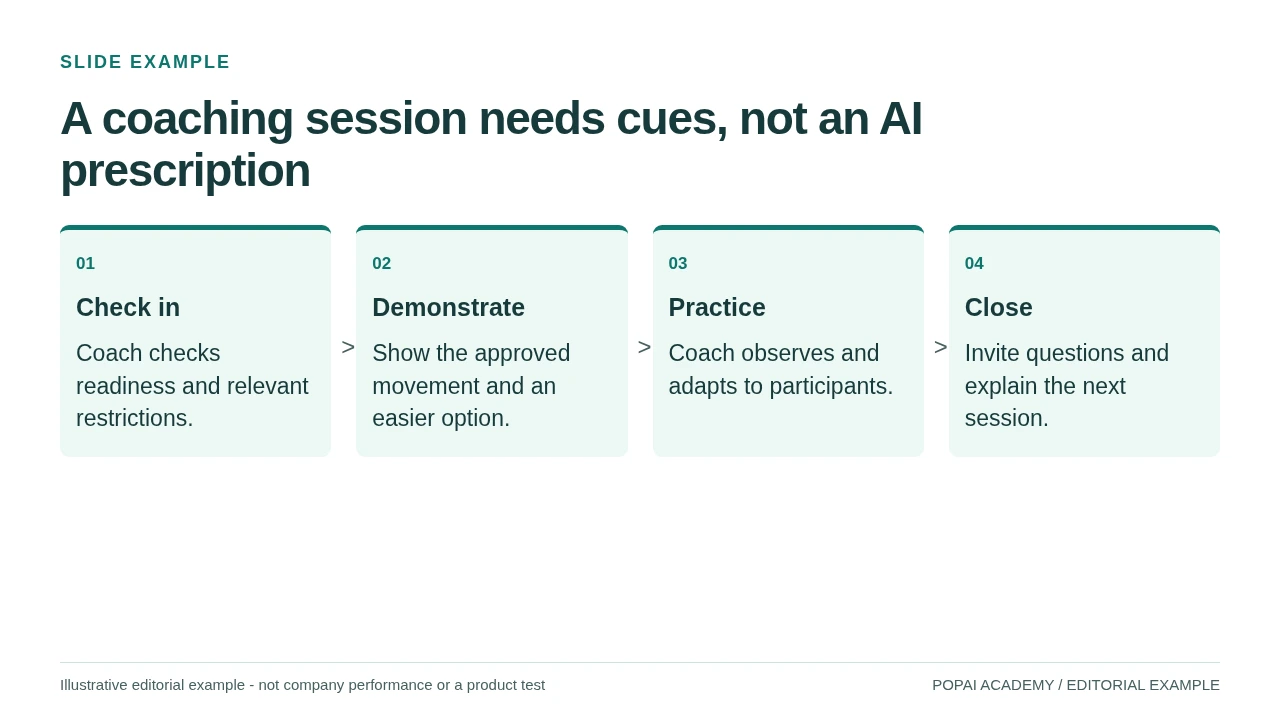
A course-plan slide structure; no personalized repetitions, loads or intensity are prescribed.
Read or copy the slide content
01
Check in
Coach checks readiness and relevant restrictions.
02
Demonstrate
Show the approved movement and an easier option.
03
Practice
Coach observes and adapts to participants.
04
Close
Invite questions and explain the next session.
Prompt for A coaching session needs cues, not an AI prescription
Create a coach-reviewed course plan from the approved session outline. Separate demonstration, practice and safety cues. Do not invent individualized exercise or nutrition advice.
Monthly retention: keep the opening cohort visible
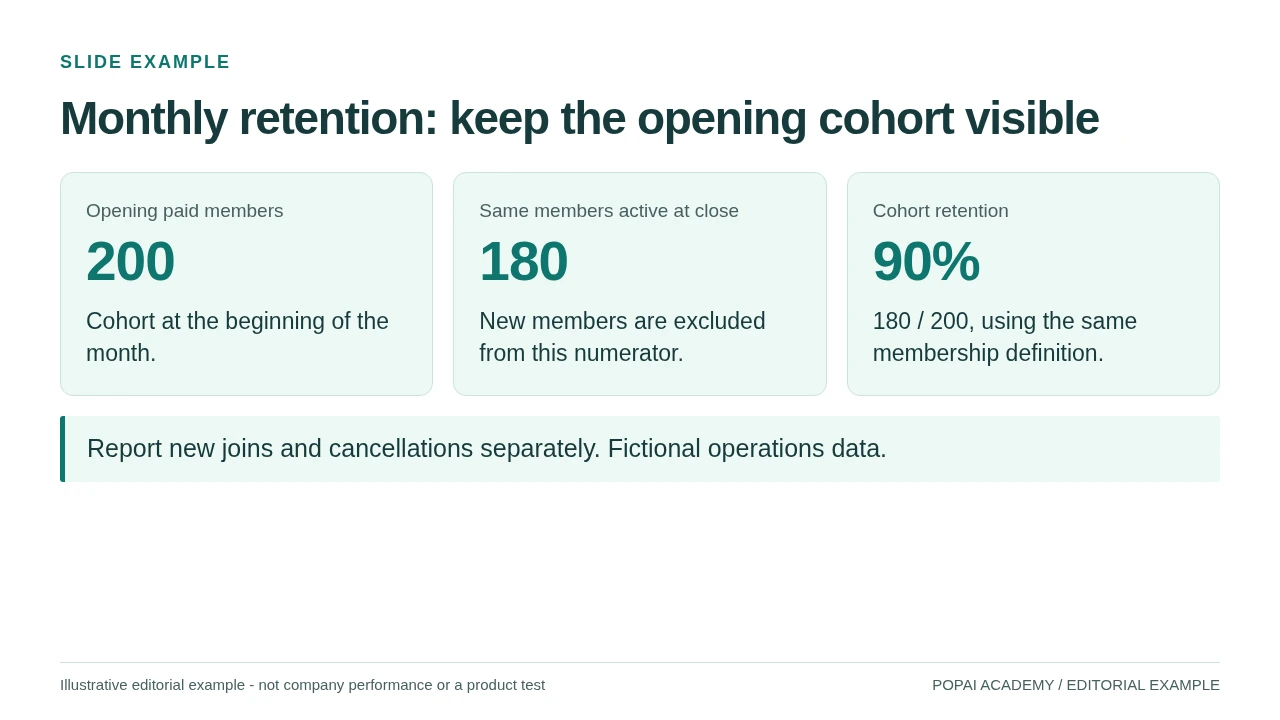
A gym operations example with an explicit denominator, not a fitness outcome.
Read or copy the slide content
Opening paid members
200
Cohort at the beginning of the month.
Same members active at close
180
New members are excluded from this numerator.
Cohort retention
90%
180 / 200, using the same membership definition.
Report new joins and cancellations separately. Fictional operations data.
Prompt for Monthly retention: keep the opening cohort visible
Create a slide with the purpose "Monthly retention: keep the opening cohort visible". Use these approved source fields or replace the illustrative inputs before use: Opening paid members 200 Cohort at the beginning of the month. Same members active at close 180 New members are excluded from this numerator. Cohort retention 90% 180 / 200, using the same membership definition. Report new joins and cancellations separately. Fictional operations data.. Preserve labels, units, source notes and any uncertainty. Do not add results, claims, customers or capabilities. Suggest a readable layout and keep the output editable in the chosen tool.
Questions to take to your coach or clinician
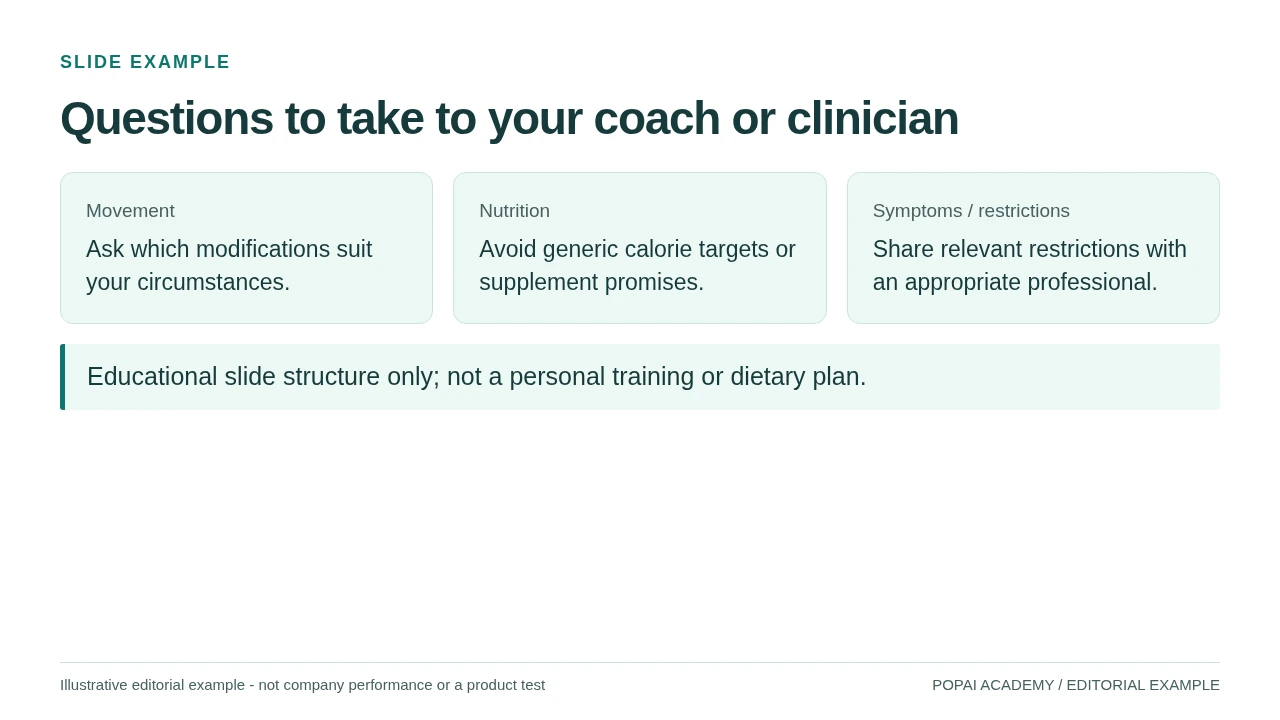
Member safety slide with a referral boundary rather than a medical or nutrition prescription.
Read or copy the slide content
Movement
Ask which modifications suit your circumstances.
Nutrition
Avoid generic calorie targets or supplement promises.
Symptoms / restrictions
Share relevant restrictions with an appropriate professional.
Educational slide structure only; not a personal training or dietary plan.
Prompt for Questions to take to your coach or clinician
Create a slide with the purpose "Questions to take to your coach or clinician". Use these approved source fields or replace the illustrative inputs before use: Movement Ask which modifications suit your circumstances. Nutrition Avoid generic calorie targets or supplement promises. Symptoms / restrictions Share relevant restrictions with an appropriate professional. Educational slide structure only; not a personal training or dietary plan.. Preserve labels, units, source notes and any uncertainty. Do not add results, claims, customers or capabilities. Suggest a readable layout and keep the output editable in the chosen tool.
AI Fitness Presentation Structure: Build a Useful Deck
Start with the audience’s decision or action, then give each slide one job.
A 10–12-slide deck is a useful starting point, not a rule. It might support a 12–18-minute talk if the slides are concise and the speaker adds explanation; questions, demonstrations, or discussion will change the timing. For a five-minute update, combine related slides and keep only what supports the audience’s next decision.
A flexible 12-slide outline—and what to put on each slide
- Title and promise: Name the audience and what they will leave knowing.
- Why this matters: State the need, opportunity, or challenge in one evidence-backed sentence.
- Starting point: For a class, describe experience, equipment, and time available; for a business deck, describe the customer or operating context.
- Goal and measures: Define the intended outcome and how it will be reviewed. Separate activity measures, such as attendance, from health outcomes.
- Weekly overview: Show the balance of training, rest, and optional activity.
- Sample session: Give the session flow, including movement patterns, work and rest intervals, and alternatives.
- Effort and scaling: Explain how participants can adjust effort or choose a suitable option.
- Warm-up and recovery: Include preparation, rest, and relevant recovery habits.
- Progression: Show how the plan may be adjusted over time without promising a particular result.
- Tracking: Define the measure, reporting period, and denominator; for a proposal, this may instead be success criteria.
- Limitations and support: State assumptions, alternatives, and when qualified guidance is appropriate.
- Next steps: End with a specific action, check-in, or enrollment instruction.
Short instructional talk: Combine slides 2–4 into “Who this is for and what you’ll learn,” then keep the weekly plan, one session example, scaling options, and next step. Business proposal: Replace the session and recovery slides with service design, staffing, and a budget or pilot plan. Workplace update: Keep the goal, participation measure, findings, limitations, and planned improvement; avoid presenting attendance as proof of improved health.
Prepare an AI Fitness Presentation Prompt
Specific constraints make the first draft more relevant and easier to review.
Before generating slides, decide who will see the presentation, what they should do afterward, and which facts the AI may use. A beginner class in a studio with resistance bands is not interchangeable with a workplace update or a gym proposal. If the AI lacks a fact, ask it to flag the gap rather than fill it with a plausible-sounding guess.
Set the brief before you generate
- Audience and experience: Name the group and what they already know.
- Purpose and duration: Specify whether the deck teaches, pitches, or reports, plus the talk time and slide limit.
- Setting and resources: Include equipment, space, session length, and schedule.
- Constraints: Note adaptations to consider and topics that need qualified review.
- Evidence and data: Supply approved sources and verified figures, or request clearly labeled placeholders.
- Style and output: Describe tone, visual direction, and intended format.
Prompt for a beginner group-class overview
Draft an 8-slide overview for an adult beginner group class at [setting]. The talk is [minutes] long and should help participants understand the class flow and choose an appropriate starting option. Include arrival and setup, warm-up, the main session blocks, cooldown, and next steps. Use only the equipment listed here: [equipment]. For each proposed movement, include a lower-impact or simpler alternative, and flag any exercise detail that needs review by a qualified fitness professional. Do not give medical advice or assume that one option suits everyone. Use only these supplied facts and sources: [paste]. If a detail is missing, write “[confirm]” instead of inventing it. Give each slide a takeaway and no more than three concise bullets.
Prompt for a studio proposal using supplied data
Create a 9-slide proposal for [studio/service] for [audience or decision-makers]. The goal is to request approval for [pilot, schedule, or budget]. Cover the need, service concept, delivery plan, staffing and resources, pilot timeline, proposed measures, risks, and decision requested. Use only the figures and source notes supplied below: [paste verified data and citations]. Do not invent market size, costs, participation, or expected outcomes. Label estimates as estimates and placeholders as placeholders. For every metric, show its definition, reporting period, and denominator. Use a practical, evidence-led tone and make the final slide’s requested decision explicit.
Repair a vague or unreliable draft
Prompt wording changes the output: “make a fitness deck” leaves the audience, equipment, and evidence unspecified; “make an eight-slide beginner class overview using only bodyweight exercises and the supplied source notes” narrows the task. If a draft invents data, replace the figure with “[insert verified value]” and ask for the slide to be rebuilt without it. If it assumes unavailable equipment, specify what is actually on site and request alternatives. If slides are dense, ask for one takeaway and up to three bullets per slide rather than deleting important qualifications.
Generate and correct the outline before polishing the visuals. If you use PopAi, treat the output as a draft and check the current product interface for supported inputs and export options; features and file handling can change. PopAi AI Presentation is one place to start a presentation workflow, but the source facts and final review remain your responsibility.
AI Fitness Presentation Examples by Goal
Use the audience, sample slide content, and call to action—not just the topic—to make each example useful.
These are compact worked examples, not claims about real programs or results. Adapt the figures and exercise details to verified records and qualified review. For guidance on comparing tools for different drafting and editing workflows, see AI presentation makers.
Beginner plan: make the first week easy to understand
Audience and goal: Adults new to a community fitness program; explain how to get started and where to find options. Sample sequence: “What to expect,” “Your first week,” “One session, step by step,” “Ways to scale,” and “How to check in.” A weekly overview might show two scheduled beginner sessions, an optional walking opportunity, and rest days—but it should be labeled as an example, not an individual prescription. Sample slide copy: “Choose the version that matches your comfort and available equipment; ask the instructor before class if you’re unsure.” Call to action: “Choose a session and tell the instructor what equipment or format you need.”
Group class or instructor portfolio: show the teaching, not just the energy
Audience and goal: A prospective participant or studio manager deciding whether a class fits. For a class overview, show arrival and setup, warm-up, main blocks, cooldown, and movement options. For a portfolio, use slides such as “My teaching approach,” “Class formats,” “How I scale a session,” and “Qualifications and experience.” Include verifiable certifications, relevant experience, and permission-cleared images; a mockup or AI-generated image is not evidence of a class you taught. Sample slide copy: “Main block: demonstrate the movement, offer the listed alternative, and let participants choose their pace.” Call to action: Invite the audience to try a class or contact you about a role.
Gym proposal or workplace update: distinguish plans from results
Audience and goal: A decision-maker considering a service or reviewing a pilot. A proposal might use “Need,” “Service design,” “Staffing,” “Pilot timeline,” “Measures,” and “Decision requested.” A workplace update might use “Who participated,” “What we measured,” “What we heard,” and “What changes next.” A participation rate is not a health outcome, and a proposed program is not evidence of effectiveness.
Illustrative case—not real program data: A four-week workplace pilot has 40 people who opted in. If 28 attended at least one session, report “28 of 40 enrolled participants (70%) attended at least once during the four-week pilot.” State the opt-in basis and period. That figure describes attendance among enrollees; it does not show that the program improved fitness or represent all employees. Call to action: Ask leaders to approve a next pilot period or a specific program adjustment, rather than claiming a proven outcome.
Slide test: could a reader tell who the deck is for, what the evidence supports, and what happens next from the slide titles alone? “Pilot attendance and what we’ll change” is more useful than a vague title such as “Results.”
Use Fitness Data and Visuals Responsibly
A chart should make the measure, timeframe, and limits of the data clear at a glance.
Choose and interpret the measure
Use a line chart for comparable measures tracked over time, a bar chart to compare categories such as session attendance, or a simple table for a weekly schedule. Define what counts, when it was measured, and who is included. For group reporting, aggregate or anonymize records and avoid putting identifiable health information on slides or into an AI tool unless you have appropriate permission and safeguards.
Worked chart example—illustrative figures only: For the 40-person workplace pilot above, a bar chart could show “Participants attending at least one session” on the y-axis (number of people) and “Weeks 1–4” on the x-axis. If the weekly counts were 20, 24, 25, and 22, label the chart “Attended at least one session that week; 40 enrolled participants; four-week pilot.” State whether people who did not attend are counted as zero and whether records are complete. Weekly counts are not a completion rate unless “completion” is defined, and changes do not establish why attendance shifted.
Small-sample and missing-data check: If only 8 people enrolled, one person changes the rate by 12.5 percentage points. Show the count alongside the percentage, avoid broad comparisons, and note missing attendance records rather than silently excluding them. Differences between two groups or periods may reflect selection, scheduling, or record quality; they do not by themselves show that a program caused an outcome.
Public-health reference: The World Health Organization’s physical activity fact sheet says adults should do at least 150–300 minutes of moderate-intensity aerobic activity, or an equivalent amount of vigorous activity, per week, and muscle-strengthening activities on at least two days. If you include this guidance, link or cite the source on the slide and present it as broad population guidance—not an individualized prescription. Explain terms in plain language and seek qualified review before turning general guidance into a specific program.
Make charts and slides readable
- Include readable labels, units, timeframe, and the number of people behind percentages.
- Use sufficient contrast and do not rely on color alone to distinguish categories.
- Keep charts simple enough to read from the back of a room; check them on the display you will use.
- Credit external statistics and mark hypothetical values clearly.
Review Safety, Accuracy, and Slide Quality
Review the proposed content systematically before spending time on visual polish.
For a training slide, a qualified fitness professional should check whether the session fits its stated audience and setting. Material about medical conditions, injury recovery, pregnancy, or other specialized needs may require an appropriate health professional. A general presentation should not be framed as diagnosis or treatment.
Use this six-point review before presenting
- Check assumptions: Does the plan match the stated experience level, equipment, space, and time?
- Inspect the session: Are work and rest intervals clear? Do progressions have a sensible starting point and alternatives? For example, if a slide says “increase the load each week,” ask what happens when equipment is unavailable or the participant is not ready to progress.
- Verify the math: Recalculate session totals, durations, weekly frequency, percentages, and chart denominators.
- Trace every claim: Confirm statistics and recommendations against current, reliable sources; remove or label anything that cannot be verified.
- Protect people and permissions: Remove identifying details and check permission for participant data, photos, and logos.
- Test the actual deck: Check text size, contrast, chart labels, reading order, and the exported file on the software and display you will use.
Example review finding: “This slide asks beginners to increase resistance every week but gives no way to judge readiness and assumes dumbbells are available. Add an equipment-free option and have the progression reviewed before presenting.”
Practical workflow: Lock the outline, verify sources and figures, have the exercise content reviewed where appropriate, then generate and edit the slides. Treat AI-generated wording, charts, and layouts as draft material—not as confirmation that the content is accurate or suitable.
Generate, Refine, and Export Your Fitness Slides
Separate content decisions from design decisions, then test the exported deck.
Start with a short outline and a verified input, such as: “Eight-slide beginner class overview; resistance bands and chairs available; 45-minute class; use the supplied class flow; flag missing details.” Review the resulting sequence for assumptions and missing information before asking for polished slides. This example describes an input brief, not a tested or guaranteed product result.
After generating a draft, edit for duplicated points, crowded slides, missing alternatives, and charts that need a definition or denominator. Choose a visual style that suits the audience, but prioritize readable instructions over decorative fitness imagery. Product interfaces and supported input or export formats can change, so check the current tool documentation or interface before relying on a particular file type. Open the exported PPTX or PDF on the device and display you plan to use; if a chart or text box shifts, simplify the layout and export again.
Keep a clean master deck and duplicate it for different audiences. Record the source and review date for statistics, and replace sample figures only with checked data. This makes it easier to spot an outdated claim or placeholder before the slides are reused.
What These Fitness Templates Are For
The examples provide slide structure and editable HTML copy, not an individualized training plan, a diet or a safety clearance. A qualified coach should approve movement cues; relevant clinical or dietary questions belong with an appropriate professional. The worked example's WHO reference provides population-level background, not an exercise prescription for a particular participant.