PopAi vs GenPPT: Which AI Presentation Maker Fits Your Workflow?
Published on May 20, 2026 ยท PopAi Editorial Team
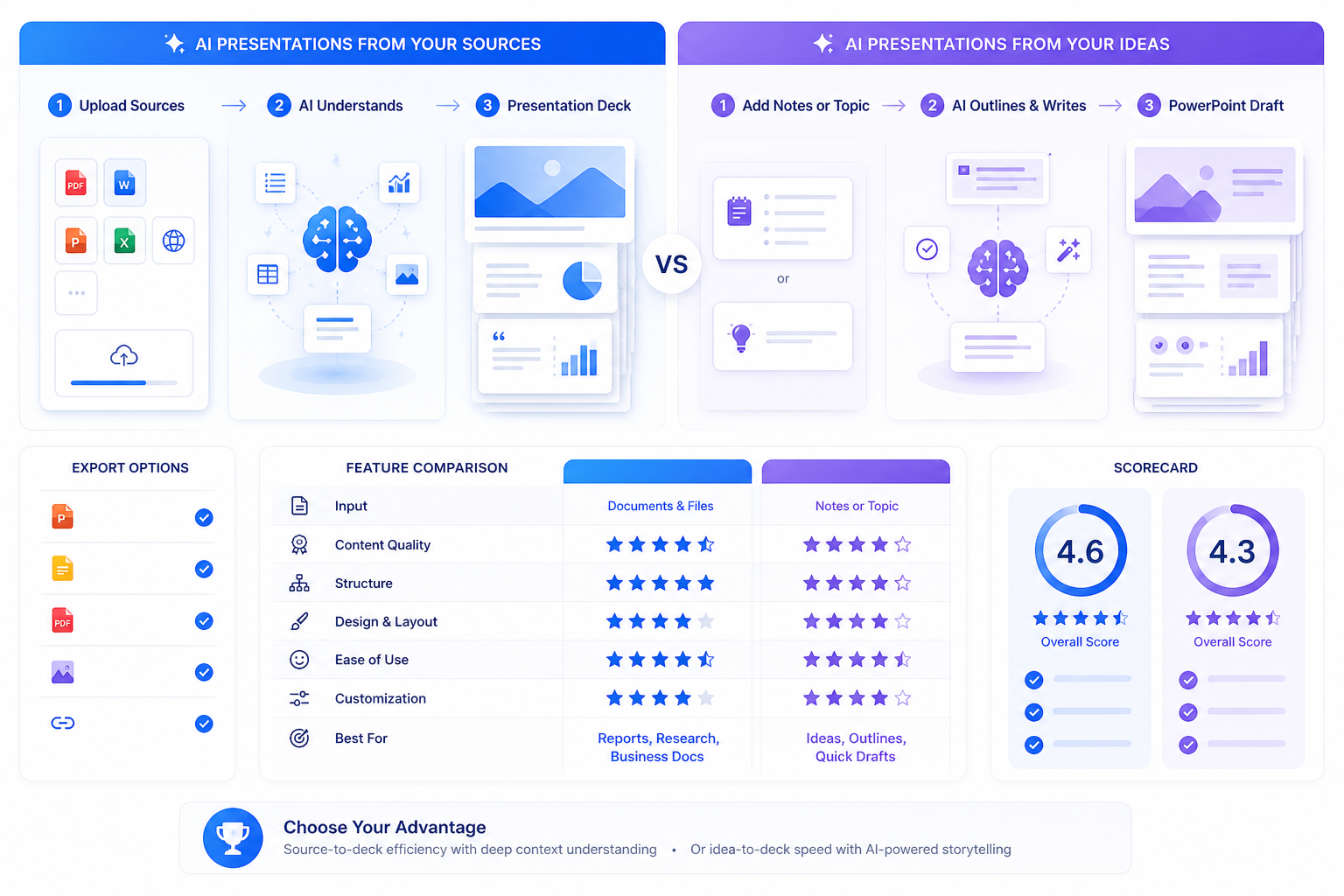
If you are comparing PopAi vs GenPPT, the right question is not simply which AI presentation maker can create slides faster. The more useful question is which one gets you closer to a deck you can actually present, edit, and hand off without a long cleanup cycle.
This page is written as a practical buyer comparison. PopAi is the stronger fit when your starting point is a PDF, Word document, long report, research note, internal brief, or other source-heavy material that needs to become a structured deck. GenPPT is also a capable AI presentation maker, especially for turning notes, links, or topics into editable PowerPoint drafts quickly. If you are still building a broader shortlist, this guide to the 12 best AI presentation makers in 2026 is the fixed pillar page for comparing adjacent tools.
Quick verdict: choose PopAi for PDF/Word-heavy document-to-deck workflows, branded templates, multilingual deck creation, and PPTX/PDF handoff. Choose GenPPT when you want a fast notes-, links-, or topic-to-PowerPoint draft and are prepared to review the storyline, evidence, and brand fit manually.
PopAi vs GenPPT at a Glance
Both products can help users move from a rough idea to a presentation draft. The biggest difference is the workflow they are best suited for. PopAi is more useful when the source material already exists in a document or brief. GenPPT is worth testing when you want a fast PowerPoint draft from notes, links, or a topic.
| Feature | PopAi | GenPPT | Practical takeaway |
|---|---|---|---|
| Best input type | Prompts, PDFs, Word documents, PPTX files, web pages, outlines, and notes | Topics, notes, links, prompts, and concise presentation input | PopAi is stronger for source-heavy workflows; GenPPT is strong for fast idea-to-PPTX drafts. |
| Document-to-deck workflow | Designed for turning existing source material into a structured presentation draft | Useful for generating a PowerPoint draft from notes, links, or a topic | Use PopAi when your deck depends on a real PDF, Word file, report, or long brief. |
| Export | PPTX and PDF export are available; share-link handoff is also part of the workflow | PowerPoint export is available; plan rules, watermarking, and trial limits should be checked before purchase | Test the exported file in PowerPoint before choosing either tool for a team workflow. |
| Templates and brand work | Supports templates and brand-style presentation workflows; strict brand systems still need manual review | Template-based deck generation; final brand compliance should be checked after export | Neither tool should skip final brand review for sales, investor, or client-facing decks. |
| Collaboration | Not a real-time multi-person online slide editor today; use export or share-link review handoff | Check the current account, editing, and team features before rollout | Do not buy either tool only on a collaboration assumption. Test your actual review flow. |
| Best use cases | Business updates, training decks, pitch preparation, sales narratives, reports-to-slides, and multilingual decks | Quick topic decks, lightweight business proposals, classroom drafts, and fast PowerPoint first drafts | PopAi is better when source accuracy and structure matter; GenPPT is better when speed is the main goal. |

Decision in one sentence
Choose the tool that reduces total time to a usable deck, not just time to the first preview. PopAi is especially relevant when your input contains existing source information. GenPPT is attractive when you want a fast PowerPoint draft and can refine the argument afterward.
Workflow and Content Quality
The biggest productivity gap usually appears before the deck looks polished. A useful AI presentation tool must identify the audience, objective, key message, evidence, and next action. Otherwise, it simply turns a prompt into decorative slides.
From rough input to a useful outline
Most professional decks do not start as clean outlines. A product manager may have a feature brief, a consultant may have a client discovery note, a teacher may have a lesson document, and a founder may have fundraising notes. PopAi is the better fit when that messy input must become a structured deck because it supports uploading documents and generating slides from the material. GenPPT is better positioned for a quick draft from a topic, notes, or links.
For a fair comparison, use the same deck brief in both tools. Do not stop after the generated preview. Review the full output for slide titles, repeated claims, unsupported statements, text density, visual consistency, and whether the deck can be edited quickly after export.
Recommended pilot: 900-word launch brief to 10 slides
Use this benchmark before buying either tool: take a 900-word product launch brief and ask both products to create a 10-slide executive update for a VP-level audience. Score the results after 30 minutes of cleanup rather than judging only the first cover slide.
| Review point | What a strong PopAi result should show | What a strong GenPPT result should show | Common failure to watch |
|---|---|---|---|
| Opening logic | Clear executive summary, launch objective, and decision context | Fast overview slide that frames the topic | Generic intro that repeats the prompt |
| Slide titles | Takeaway-style titles with a business point of view | Readable section labels that can be edited quickly | Flat titles like Overview, Market, Solution, and Conclusion |
| Evidence placement | Source facts grouped into relevant slides with room for human verification | Usable draft structure with claims that still need fact review | Unsupported metrics or claims that look plausible but are not in the source |
| Cleanup time | Less rewriting when the input is a real document or report | Less setup time when the input is a simple topic or notes | Attractive slides that still require a full rewrite |

Design Control, Templates, and Brand Consistency
AI presentation makers can speed up slide creation, but they do not remove the need for brand review. PopAi supports templates and brand-style workflows, which makes it useful for users who want a professional starting point from uploaded source content. GenPPT also provides template-based generation and can create polished PowerPoint drafts, but teams should still check fonts, colors, layout consistency, and whether exported objects remain easy to edit.
Where PopAi has a practical advantage
PopAi is stronger when the presentation starts with a real business source: PDF, Word file, report, existing PPTX, web page, or long outline. That makes it a better fit for teams that produce weekly stakeholder updates, training materials, sales narratives, or multilingual presentations from existing documents.
Where GenPPT can still be a good fit
GenPPT is a reasonable shortlist option when the user wants a fast deck from notes, links, or a topic and prefers to finalize the result in PowerPoint. Its positioning around true PPTX export is useful for people who do not want to be locked into a web editor. The tradeoff is that high-stakes decks still need human review for storyline, evidence, and brand compliance.
Export, Sharing, and Review Handoff
PopAi should not be positioned as a real-time collaboration workspace. The accurate workflow is to generate and edit the deck in PopAi, then export it as PPTX or PDF, or share a link for review. If your team needs multi-person slide editing, plan the final review in PowerPoint, Google Slides, or your existing team review process.
For GenPPT, the core export question is whether the plan you are using gives you the PowerPoint export, watermark rules, and generation volume you need. Always test the exact account tier that your team would buy.

| Scenario | Better fit | Why |
|---|---|---|
| Turning a dense report into a management update | PopAi | Document-to-deck support matters more than speed from a blank prompt. |
| Creating a fast presentation from a short topic | GenPPT | The workflow is well suited to quick prompt-, notes-, or topic-to-PPTX drafts. |
| Preparing a branded sales deck | PopAi, then manual review | Templates help, but final brand details should be checked by a human. |
| Exporting and polishing in PowerPoint | Both | Both should be tested for PPTX editability, fonts, object movement, and image replacement. |
A short five-step export and review checklist
Generate the same deck in both tools using identical inputs, then run through this checklist before deciding:
- Review the storyline, slide titles, visual consistency, and factual claims.
- Export the deck and perform a five-minute editability test.
- Check for watermarking, plan-level export limits, font substitution, and flattened objects.
- Measure total time from prompt or upload to presentation-ready file.
- Repeat the test on a second real brief to confirm the first result was not a one-off.
Pricing and Value: What to Verify Before Buying
Pricing and plan limits can change quickly, so confirm the current offer on each vendor's pricing page before buying. At the time this page was updated, GenPPT's pricing page listed 20 AI presentations per month, PowerPoint export with no watermark, AI images on every slide, an annual option at $99/year, a monthly option at $19/month, and a $1 three-day trial. PopAi offers a certain amount of free usage, while exact generation credits, export access, and account limits should be checked in the current PopAi account or pricing flow.
- Trial or free allowance: Check how many decks you can generate before upgrading.
- Export: Confirm PPTX/PDF availability, watermark rules, and whether objects remain editable.
- Document input: Test whether your real PDF or Word files convert cleanly into a usable deck.
- Brand workflow: Check whether templates, fonts, colors, and layouts match your brand requirements.
- True ROI: Track minutes saved per finished deck, not just slides generated per month.
How to Choose Between PopAi and GenPPT
Run a same-prompt pilot before making the final decision. Select one real presentation you need to create soon, remove confidential details if necessary, and use the same input in both platforms. The winner is the product that gives you a stronger message, cleaner visuals, and fewer manual corrections.
Ready-to-use test prompts
- Business review: Create a 10-slide quarterly business review for a VP audience. Include performance summary, key drivers, customer insights, risks, opportunities, recommended actions, and decisions needed. Use executive-style takeaway titles.
- Investor pitch: Create a 12-slide seed pitch deck for a B2B SaaS company. Include problem, market, solution, product, traction, business model, GTM, competition, team, financial assumptions, fundraising ask, and next steps.
- Training deck: Create an 8-slide onboarding training deck from the following policy summary. Include learning objectives, examples, common mistakes, discussion questions, and a final knowledge check.
The sample scores below are a practical starting point based on the workflows described in this comparison. Adjust them after you run your own same-input pilot, especially if your team values speed, source-document handling, or PowerPoint export differently.
| Criterion | Suggested weight | Suggested PopAi score 1-5 | Suggested GenPPT score 1-5 |
|---|---|---|---|
| Understands audience, objective, and tone | 15% | 4 | 3.5 |
| Creates a logical, persuasive structure | 20% | 4.5 | 3.5 |
| Handles source documents cleanly | 20% | 4.5 | 3 |
| Produces readable, consistent layouts | 15% | 4 | 4 |
| Supports efficient revision workflow | 10% | 4 | 4 |
| Exports cleanly for your final handoff | 20% | 4 | 4 |
Final recommendation
For most professional workflows, PopAi is the better choice when the presentation starts from source material and needs a coherent executive-ready story. GenPPT is a reasonable shortlist option when your main need is quick slide generation from a topic, notes, or links and you are comfortable refining the structure manually. The safest buying decision is to test both with one real deck, export the result, and measure cleanup time.
| Need | Better fit | Reason |
|---|---|---|
| PDF or Word document to PPT | PopAi | Better fit for turning existing source material into a structured deck. |
| Fast topic or notes to PowerPoint | GenPPT | Strong option for quick notes-, links-, or topic-to-PPTX drafts. |
| Business storytelling from internal materials | PopAi | More useful when the deck must reflect a real brief, report, or policy document. |
| Strict brand compliance | Manual review after either tool | Templates help, but final fonts, colors, and layouts need human approval. |
| Best overall for document-heavy professional workflows | PopAi | Lower structural cleanup is usually more valuable than the fastest first draft. |
Frequently Asked Questions
Is PopAi better than GenPPT for business presentations?
PopAi is usually the stronger fit when the deck starts from a PDF, Word document, report, long outline, or business brief. GenPPT is worth testing when you want a fast notes-, links-, or topic-to-PowerPoint draft and can refine the story afterward.
Can PopAi or GenPPT export to PowerPoint?
PopAi supports PPTX and PDF export. GenPPT positions native PowerPoint export as a key feature. In both cases, test the exact account tier, watermark rules, and whether text, images, and objects remain editable after export.
Does PopAi support online collaboration?
PopAi should not be described as a real-time online collaboration workspace today. A safer workflow is to generate and edit in PopAi, then export PPTX/PDF or share a review link and finalize the deck in your team's normal review process.
Which tool is better for PDF or Word to presentation workflows?
PopAi is the better fit for PDF or Word document-to-deck workflows because the product supports uploading those file types and generating slides from existing source material.
What should I test before choosing between PopAi and GenPPT?
Use the same prompt or source brief in both tools. Compare outline quality, factual accuracy, slide titles, design consistency, PPTX editability, plan limits, watermark rules, and cleanup time.