How to Create Academic Conference Presentations with AI
Published on August 10, 2026
Imagine a PhD student with a 9,000-word conference paper, a 12-minute speaking slot, three minutes of Q&A, and a session chair who will hold up a “2 minutes” card before the conclusion has even started. The challenge is not producing slides. It is deciding which claims, figures, caveats, and citations deserve live attention.
This workflow applies to society meetings, IEEE/ACM-style research talks, medical congresses, humanities panels, graduate symposia, workshops, and recorded conference presentations. The specifics change by field, but the core problem is the same: a paper written for close reading must become a timed argument that an audience can follow once. Tools such as PopAi AI Presentation can help you start from a PDF, Word document, text, HTML, image, or existing PPTX, but the useful output is a draft structure—not a finished scholarly claim.
As a practical rule of thumb from research-communication work, turning a manuscript into a conference deck often costs an afternoon: extracting the argument, cutting the literature review, rebuilding figures, adding citations, and rehearsing. AI can reduce the mechanical work, but it cannot decide what your field will consider convincing, ethical, or overclaimed.
AI is most useful when it helps you decide what not to show. A conference presentation is not a mini-paper; it is a timed argument built around a few defensible findings.
For example, a paper with five findings might become a talk with only two: the strongest empirical result and the most surprising implication. Robustness checks move to backup slides, the literature review becomes one gap slide, and a secondary analysis is mentioned only if someone asks during Q&A.
Plan Academic Conference Presentations with AI Before Generating Slides
Before generating slides, write a research-talk brief that tells the AI what the conference actually requires and what the tool must not reinterpret.
Build the research-talk brief before upload
A useful brief is more than “make slides from my paper.” It should capture the constraints that usually live in emails, submission portals, coauthor comments, and your own judgment.
- Conference context: conference name, session type, oral paper vs invited talk vs graduate symposium, and whether the audience is specialist or mixed.
- Timing: speaking time, Q&A time, whether the slot is “15 minutes total” or “15 minutes plus questions,” and any upload deadline.
- Source hierarchy: final abstract, full paper, appendix, reviewer comments, coauthor notes, preregistration, or lab-approved figures.
- Claims that must stay exact: hypotheses, effect sizes, sample size, p-values, interview count, archival source descriptions, and causal wording.
- Material to exclude: unpublished results, blinded-review details, patient or student identifiers, embargoed data, field-site details, or funder-confidential information.
- Slide requirements: 16:9 template, institutional branding, required disclosure slide, acknowledgements, embedded fonts, PDF backup, or no-internet room setup.
- Terminology: preferred labels, community-sensitive terms, discipline-specific definitions, and phrases approved by coauthors or advisors.
Use prompts that prevent overclaiming
Academic prompts should ask for structure, alternatives, and caution—not just polished wording. For example:
Prompt template:
Create a 12-slide, 12-minute academic conference presentation from the attached paper. Audience: interdisciplinary scholars familiar with qualitative methods but not this case. Tone: precise, evidence-led, and concise. Include motivation, literature gap, research question, method, 2–3 key findings, implications, limitations, and Q&A backup slide suggestions. Preserve exact wording for research questions, sample size, statistical findings, interview counts, and causal claims. Do not invent citations, numerical results, theoretical labels, or policy recommendations.
In PopAi, this brief can be paired with uploaded materials rather than typed from memory. That helps when the abstract differs from the full paper, when an advisor has approved a specific framing, or when the appendix contains the methods detail you need for credibility but not for the main narrative. If the material is unpublished or sensitive, remove identifiers and restricted sections before uploading, or use a workflow approved by your institution, IRB, lab, or data-use agreement.
Ask for multiple talk arcs, not one outline
When the audience is broader than the paper’s intended journal audience, ask AI for two or three possible arcs before generating the deck:
- Problem-first arc: start with the real-world or theoretical problem, then show why your study changes the conversation.
- Methods-first arc: useful when the novelty is a dataset, field site, instrument, model, or experimental design.
- Finding-first arc: effective for short talks where one result is surprising enough to orient the whole presentation.
Case example: a medical researcher preparing a 15-minute congress talk from a manuscript with three results tables might ask for two evidence slides instead of three tables: one cohort-flow slide showing who was included and one forest-plot-style slide showing the clinically relevant effect with confidence intervals. The appendix tables become backup material for methodologists.
Turn a Research Paper into Conference Slides Without Losing the Argument
For a broader view of available tools, compare the latest AI presentation makers before choosing the workflow that best fits your team.
Example: paper paragraph to conference slide
Source paragraph: “Across three interview rounds, participants described the onboarding process as useful but difficult to navigate. The most common barrier was not feature awareness but uncertainty about which step to complete next. This pattern appeared in novice users and in returning users after product updates.”
| Conference slide element | Slide-ready version | Review note |
|---|---|---|
| Claim title | Navigation uncertainty, not feature awareness, slowed onboarding. | Title states the argument rather than labeling the slide “Findings.” |
| Evidence bullets | Three interview rounds; repeated confusion about next step; pattern appeared after product updates. | Keep method limits visible; do not imply a larger quantitative sample. |
| Visual job | Simple flow diagram showing where users hesitated in the onboarding sequence. | Use the diagram to explain sequence, not to invent measurements. |
| Speaker note | “The useful takeaway is that education alone is insufficient; the interface must clarify the next action.” | Speaker note adds interpretation while the slide stays concise. |
References and figure citation slide example
For academic decks, add a compact citation slide or appendix slide when figures, datasets, quotations, or prior work are essential to the argument.
- References slide: list 5-8 core works with the citation style required by the conference or discipline.
- Figure credit line: under each chart or image, include source, date, permissions status, and whether the figure was adapted.
- Placeholder rule: labels such as “needs citation” or “figure permission pending” are review markers, not unfinished content. Resolve them before submission or delivery.
A journal article is organized for close reading; a conference talk is organized for live comprehension. Before choosing among AI presentation makers, decide whether your workflow lets you inspect and edit the outline before the design layer makes weak structure look finished.
The safest workflow is source-to-brief-to-outline-to-slides-to-audit. Prepare source files, remove confidential material, write the talk brief, upload the paper or abstract, generate an outline, edit the outline, generate the deck, replace figures, audit claims and citations, rehearse, cut, add backup slides, and export both PPTX and PDF for the conference room.
Map paper sections to live-talk jobs
| Paper section | Conference slide role | What to cut |
|---|---|---|
| Abstract and introduction | Motivation, research question, contribution | Broad background your audience already knows |
| Literature review | One-slide gap statement, e.g. “Prior work explains X, but not Y under these conditions” | Long citation lists, historiography, and debates not needed for the central claim |
| Methods | Credibility and reproducibility: sample, data source, model, field site, corpus, or analytic approach | Secondary procedural details unless they are contested or novel |
| Results | Core evidence slides with assertion-style titles | Marginal findings, redundant tables, and supplementary checks |
| Discussion | Implications, limitations, future work, and what changes because of the study | Speculative claims not supported by results |
Replace label titles with claim titles
Many AI-generated decks use safe but weak slide titles. Edit them so each slide tells the audience what to infer.
- Weak: “Literature Review”
Better: “Existing models explain adoption, but not sustained use after implementation.” - Weak: “Results”
Better: “Model accuracy improves most in low-resource settings.” - Weak: “Interview Themes”
Better: “Participants described trust as procedural, not personal.” - Weak: “Discussion”
Better: “The intervention works only when staffing constraints are addressed.”
Use a sample 12-minute outline as a starting point
For a common 12-minute paper presentation, this structure is usually more realistic than a slide-per-paper-section outline:
- Title and one-sentence contribution
- Problem or puzzle the audience recognizes
- Gap in prior work
- Research question and argument
- Data, corpus, sample, or field site
- Method in one visual workflow
- Finding 1 with main evidence
- Finding 2 with main evidence
- What these findings change theoretically or practically
- Limitations and scope conditions
- Conclusion: one takeaway and next step
- Backup slide placeholder or acknowledgements, depending on conference norms
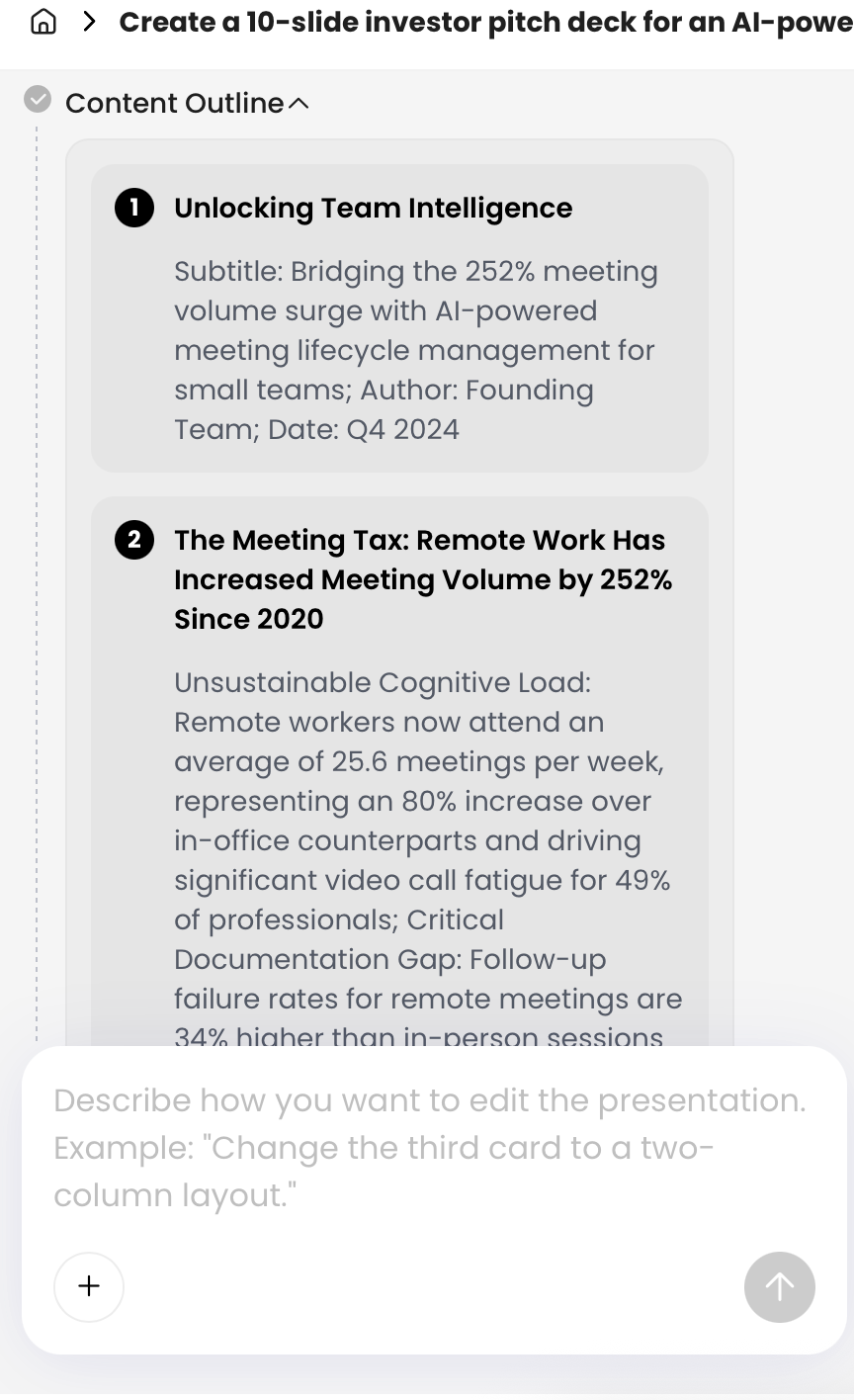
PopAi’s visible planning stage is useful because it lets you catch problems early: a missing methods slide, a literature review that consumes half the talk, or an invented “recommendations” section that your data do not support. With long PDFs, still check whether appendices, footnotes, equations, and figure captions were interpreted correctly; extraction is helpful, not authoritative.
Choose the Right Slide Count for Academic Conference Presentations with AI
AI can generate a deck in minutes, but it cannot change the physics of speaking time. Slide count should be based on evidence density, not just talk length.
Recommended slide allocation by format
Use these ranges as planning defaults, then adjust for your field. A humanities quote slide, a clinical flow diagram, or an algorithm architecture slide often needs more explanation than a transition slide.
| Format | Main slides | Maximum major findings | Backup slides |
|---|---|---|---|
| 5-minute lightning talk | 4–6 | 1 | 1–2 |
| 10-minute short paper | 7–10 | 2 | 2–4 |
| 12-minute conference paper | 9–12 | 2–3 | 3–5 |
| 15-minute conference talk | 10–15 | 3 | 4–6 |
| 20-minute presentation | 14–18 | 3–4 | 6–8 |
| 30-minute invited talk or defense segment | 22–30 | 4–5 | 8–15 |
Budget time by slide type
A practical timing formula for a 15-minute research talk is: 60–90 seconds for opening and contribution, about 2 minutes for methods credibility, 2–3 minutes for each major result, 2 minutes for implications and limitations, and at least 1 minute of buffer. Title and acknowledgements may be visible but should not consume your evidence time.
- Transition slides: 10–20 seconds if they simply orient the audience.
- Data-heavy slides: 75–120 seconds, especially with uncertainty intervals, subgroup analysis, or model comparison.
- Quote or archival slides: 60–90 seconds because the audience needs time to read and interpret.
- Diagram slides: 60–120 seconds; use builds only when they clarify sequence rather than add drama.
- Backup slides: do not count toward the timed talk, but they should be clean enough to show instantly in Q&A.
Analysis: if a 15-minute talk contains 20 evidence slides, you have about 45 seconds per slide before introductions, transitions, and inevitable overrun. That may work for a visual keynote, but it is risky for dense academic content. A regression table, clinical workflow diagram, ethnographic quote, or algorithm architecture often needs 90 seconds or more to explain responsibly.
For conference talks, the unit of design is not the slide; it is the audience’s next inference. Use AI to draft more options than you need, then cut until each slide has a job.
Ask AI for two versions: a “complete” 15-slide deck and a “ruthless” 10-slide version. Compare them side by side. The ruthless version often reveals the real spine of the talk, while the longer version provides backup slides for questions. Also create a two-minute emergency cut: know which method detail, secondary finding, or limitation slide you can skip if the previous speaker runs long.
Design Research Slides That Scholars Can Read and Trust
Academic design is evidence management: the audience must quickly distinguish your claim, your data, your uncertainty, and your contribution.
Write slide titles as claims, not labels
Each slide should make one defensible point. If the title could appear in any paper—“Background,” “Method,” “Findings”—it is probably not doing enough work.
- Use assertion-style titles: “Peer feedback improved revision quality, but only after rubric training.”
- Keep one claim per slide; split a slide if it contains two results, two mechanisms, or two interpretations.
- Use 24–28 pt minimum body text where possible; smaller text may survive on your laptop and fail in a ballroom.
- Limit body text to a few lines; move detailed definitions, proofs, or coding schemes to backup slides.
Use one-slide-one-point discipline rules
- Computer science: prioritize architecture diagrams, evaluation setup, benchmark context, and ablation results; avoid tiny code screenshots and unexplained leaderboard tables.
- Medicine and public health: label units, cohorts, denominators, confidence intervals, ethics approvals, and clinical relevance; distinguish association from causation and protect patient privacy.
- Social sciences: foreground research design, sampling, operationalization, identification strategy, and limitations; use quotes sparingly with speaker context and consent boundaries.
- Humanities: show interpretive stakes, source context, textual evidence, and conceptual movement; replace full paragraphs with short excerpts plus your reading of them.
Simplify charts without distorting evidence
When AI converts a table into a chart, check whether the visual still represents the evidence faithfully.
- Show effect sizes, confidence intervals, and sample size when they matter to the claim.
- Use direct labels instead of legends when possible.
- Avoid full regression tables; highlight only the coefficients or comparisons the audience needs.
- Keep axes honest: no unexplained truncation, missing units, or inconsistent scales.
- Use colorblind-safe palettes and do not rely on red/green contrast alone.
- Place the data source, adapted-from note, or citation near the figure rather than hiding it in speaker notes.
Case example: a social-science paper with a six-column regression table can become one slide showing predicted probabilities for the two theoretically important groups, with controls summarized in a footnote and the full model in backup. That is not “dumbing down” the analysis; it is choosing the form that lets a live audience evaluate the claim.
Use AI visuals cautiously in scholarly contexts
PopAi’s editing environment supports post-generation refinement through themes, cards, logic frames, AI image tools, AI writing, charts, and icons. For academic work, treat these as layout aids. Use logic frames to clarify sequence, cards to separate evidence types, and icons only when they reduce cognitive load. Do not let decorative visuals imply data, participants, locations, or experiments that were not actually observed.
Back-row test: Open the slide at full screen, step back, and ask whether a tired attendee can identify the claim, read the labels, understand the figure, and see the source note in under 10 seconds. If not, simplify before rehearsing.
Verify AI-Generated Academic Slides for Accuracy, Citations, and Ethics
The main risk in using AI for academic conference presentations is misplaced confidence. AI may compress accurately, but it may also smooth over uncertainty, invent transitions, overstate findings, or detach a claim from its citation.
Audit claims and numbers in order
Verify from the argument outward. First check whether the outline matches the paper, then inspect slide titles, numbers, citations, figures, and confidentiality.
- Outline audit: confirm the deck follows the actual contribution rather than a generic introduction-method-results-discussion pattern.
- Claim audit: every headline should match the evidence in your paper, dataset, corpus, or field notes.
- Number audit: verify percentages, p-values, sample sizes, dates, units, confidence intervals, and denominators against the source document.
- Figure audit: replace AI-generated placeholders with approved figures, properly attributed images, or original visualizations.
- Citation audit: add slide footnotes or a compact references slide for key claims, images, datasets, adapted figures, and quoted material.
- Coauthor audit: send the revised deck to the person most likely to catch framing, methods, or attribution errors.
Watch for common AI slide errors
These errors are small enough to miss during formatting and serious enough to damage credibility in Q&A.
- Association becomes causation: “X was associated with Y” becomes “X caused Y.” Fix by restoring the study design language.
- Non-significant becomes “key”: a suggestive trend becomes a headline finding. Fix by labeling it exploratory or moving it to backup.
- Sample description changes: “n=47 interviews” becomes “47 surveyed participants.” Fix by checking data type and recruitment wording.
- Numbers are rounded incorrectly: p=.049, p=.051, percentages, or denominators are simplified in misleading ways. Fix against the table or analysis output.
- Theory is misattributed: a concept is assigned to the wrong scholar or school. Fix with a citation footnote or remove the attribution.
- Fake references appear: an invented DOI or plausible-sounding article is added. Fix by using only verified sources from your reference manager.
- Generated images look evidentiary: an AI image implies a real field site, patient, classroom, or lab setup. Fix by replacing it or labeling it as conceptual.
Check citations, permissions, and source notes
Slides do not need journal-style footnotes everywhere, but the audience should know where key evidence comes from. Use compact source notes such as “Data: Author survey, 2024, n=312,” “Adapted from Smith 2023,” or “Image reproduced with permission.” If you include a final references slide, keep it short and focused on sources actually used in the talk.
Protect confidential or sensitive data
Before uploading or presenting, review obligations from your institution, conference rules, IRB or ethics board, funder agreement, publisher policy, and relevant privacy laws such as HIPAA, FERPA, GDPR, or local equivalents where applicable. This is especially important for clinical research, education data, ethnography, community-based work, corporate partnerships, and manuscripts under blinded review.
- Remove names, faces, locations, metadata, file comments, and field-site clues unless explicitly cleared.
- Do not upload restricted datasets, patient information, student records, or embargoed findings to third-party tools without approval.
- Keep a record of what files were used to generate the deck, especially for lab, funder, or research-integrity documentation.
- Follow conference or institutional requirements for disclosing AI assistance, particularly for generated images, translation, or substantive text drafting.
Ethics vary by field, but the principle is stable: do not let AI create a visual or textual claim that your evidence, permissions, or participants cannot support. If AI visuals are used only as conceptual illustrations, label them clearly when appropriate and avoid realistic depictions of vulnerable groups or study settings.
Collaborate, Rehearse, and Export Your Conference Deck
Once the draft is accurate, the final work is delivery preparation: coauthor alignment, timing, room compatibility, backup files, and Q&A readiness.
Build a review workflow with clear owners
| Version | Owner | Main review task | Output |
|---|---|---|---|
| Version 1 | Presenter | Generate structure from paper, abstract, and brief | Editable outline and rough deck |
| Version 2 | Presenter | Replace figures, correct claims, remove sensitive material | Evidence-accurate draft |
| Version 3 | Advisor or coauthor | Check framing, theory, methods, authorship, and permissions | Scholarly-approved deck |
| Version 4 | Presenter plus rehearsal reviewer | Cut for timing, improve transitions, prepare Q&A | Conference-ready PPTX and PDF backup |
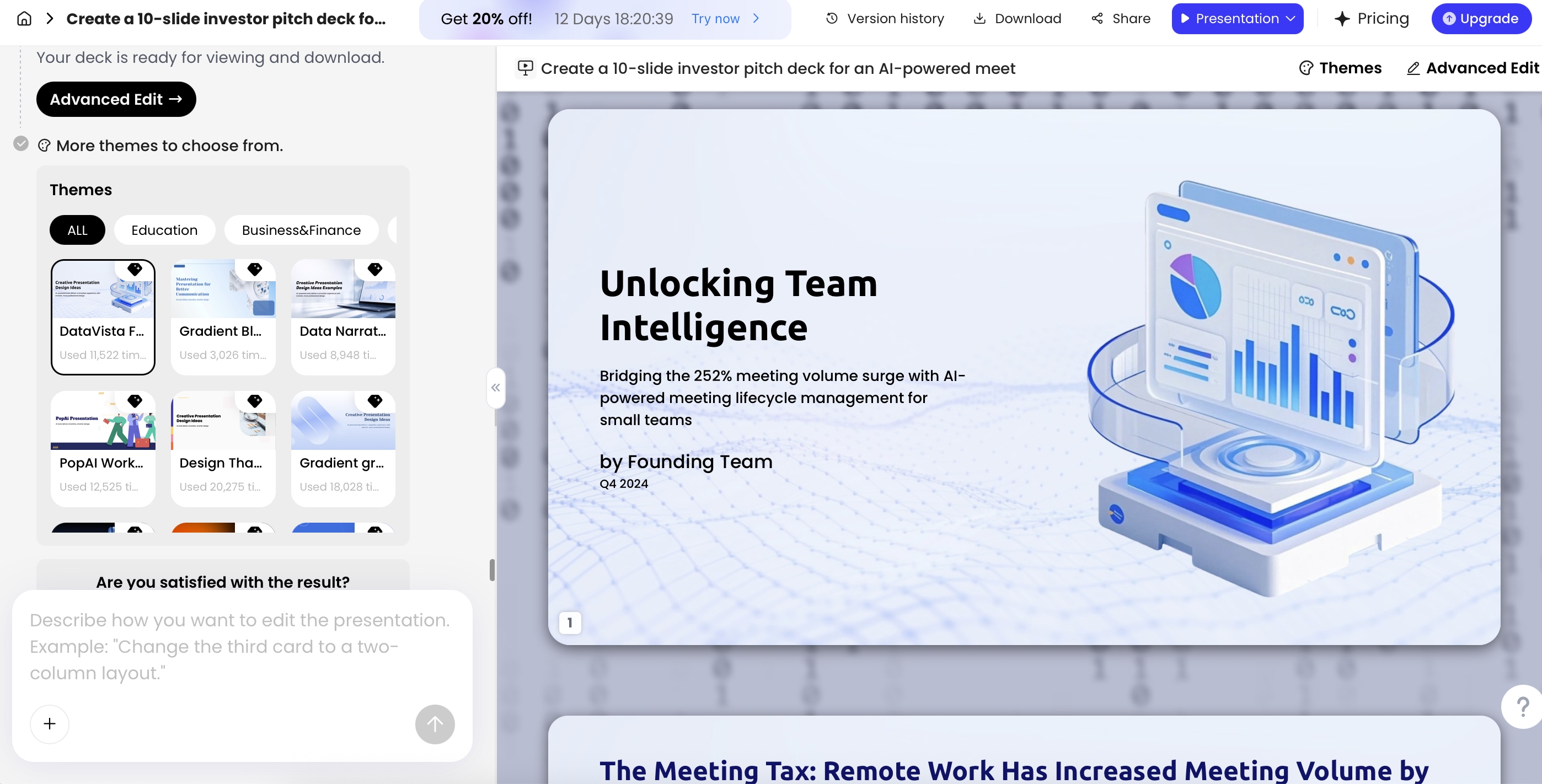
PopAi supports continuing revisions after generation through natural-language modification and advanced editing. For example, after a draft is created, you might ask the tool to shorten a dense background slide for a specialist audience, convert a methods list into a clearer process layout, or make the conclusion more action-oriented without changing the findings. Export behavior should still be tested on your own files: open the PPTX in the PowerPoint version you will use, check whether text remains editable, confirm fonts and equations, inspect charts and citations, and export a PDF backup in case the room computer behaves differently.
Rehearse like a conference speaker, not a slide reviewer
A good academic rehearsal catches over-explanation, weak transitions, and Q&A vulnerabilities that are invisible in edit mode.
- Timing run: present once without stopping and mark where you are at 5, 10, and 12 or 15 minutes.
- Transition run: practice only the first and last sentence of each slide so the argument feels continuous.
- Field review: ask a colleague in your area to challenge methods, interpretation, and missing citations.
- Non-specialist review: ask someone outside the subfield where they got lost and which slide carried the main contribution.
- Cut run: prepare a shorter version by marking one optional method detail, one secondary result, and one discussion point you can skip.
- Room test: test fonts, videos, animations, embedded media, clicker behavior, and audio on the actual or closest available setup.
Prepare 3–5 backup slides for likely questions: robustness checks, additional examples, full model specifications, sensitivity analysis, appendix methods, ethics details, or a full reference list. You can also ask AI to generate 15–20 possible questions from the perspective of a skeptical reviewer, a methodologist, a domain expert, and a non-specialist attendee. Then answer those questions yourself using your evidence.
Handle translation and hybrid delivery carefully
For international conferences, AI can help draft translated slide text, but have technical terms checked by a fluent speaker or field colleague. Many mistranslations are subtle: “significant,” “control,” “subject,” “model,” and “bias” carry discipline-specific meanings. For hybrid or recorded talks, also check caption readability, microphone quality, screen-share resolution, and whether slide source notes remain visible after compression.
Final export checklist: bring PPTX and PDF copies, store them in cloud, email, and USB locations, embed or package fonts where possible, avoid relying on internet access, flatten complex charts if needed, and keep an accessible shared version for attendees who request the deck after the session.
FAQ: Academic Conference Presentations with AI
How many slides should a 15-minute academic conference presentation have?
Most 15-minute research talks work best with 10 to 15 slides, depending on figure density and speaking pace. If you have 20 slides, you average about 45 seconds per slide, which is often too fast for methods and results.
Can AI turn a research paper PDF into conference slides?
Yes. Tools such as PopAi can start from PDF, Word, text, HTML, image, and PPTX inputs, extract a presentation structure, and generate a draft slide deck. Researchers should still verify claims, numbers, citations, and figures before presenting.
Is it acceptable to use AI-generated images in academic presentations?
It depends on the discipline and purpose. AI-generated images should not be presented as evidence, field documentation, patient images, or ethnographic records. Use disclosure, licensing checks, privacy review, and advisor or IRB guidance when sensitive subjects are involved.
How much manual editing is still needed after AI generates the slides?
Expect to edit the deck for accuracy, emphasis, figure quality, terminology, and timing. AI is strongest for outlining, compression, layout exploration, and revision prompts; the researcher remains responsible for scholarly judgment.
Create your presentation with one click now
Turn research materials into a structured academic presentation draft, then refine it for your conference audience.
Start with PopAi AI Presentation