Real-World Sales Pitch Examples Created with Popai.pro

If you are a founder, account executive, sales manager, or consultant, you rarely need a prettier deck first. You need sales pitch examples that help a buyer understand the problem, trust your solution, and agree to the next conversation.
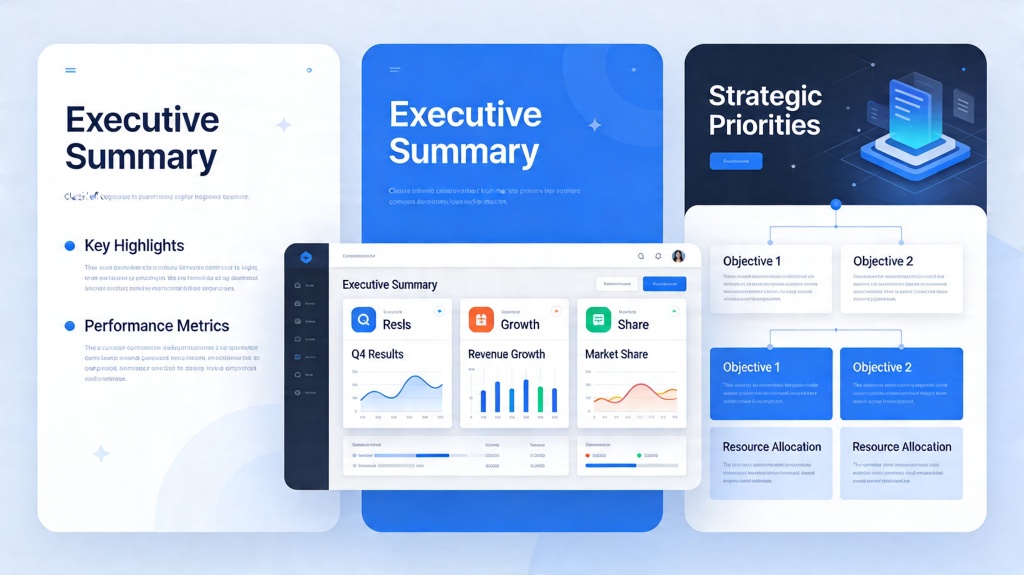
This guide breaks down real-world sales pitch examples created with Popai.pro, including what each slide should do, where AI speeds up the workflow, and what you should still edit by hand. The goal is practical: a pitch deck you can adapt for discovery calls, demos, partner meetings, and follow-up emails.
For teams that need to move from scattered notes to a structured buyer narrative, PopAi AI Presentation can turn a prompt, outline, or source document into a usable first draft while leaving room for your sales judgment.
What real sales pitch examples need before design
A strong sales pitch starts with the buying decision, not with colors, animations, or product screenshots.
Define the buyer’s job before writing slides
The best sales decks are specific to a buying situation. A CFO evaluating cost control needs a different storyline from an operations leader trying to reduce manual work. Before generating slides, write one sentence that identifies the buyer, the pain, and the desired business outcome.
For example: “This deck is for mid-market revenue leaders who need to reduce proposal turnaround time without adding headcount.” That one sentence keeps the AI output focused and prevents the pitch from becoming a generic company overview.
Use a five-part pitch spine
Most practical sales pitch examples follow a simple spine. You can vary the order, but the buyer still needs each answer before they commit time, budget, or internal support.
- Problem: What is broken, expensive, slow, or risky today?
- Impact: Why does this problem matter financially, operationally, or strategically?
- Solution: What changes when your product or service is adopted?
- Proof: What evidence makes the claim believable?
- Next step: What should the buyer do after the meeting?
Good sales decks do not explain everything. They remove enough uncertainty for the buyer to take the next action.
Pro Tip: If your notes are messy, paste the buyer context, pain points, offer, proof points, and desired call to action into PopAi AI Presentation and ask for a 7-slide sales pitch outline before generating the full deck.
Sales pitch examples created with Popai.pro: 3 deck patterns
These three deck patterns cover the most common sales situations: first meeting, product demo, and executive buy-in.
Example 1: B2B SaaS discovery pitch
This deck works for a first serious buyer conversation. It should not overload the buyer with features. Instead, it should prove that you understand their current workflow and can help them reach a measurable business outcome.
A useful slide sequence is: buyer pain, current workflow gap, cost of delay, proposed solution, workflow after adoption, customer proof, next-step agenda. The “cost of delay” slide is especially important because it reframes the meeting from software evaluation to business priority.
Example 2: Product demo follow-up deck
After a demo, buyers often remember fragments: one workflow, one objection, one pricing concern. A follow-up deck should summarize what was discussed, restate the value in the buyer’s language, and make the internal share-forward easy.
In this example, Popai.pro can help convert call notes into a concise recap deck: meeting goals, current challenges, demo highlights, relevant features, implementation path, pricing considerations, and recommended next step. The human edit is critical: replace vague phrases like “improves efficiency” with the buyer’s exact pain and terminology.
Example 3: Executive decision pitch
Executive decks should be shorter and sharper than user-level demos. They need the business case, risk control, and adoption plan. A strong executive deck may include only six slides: strategic problem, financial or operational impact, solution overview, proof, rollout plan, and decision request.

How to prompt AI for better sales pitch examples
The quality of an AI-generated pitch deck depends heavily on how much buyer context you provide upfront.
Start with a complete prompt block
A weak prompt says, “Create a sales deck for our software.” A strong prompt gives role, audience, pain, proof, offer, tone, and meeting objective. That context helps the generator choose a more relevant structure and prevents generic slides.
Use this prompt structure as a starting point:
- Audience: Who will read or hear the pitch?
- Situation: What problem are they facing right now?
- Offer: What product, service, or package are you selling?
- Proof: What customer examples, benchmarks, or credentials can you share?
- Objections: What concerns are likely to come up?
- CTA: What should happen after the deck?
Give the AI constraints, not just instructions
Constraints improve sales decks because they force prioritization. Ask for “no more than eight slides,” “one message per slide,” “executive-friendly language,” or “plain English for a non-technical buyer.” These limits create a tighter narrative and make the draft easier to review.
According to Google’s Search Quality Rater Guidelines, helpful content should demonstrate first-hand usefulness and clear purpose. The same principle applies to sales decks: the buyer should quickly understand why each slide exists.
Slide-by-slide sales pitch template you can adapt
This slide-by-slide structure is a practical template for turning sales pitch examples into your own buyer-ready deck.
Recommended 8-slide structure
| Slide | Purpose | What to include |
|---|---|---|
| 1. Buyer-specific title | Show relevance immediately | Buyer name, outcome, meeting date |
| 2. Problem snapshot | Create urgency | Current friction, cost, delay, risk |
| 3. Impact | Connect pain to business value | Time, revenue, cost, compliance, productivity |
| 4. Solution overview | Explain the core change | One clear before-and-after message |
| 5. Workflow or demo flow | Make the solution concrete | Three to five steps, not every feature |
| 6. Proof | Reduce perceived risk | Case study, testimonial, logo, pilot result |
| 7. Commercial path | Clarify how buying works | Package, timeline, onboarding, pricing logic |
| 8. Next step | Advance the deal | Workshop, pilot, procurement review, stakeholder call |
Evidence that makes the deck more persuasive
Sales enablement teams often compare deck versions by reply quality, meeting conversion, and whether prospects forward the deck internally. In practical reviews, decks with a buyer-specific title slide and a concrete next-step slide are easier for champions to share because the recipient can understand the context without hearing the live pitch.
Another useful benchmark is slide density. In sales deck audits, the weakest pages usually contain multiple claims, multiple screenshots, and no clear decision point. A better test is simple: if a buyer reads only the headline and one visual, they should still understand the slide’s message.
Pro Tip: Ask PopAi AI Presentation to generate two versions of the same pitch: one for a 10-minute executive review and one for a 30-minute product walkthrough. Comparing both versions reveals what can be cut.
Common mistakes in AI-generated sales pitch examples
AI can accelerate deck creation, but sales judgment still decides whether the pitch feels credible.
Mistake 1: Overexplaining the company
Many sales decks spend too much time on company history, awards, and broad mission statements. Buyers care about credibility, but only after they see relevance. Keep company background short and connect every credibility point to the buyer’s risk.
Mistake 2: Using proof that is too generic
“Trusted by leading teams” is weaker than a specific example. If you cannot disclose customer names, use anonymized but concrete proof: “A 200-person services team reduced weekly reporting preparation from two days to one afternoon after standardizing the workflow.” Only use numbers you can verify internally.
Mistake 3: Ending with a vague call to action
A final slide that says “Thank you” wastes the moment when attention is highest. Replace it with a specific decision path: “Confirm pilot scope,” “Schedule security review,” or “Align stakeholders for pricing approval.”

Checklist before you send a sales pitch deck
Use this final review to turn an AI-generated draft into a deck that feels tailored and sales-ready.
Buyer relevance checklist
- The first slide names the buyer, situation, or business outcome.
- The problem slide matches the buyer’s words from discovery or research.
- Every feature is tied to a business impact.
- Proof is relevant to the buyer’s company size, industry, or use case.
- The final slide requests one specific next step.
Credibility checklist
- All numbers are sourced, verified, or clearly framed as estimates.
- Claims avoid exaggeration and unsupported superlatives.
- Pricing language matches what your sales team can actually offer.
- Implementation timelines are realistic for the buyer’s environment.
The practical advantage of using AI is not that it replaces the seller. It gives the seller a structured draft faster, so more time can go into buyer insight, proof, and deal strategy.
FAQ about sales pitch examples created with Popai.pro
These are the questions sales teams usually ask before using AI-generated sales decks in real buyer conversations.
Can I use these sales pitch examples for both cold outreach and live demos?
Yes, but the deck length should change. For cold outreach, use a short version with problem, value, proof, and meeting request. For a live demo, add discovery context, workflow screenshots, pricing logic, and a clear implementation plan.
How much editing should I do after Popai.pro creates a sales pitch deck?
Treat the first draft as a structured starting point. Edit buyer-specific language, add real customer proof, verify claims, replace generic screenshots, and tighten the call to action before presenting.
What makes a sales pitch example feel real instead of generic?
A realistic sales pitch names a specific buyer pain, quantifies the business impact where possible, shows relevant proof, handles one obvious objection, and ends with a practical next step.
Should a sales pitch deck include pricing?
Include pricing when the buyer expects budget clarity or when price is part of the qualification process. If the sales motion is consultative, show pricing ranges, packaging logic, or ROI assumptions instead of a rigid quote.
Create your presentation with one click now
Turn your buyer notes, product details, and proof points into a structured sales pitch deck faster. Start with AI, then personalize the message for your next meeting.
Create a sales pitch deck![Best Used Cars Under $10,000 [2026] - Presented with AI Presentation Maker](https://popai-file-boe.s3.ap-southeast-1.amazonaws.com/jimeng-generate/b0e12bedf5449a587eec33bad9dec11d.jpeg)