AI PPT Maker Showdown: Stunning Slides with PopAi

If you are a marketer, founder, consultant, educator, or team lead, the hard part of making a deck is rarely opening PowerPoint. It is turning scattered notes, documents, and pressure from stakeholders into a clear story that looks credible.
An AI PPT maker can cut the drafting time dramatically, but only if it handles structure, design, and editing with enough control. This showdown looks at what matters in real slide work and how PopAi helps create stunning presentations without making the deck feel generic.
What an AI PPT maker should do before design
This section defines the real job of an AI slide tool: not just decorating content, but shaping a presentation people can follow.
Start with the audience, not the template
A presentation is a decision tool. A sales deck asks buyers to believe a problem is urgent. A quarterly business review asks leaders to trust the numbers. A training deck asks learners to remember a process. The design should support that job.
That is why an effective AI PPT maker should ask for or infer context such as audience, goal, tone, source material, and slide count. If a tool jumps straight to colorful layouts, you may get slides that look modern but say very little.
Convert messy inputs into a usable narrative
In hands-on deck work, most inputs are imperfect: a long report, meeting notes, a product one-pager, a PDF, or a rough prompt. The first win is structure. A good AI flow turns raw material into sections such as problem, insight, recommendation, evidence, and next steps.
- For founders: problem, market, solution, traction, business model, ask.
- For marketers: objective, audience insight, campaign idea, channel plan, measurement.
- For internal teams: status, blockers, data, decision needed, owner actions.
The best AI-generated deck is not the prettiest first draft. It is the first draft that makes the next editing decision obvious.
AI PPT maker showdown criteria that actually matter
Use these criteria to compare AI presentation tools based on real workflow value, not demo-page sparkle.
Criteria for judging a slide generator
For this article, we evaluated the workflow like a busy professional would: how fast the tool gets from prompt to editable deck, how coherent the slide order feels, and how much rewriting is needed before the presentation can be shared.
| Criterion | Why it matters | What to look for |
|---|---|---|
| Story structure | Beautiful slides fail if the argument is unclear. | Logical sections, takeaway-style titles, and a clear final action. |
| Input flexibility | Real teams work from docs, notes, and outlines. | Support for prompts, documents, pasted text, and iterative edits. |
| Visual consistency | Executives notice messy spacing and mixed styles quickly. | Consistent typography, layout rhythm, charts, icons, and image treatment. |
| Editability | AI output still needs human review. | Slides that are easy to revise, reorder, export, and present. |
Evidence from a controlled drafting test
For a practical benchmark, we used the same 650-word product update brief and asked for a 10-slide executive presentation. The useful measure was not “could AI make slides?” but “how much usable structure appeared before manual editing?”
In that test, the strongest drafts had three visible traits: every slide had one main message, section transitions were clear, and the final slide asked for a decision. Weak drafts spent too many slides restating background information or used titles like “Overview” and “Details,” which are hard to act on.
Pro tip: If you want a faster first draft, give PopAi’s presentation maker a role, audience, slide count, and decision goal in the same prompt.
A PopAi workflow for creating stunning slides faster
Here is a practical workflow you can use when you need a polished presentation but do not have time to build every slide manually.
Step 1: Write a brief that sounds like a real assignment
A weak prompt says, “Make a presentation about our product.” A stronger prompt says, “Create a 12-slide sales enablement deck for mid-market HR leaders. The goal is to explain the cost of manual onboarding, introduce our automation platform, show three use cases, and end with a demo CTA.”
Specificity reduces generic output. It also gives the AI enough constraints to choose a structure, not just a theme.
Step 2: Generate, then edit the storyline first
Before changing colors or images, read the slide titles in order. If the titles alone do not tell a story, fix them before visual polishing. A deck with strong title logic is easier to design because every slide has a clear job.
For teams that frequently need first drafts from reports, campaign plans, or client notes, PopAi AI Presentation is useful because it lets you start from the substance and move quickly toward an editable slide flow.
Step 3: Upgrade the visual hierarchy
Once the narrative works, polish what the audience sees first: headline, key number, visual, and supporting text. Keep one dominant idea per slide. If three points compete for attention, split the slide or turn the details into speaker notes.
- Rewrite every slide title as a takeaway, not a label.
- Replace long paragraphs with bullets of seven to ten words where possible.
- Use charts only when they clarify comparison, change, or composition.
- Check that each slide has a clear reading path from top left to bottom right.
Best use cases for PopAi in business and education
PopAi is most valuable when the user has information but needs speed, structure, and presentation polish.
Business decks with repeated formats
Marketing plans, sales proposals, product updates, and QBRs often follow familiar patterns. That makes them strong candidates for AI-assisted drafting. You can standardize the structure while still customizing the examples, numbers, and recommendations.
In internal workflows, the time saving is often visible in the first hour. Instead of spending 30 minutes deciding the table of contents and another 30 minutes formatting basic layouts, the team can review a generated draft and focus on the argument.
Education and training presentations
Teachers, trainers, and students benefit from AI slides when they need to explain a topic in a clean sequence. A good prompt can ask for learning objectives, examples, recap slides, and discussion questions. That turns a broad topic into a teachable flow.
Do not judge an AI deck only by the opening slide. Scan the full slide sequence; structure is where most presentation quality is won or lost.
Common AI presentation pitfalls and how to avoid them
AI speeds up deck creation, but it can also hide weak thinking behind polished design if you skip review.
Pitfall 1: Generic titles
Titles like “Market Analysis” or “Solution Overview” tell the audience where they are, but not what to think. Replace them with message titles such as “Manual onboarding delays new-hire productivity” or “Automation reduces repetitive HR admin work.”
Pitfall 2: Too much text per slide
According to Nielsen Norman Group’s long-running usability research on web reading behavior, people scan far more than they read word by word. Slide audiences behave similarly under time pressure. Dense paragraphs create cognitive load, especially in meetings where people are also listening to the presenter.
Pitfall 3: Unverified claims
AI may summarize or rephrase supplied material, but the presenter owns the facts. Check financial numbers, customer claims, market sizing, legal language, and competitive comparisons before sharing. If a claim cannot be traced to a source, soften it or remove it.
Pitfall 4: Visual variety without visual logic
A deck can look energetic and still feel chaotic. Use variety for emphasis, not randomness. Keep repeated slide types consistent: agenda, section divider, data slide, quote slide, comparison slide, and final recommendation.
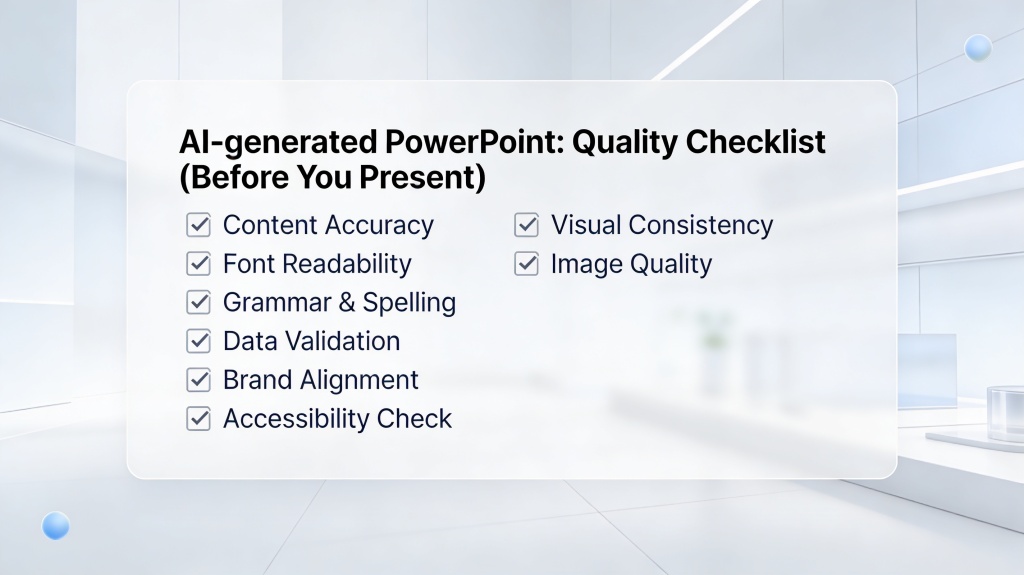
Final quality checklist before you present
Run this checklist after generating your deck and before sending it to a client, class, or leadership team.
The five-minute slide review
- Read only the titles: Do they tell a complete story?
- Check the ask: Is the final action clear and realistic?
- Validate the evidence: Are numbers sourced or clearly marked as estimates?
- Trim text: Can any slide become simpler without losing meaning?
- Match the audience: Are examples relevant to the people in the room?
- Test the flow: Can you explain the deck in half the scheduled time?
When to regenerate instead of editing
If the first draft has a weak design but a strong story, edit it. If the story is pointed at the wrong audience, regenerate with a sharper prompt. Editing a misframed deck usually takes longer than restarting with better instructions.
A useful restart prompt includes what was wrong: “Make this more executive-level, reduce background slides, add sharper recommendations, and focus on budget approval.” This turns feedback into direction rather than frustration.
FAQ: AI PPT maker questions
These are the questions professionals usually ask before relying on AI for a real presentation deadline.
Can an AI PPT maker replace a presentation designer?
It can replace the first-draft production work for many business decks, but it should not replace strategic judgment. Use AI to structure slides, suggest layouts, and speed up formatting, then have a human refine the story, brand nuance, and executive-level messaging.
What should I prepare before using PopAi for a deck?
Prepare the audience, objective, source material, desired slide count, tone, and any brand constraints. A short brief with these inputs helps PopAi create a more relevant first draft and reduces the editing you need later.
Is an AI-generated PPT good enough for client meetings?
Yes, if you review the claims, tailor examples, and polish the final narrative. Treat the generated deck as a strong working draft rather than a file to send without review, especially when numbers, legal statements, or client-specific recommendations are involved.
How do I avoid generic AI slide designs?
Give the tool specific direction: audience, visual style, brand colors, example structure, and must-have sections. Then edit titles into takeaway statements and replace generic icons or stock phrases with concrete evidence from your project.
Create your presentation with one click now
Turn your ideas, notes, or documents into a structured, polished presentation draft in minutes, then refine it for your audience.
Start creating with PopAi