
Tired of staying up late to make PPTs for real estate sales or project reports? Fear not! With AI tools, you can create a professional–level Real Estate slides presentation in just 30 minutes. This article will teach you exactly how to do it, step by step.
The Pain Point: Why Do Real Estate Professionals Struggle to Make Good PPTs?
Real estate professionals typically face a few common PPT scenarios: reporting project progress to leaders, delivering investment promotion roadshows to potential investors, or introducing property highlights to clients. Every time, you’re stuck with the same frustrations:
l Staring at dozens of pages of feasibility reports, market data, and floor plan Word documents, unsure where to start “copy–pasting”;
l Finally finishing the content, only to be embarrassed by the ugly layout and spending hours adjusting formats until you’re exhausted;
l Worst of all, failing to convey a clear logic—you think the highlights are impressive, but clients end up confused.
The result? You spend several all–nighters on a presentation, only to lose points at the first impression because it’s not professional or intuitive enough. Your core value is dragged down by a poor presentation tool.
Step 1 (Critical Preparation): Clarify These 3 Specific Questions Before You Start
Before opening PopAI or any other AI PPT tool, don’t rush to act. Spend 1 minute clarifying three questions—this will double your efficiency later:
1. Who is your audience? (Investors focused on data and profits? Or end clients concerned about floor plans and lighting?)
2. What is your goal? (To get approval for funding? Or to secure a follow–up property viewing?)
3. How much time do you have to present? (A 5–minute elevator pitch? Or a 30–minute in–depth report?)
Once you’ve thought these through, turn them into a single “instruction.” For example: “A Real Estate slides presentation for young first–time homebuyers, highlighting the community’s greenery and floor plan cost–effectiveness to encourage property viewings, with a duration of approximately 10 minutes.” This sentence is your “battle plan” for guiding the AI.
Step 2 (Fast Start): Two Specific Methods to Get a PPT Outline in 30 Seconds
Open PopAI’s creation page, and you’ll see two commonly used entry points—choose one based on your situation:
Method A (Start from Scratch): Directly “Tell” AI Your Needs
In the input box, paste or type the “instruction” you just crafted. For example: “Generate an investment promotion PPT outline for a technology industrial park, targeting intelligent manufacturing business owners, with a focus on tax incentives and industrial chain support.”
Click “Generate,” and PopAI will create a fully structured outline in tens of seconds. Typically, it will include a logical flow like “Market Opportunities → Core Project Advantages → Supporting Policies → Success Cases → Cooperation Plans.” This outline serves as both the table of contents and the core message for each slide.
Method B (Existing Materials): Directly “Upload” Your Documents to AI
If you already have existing materials—such as a project introduction Word/PDF or research report—click the “Import File” button. PopAI supports direct uploads of Word, PDF, and TXT files, as well as pasting web links.
Drag and drop your dozens–of–pages project report PDF into the tool. The AI will automatically extract key information like a senior planner, organizing it into a logical PPT outline. For example, it may summarize core chapters such as “Location & Transportation,” “Product Planning,” and “Appreciation Potential.” This is far faster than manual copy–pasting.
Step 3 (Core Refinement): Edit Your Outline by Dragging and Dropping
The AI–generated outline is a “standard version,” but your project is “custom–made”—so editing is a must. PopAI’s outline editor is extremely user–friendly:
l Adjust order: If you think “Product Planning” should come before “Location & Transportation,” simply drag and drop the chapter title to reorder it.
l Add/delete content: Notice the AI missed your project’s proud “green building certification”? Click “Add Chapter” in the outline and type it in. If a section is redundant, select it and click “Delete.”
l Optimize titles: Transform plain AI–generated titles like “Project Supporting Facilities” into more engaging ones such as “All–Round Living Circle: High–Quality Amenities Within Walking Distance.” Remember: Each slide’s title should be a point of view, not just a noun.
This step injects your professional expertise into the PPT. Typically, it takes only 5–10 minutes to get a fully customized content script.
Step 4 (Visual Implementation): One–Click Template Application—Say Goodbye to Ugly PPTs
With the content finalized, it’s time to address the “aesthetics.” Click “Select Template,” and you’ll access PopAI’s extensive library of themed templates. When choosing, follow one principle: Form follows content and audience.
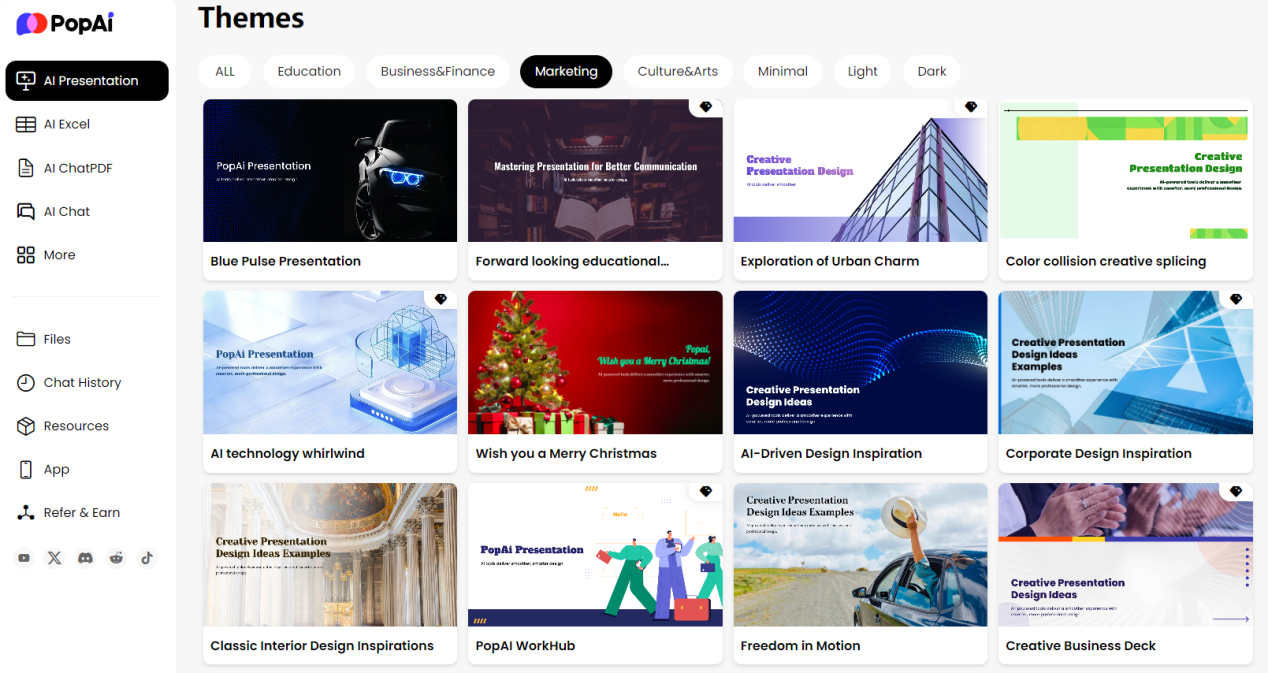
l For investors: Choose templates like “Classic Business,” “Data Blue,” or “Dark & Sophisticated” to convey professionalism and reliability.
l For residential clients: Opt for “Modern Home,” “Warm & Elegant,” or “Eco–Green” templates—these feel more livable and approachable.
l For concept project reports: Select templates with stronger “creative geometry” or “artistic” styles.
After choosing a template, click “Generate PPT.” PopAI will instantly populate all your outline content into the selected template, automatically matching fonts, colors, icons, and basic image–text layouts. You’ll immediately get a draft that looks like it was designed by a professional.
Step 5 (Detail Polishing): These Specific Tweaks Take Your PPT from “Good” to “Great”
The initial draft is usable, but spending 10 minutes optimizing details will make a huge difference:
l Adjust slide layout: If a slide has too much text and feels cluttered, don’t manually tweak it—click the “Switch Layout” button on the right. PopAI will offer 3–4 different image–text arrangements (e.g., image on left, text on right; image on top, text below). Select the cleanest one, and the content will reformat automatically.
l AI–powered copy refinement: If you’re unhappy with the wording on a slide, select the text box and use the “Simplify Language” or “Expand” function in the pop–up toolbar. For example, condense a lengthy policy description into 3 bullet points with icons—making it easy for the audience to grasp at a glance.
l Smart image generation: If a slide needs an image but you don’t have one, use the built–in AI image tool. Click “AI Generate” in the image placeholder and type a description like “Exterior of a modern industrial park office building with glass curtain walls, blue sky, and white clouds.” The AI will generate a usable image, saving you tons of time searching for stock photos.
l Check consistency: Quickly browse through the presentation to ensure uniform fonts, bullet points, and color schemes. Thanks to template–based generation, PopAI usually handles this well—you just need a quick confirmation.
Step 6 (Delivery & Follow–Up): Which Sharing Method Is Right for You?
Once the PPT is finalized, PopAI offers two mainstream ways to share it:
Online Sharing Link (Ideal for Internal Collaboration & Remote Communication)
Click the “Share” button to create a link. Send this link to leaders, colleagues, or clients via WeChat or email. They can view the entire Real Estate slides presentation directly in a browser—no software installation required. Additionally, they can add comments directly on the slides (e.g., “This data needs updating”), which you’ll see in real time—greatly boosting revision efficiency.
Export Files (For Offline Formal Occasions)
If you need to present on stage or use a USB drive, click the “Export” button. Choose your preferred format—we recommend “.pptx” (Microsoft PowerPoint format) for easy editing on any computer, or PDF to ensure the layout remains unchanged.
Focus Your Time on What Matters Most
At the end of the day, creating Real Estate slides presentation isn’t about chasing fancy designs—it’s about delivering information efficiently and persuasively to drive transactions. Tools like PopAI compress the time–consuming, repetitive tasks (organizing data, structuring content, formatting) that take up over 80% of your time into just 30 minutes.
The time you save should be spent on deeper client research, refining your pitch, and practicing in–person presentations. The value of tools is to boost efficiency, while your professional insights and communication skills are your irreplaceable core competitiveness.
Now, go ahead and try using AI to create your first “quick and impressive” real estate proposal. You’ll find that winning over clients can start with a great PPT that requires minimal effort.