As the golden recruitment seasons of March and April and the autumn recruitment drive roll around, a traditional document–based resume alone is no longer enough to catch interviewers’ eyes. Especially for roles in product management, operations, design and other creative or strategic fields, a polished resume PPT has become a must–have to showcase your comprehensive professional abilities. This piece will uncover five tools that can drastically elevate both the efficiency and quality of your resume creation, helping you face the job application challenges with confidence.
Why a Stunning Resume PPT Is Indispensable in Your Job Hunt
In an era of information overload, interviewers spend an average of less than one minute reviewing a single resume. How can you systematically, vividly and professionally present your competency framework and project value in this golden 60 seconds? A well–structured, visually striking resume PPT is the perfect answer. It is far more than a mere list of your work experiences; it is a concentrated display of your logical thinking, summarization skills, visual aesthetic taste and communication abilities. Unlike linear document resumes, slide–based presentations give your career story a more compelling rhythm and impact, putting you in control during group interviews or one–on–one presentations.
Key Factors to Consider When Choosing a Resume PPT Tool
Faced with a plethora of available tools, how do you make a wise choice? The key is to evaluate whether they align with your core needs, which include the following critical factors:
l Intelligence Level: Can the tool automatically generate a first draft based on your inputs (e.g., text, links), saving you a great deal of time from building a presentation from scratch?
l Design Friendliness: Does it provide high–quality templates and materials that fit business or creative styles, lowering the barrier to professional design?
l Customization Flexibility: After automatic generation, can you easily tweak the details to ensure every slide accurately reflects your personal strengths and characteristics?
l Collaboration and Sharing: Is it convenient to collaborate with others on revisions, and can it generate formats that are easy to share and present across different devices?
l Cost–Effectiveness: Are its free features robust enough for your needs, or is the paid plan truly worth the investment?
An In–Depth Comparison of the Top 5 Resume PPT Creation Tools
1. PopAI: An AI–Powered All–in–One Solution for Smart Resume PPTs
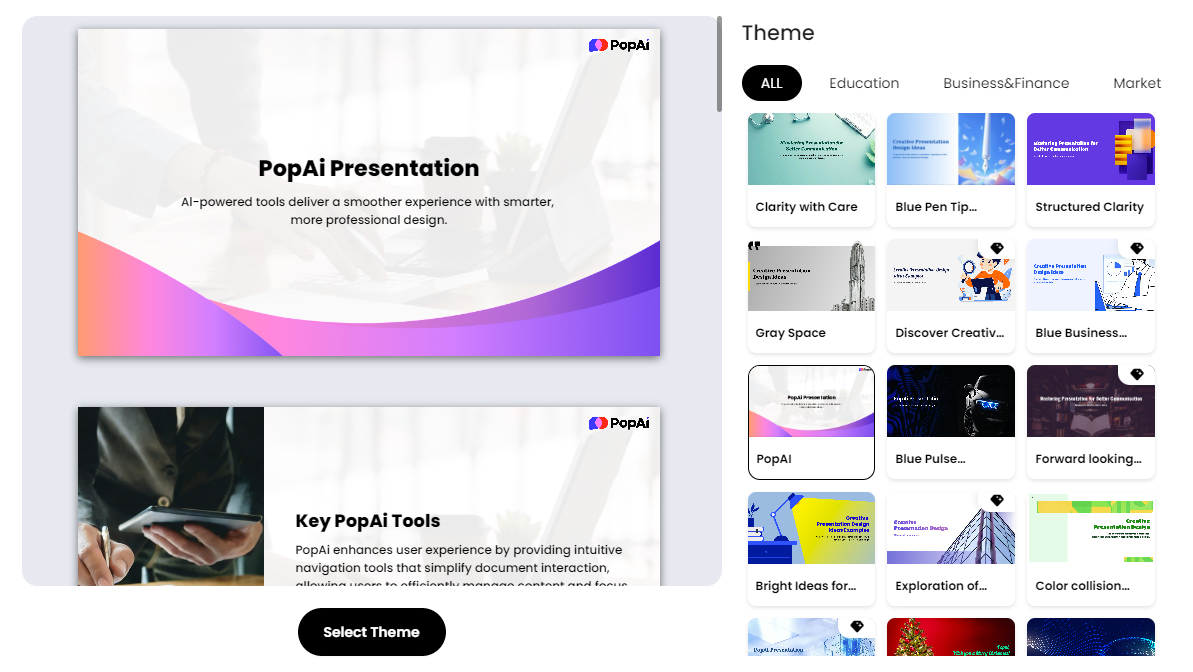
When it comes to using artificial intelligence to completely revolutionize the resume PPT creation process, PopAI is undoubtedly the top choice. It deeply understands the core pain points job seekers face when crafting resume PPT slides— the struggle of starting from a blank page, balancing content and visual design, and the inefficiency of customizing presentations for different job positions.
PopAI’s features directly address these pain points with targeted solutions:
l Instant PPT Generation & Smart Layout: Simply upload your existing resume document, input the job description or core keywords, and PopAI will quickly generate a well–structured, professionally laid–out first draft of your resume PPT. You can customize the number of slides, and the tool will recommend the most suitable narrative logic and visual style based on different audience scenarios, such as “fresh graduate job search”, “career switch for senior professionals” or “creative role applications”.
l AI–Enhanced Content & Visual Matching: Its built–in AI not only polishes your job descriptions, using more professional and impactful language to highlight your achievements (e.g., refining “in charge of project management” to “led cross–departmental projects with a 100% success rate”), but also intelligently searches and recommends high–quality copyright–free images, icons and data visualization materials that are highly relevant to your content. This ensures your presentation is both information–rich and visually appealing.
l Seamless Editing & Audience–Centric Design: After generating the first draft, you can easily drag and drop to adjust the overall structure and single–slide content, just like building with blocks. PopAI’s editing system intelligently maintains the beauty and coherence of the typesetting. More importantly, it encourages you to design with the audience (interviewers) at the center, making it easy for you to create a customized “Why Us?” slide for different companies. Personalized content greatly enhances the impact and sense of immersion of your presentation.
l Flexible Import & Automatic Conversion: PopAI supports content import from local files, Google Drive or even direct web URLs, allowing you to start creating seamlessly. Its powerful document–to–presentation feature can automatically convert lengthy Word/PDF resumes into well–organized slides, serving as a powerful tool for you to quickly build the framework of your resume PPT.
2. Canva: A Designer–Grade Creation Platform with a Vast Library of Templates
Canva is a treasure trove of design resources, especially suitable for users with high aesthetic requirements who are willing to polish details manually. Its massive collection of resume and presentation templates covers all styles, from minimalist and professional to bold and creative, with consistently high quality. For job seekers targeting foreign companies or roles that require a strong design sense, Canva’s international templates and design elements are a huge advantage. It is more like a powerful design studio—while it has a slightly steeper learning curve, it offers the highest level of creative freedom to users.
3. PPTGO: An Efficiency–First Tool for Blazing–Fast Generation
As its name suggests, PPTGO is all about speed. It features an extremely clean interface and ultra–short operation paths, making it highly practical for users who prioritize efficiency and want to convert existing documents into slide frameworks in the shortest time possible. It can quickly understand your text content and generate corresponding slides by section, acting as an accelerator for turning your written resume into a visual one. However, when it comes to design refinement and in–depth AI content optimization, it focuses more on basic format conversion compared to tools like PopAI.
4. Gamma: An Innovative Choice for Crafting Smooth Web–Style Presentations
Gamma breaks the page–turning mode of traditional slides, adopting a scrolling or card–based layout similar to modern websites. The resume PPT created with Gamma is more like an interactive personal portfolio webpage, boasting a novel style and smooth browsing experience. It is particularly suitable for job seekers in design, media, technology and other fields to showcase their portfolios or create an unforgettable online resume experience. It is worth noting that as an overseas tool, it may have slight shortcomings in access stability and localized design materials.
5. Beautiful.ai: A Dream Tool for Perfectionists with AI–Powered Adaptive Typesetting
The core cutting–edge feature of this tool is its “dynamic templates” and “adaptive layout”. When you edit text or replace images, all elements on the page will automatically adjust their size, spacing and alignment, always maintaining a professional and neat look. For users who care deeply about beautiful typesetting but are not good at manual adjustments, it completely eliminates the anxiety of messy layout. However, its template styles are relatively fixed, and it may not be as comprehensive as PopAI in terms of in–depth AI content generation and customization flexibility.
Advanced Tips: Avoid Common Mistakes in Resume PPT Creation
Choosing the right tool is only half the battle; avoiding the following mistakes will make your resume PPT even more professional and polished:
l Information Overload: Slides are not a copy of your speech script. Stick to the principle of “one key point per slide”, and use more keywords, charts and achievement data (e.g., “boosted work efficiency by 30%”) to convey information concisely.
l Inconsistent Style: Strictly unify your font, color scheme and icon style. Use the theme functions provided by tools (such as PopAI’s theme switching and Canva’s style copy) to maintain consistency efficiently.
l Ignoring the Narrative Arc: An excellent resume PPT should have a clear logical narrative, such as “Who I Am – My Core Competencies – My Key Achievements – What I Can Bring to Your Company”. This cohesive story line helps interviewers follow your career journey easily.
l Neglecting Adaptability: Fine–tune the content and focus of your resume PPT for different companies and positions. With the flexible editing features of tools like PopAI, you can quickly create customized versions tailored to each application.
l Lack of Rehearsal: A tool–generated PPT is just a carrier; a polished and confident delivery is the soul of your presentation. Be sure to rehearse repeatedly based on your final resume PPT to ensure smooth and self–assured expression during the interview.
In the cutthroat job market, every detail counts in standing out. Choosing an all–in–one tool like PopAI, which combines intelligence, efficiency and aesthetic design, allows you to focus more energy on polishing your content and preparing for interviews—instead of struggling with the technicalities of PPT creation. By leveraging these powerful tools, you can firmly seize every opportunity in the fierce competition and successfully land your dream job offer.