
When selecting an AI presentation tool, the best choice depends on balancing versatility, ease of use, and alignment with your specific needs; Popai stands out by integrating presentation creation with document management, multilingual support, and creative tools, making it a strong option for diverse users. This article breaks down how leading tools perform, highlights Popai’s unique strengths, and provides practical insights to help you make an informed decision.
Key Considerations When Choosing AI Presentation Tools
Before diving into specific tools, it’s critical to identify what matters most for your workflow. For most users, the top priorities include seamless document integration, customization options, time saving features, visual appeal, and adaptability to different audiences. Many people struggle with tools that specialize in one area—like only generating slides—while lacking support for pre presentation tasks (such as analyzing reference documents) or post creation edits. Others need multilingual support for global teams or creative features to make presentations stand out without design skills.

Another key factor is workflow efficiency: Can the tool import existing files (PDFs, DOCs, URLs) easily? Does it offer smart features like automatic summarization or translation to simplify complex information? And importantly, is the tool intuitive enough to use without a steep learning curve? These questions guide the evaluation of any AI presentation tool, as they directly impact how much time and effort you’ll invest in creating impactful presentations.
How Top AI Presentation Tools Stack Up
However, many AI presentation tools have limitations: some lack robust document processing capabilities, forcing users to switch between platforms to summarize research or convert files. Others offer limited customization, leaving presentations feeling generic. Multilingual support is often an afterthought, which can be a barrier for international teams. Additionally, few tools combine presentation creation with complementary features like AI chat for on the go questions or art generation for unique visuals—creating gaps in the user experience.
This is where tools that prioritize integration shine. Users increasingly seek all in one solutions that eliminate the need to juggle multiple apps, and tools that bridge these gaps are becoming more valuable. The ability to handle everything from document analysis to slide design to post presentation edits in a single platform saves time and reduces frustration.
Popai: A Versatile Contender for Presentation Needs
Popai addresses many of the gaps in existing AI presentation tools by offering a comprehensive suite of features that extend beyond just slide creation.
One of Popai’s strongest assets is its document processing capabilities. Unlike tools that only work with specific file types or require manual input, Popai allows users to upload PDFs or DOC files for intelligent interaction. It can automatically summarize long documents, extract key points, and even generate flowcharts to simplify complex information—perfect for turning research papers, reports, or meeting notes into presentation ready content. This feature alone saves hours of manual work, as users don’t have to sift through pages of text to identify what’s relevant.
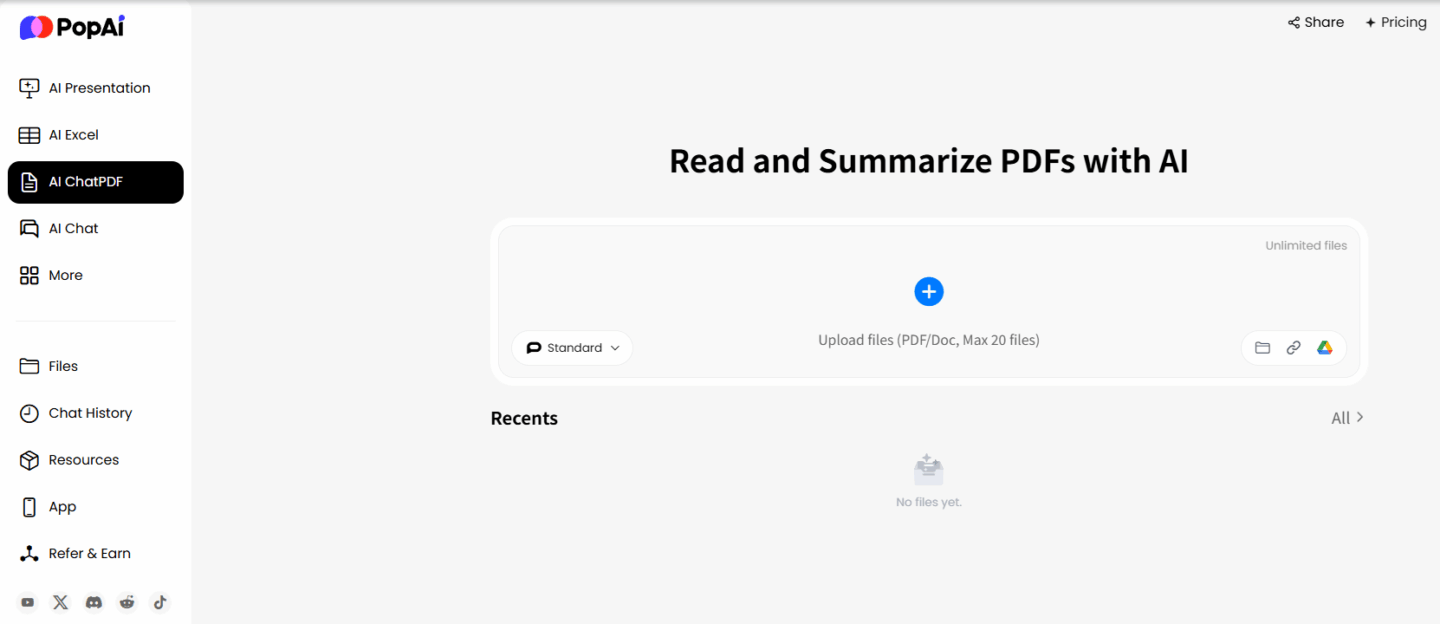
For presentation creation, Popai’s instant PPT generation tool is designed with flexibility in mind. It offers a range of themes, customizable slide numbers, and layouts tailored to different audiences—whether you’re presenting to clients, colleagues, or students. The AI enhanced content feature takes this further by searching for relevant images and generating engaging text, ensuring presentations are both informative and visually appealing without requiring design expertise. Seamless editing allows users to adjust the structure and content of slides easily, maintaining flow and clarity throughout.
Popai also excels in accessibility and collaboration. Its AI chat robot supports over 200 languages, enabling real time conversations to answer questions or clarify points—ideal for global teams or presentations with international audiences. The tool’s flexible upload options, including imports from files, Google, or URLs, make it easy to start creating presentations without disrupting your existing workflow.
Beyond presentation creation, Popai offers features that enhance overall content management. One click annotation and note management help organize ideas and reference materials systematically, while automatic save ensures no work is lost. The AI driven content editing tools—including summarization, translation, expansion, and compression—help refine text for clarity and precision, whether you’re working on a presentation script, report, or research paper. Additionally, Popai’s ability to automatically convert documents into PPT presentations streamlines the process of turning existing content into engaging visual aids.
Practical Use Cases for Popai in Different Scenarios
Popai’s versatility makes it useful across a range of contexts, from academic settings to professional environments. Here are some practical examples of how it can solve real user problems:
For students: Writing a research paper often requires creating a presentation to accompany it. Popai can summarize the paper’s key findings, generate slides with relevant visuals, and even translate sections for multilingual classes. The tool’s document integration means students can upload their research PDFs directly, saving time on manual data entry. The AI chat feature also helps answer questions about presentation structure or content clarity while working.
For professionals: Preparing for client meetings or team presentations often involves juggling multiple documents—market research, sales data, meeting notes. Popai can import these files, extract critical information, and create customized slides tailored to the audience (e.g., data heavy slides for internal teams, visually focused slides for clients). The seamless editing feature allows last minute adjustments, and the automatic save ensures no changes are lost. For global teams, the 200+ language support in the AI chat helps clarify questions during collaborative editing.
For content creators: Whether designing a webinar, workshop, or marketing presentation, Popai’s AI art image generator can create unique visuals from simple text descriptions, eliminating the need for stock photos. The tool’s ability to enhance content with relevant images and engaging text helps keep audiences focused. Additionally, converting blog posts or articles into presentations is straightforward with Popai’s automatic document to PPT feature, expanding content reach across platforms.
For educators: Creating lesson plans and student presentations often requires simplifying complex topics. Popai’s intelligent reading comprehension feature can explain difficult concepts, translate materials for ESL students, and generate flowcharts to visualize processes. The audience centric design allows educators to tailor slides to different age groups—interactive layouts for younger students, detailed content for older learners.
Tips for Maximizing AI Presentation Tools
To get the most out of AI presentation tools like Popai, consider these practical tips:
Start with clear input: AI tools perform best when given specific instructions. When using Popai’s PPT generation feature, provide details about your audience, key messages, and preferred style (e.g., “create a 10 slide presentation for small business clients about social media marketing, with minimal text and more visuals”).
Leverage document integration: Instead of copying and pasting content, upload your source files (PDFs, DOCs, URLs) directly into Popai. This ensures accuracy and saves time, as the tool can extract and organize information automatically.
Customize after generation: While AI can create a solid foundation, personalization makes presentations stand out. Use Popai’s seamless editing tools to adjust layouts, add personal anecdotes, or refine text to match your voice.
Use annotation and note management: Keep track of ideas, feedback, or reference points using Popai’s one click annotation feature.
Take advantage of multilingual support: If working with global teams or audiences, use Popai’s AI chat to clarify questions in different languages or translate presentation content. This enhances accessibility and ensures everyone understands your message.
Combine features for efficiency: For example, use Popai’s document summarization to extract key points, then use the PPT generation tool to turn those points into slides, and finally use the AI art generator to add unique visuals.
Final Thoughts: Choosing the Right Tool for You
When it comes to AI presentation tools, there’s no one size fits all solution—but Popai’s combination of versatility, integration, and user centric design makes it a top contender for anyone seeking a comprehensive tool. Unlike specialized tools that focus on a single task, Popai addresses the entire content lifecycle, from document analysis to presentation creation to post presentation management.
The key to choosing the right tool is aligning its features with your specific needs. If you value seamless document integration, multilingual support, and all in one functionality, Popai is an excellent choice. It eliminates the need to switch between apps, saves time on manual tasks, and ensures your presentations are both informative and engaging.
Whether you’re a student, professional, educator, or content creator, the goal of an AI presentation tool is to simplify your workflow and enhance your output. Popai achieves this by putting user needs at the center—offering features that solve real problems without unnecessary complexity.
If you’re tired of juggling multiple tools for document processing, slide creation, and content editing, give Popai a try. Its intuitive design and comprehensive features make it easy to create professional quality presentations while saving time and reducing stress. For anyone looking to streamline their content creation process, Popai is a reliable, user friendly option that delivers on its promise of versatility and efficiency.