Why OKR & Performance Appraisal Slides Fail (And PopAi Fixes It)
In today’s fast-paced business environment, OKR management and performance appraisal slides are critical for aligning teams, tracking progress, and justifying results. Yet, most professionals struggle with common pitfalls: overly complex structures, vague content, lack of visual hierarchy, and time-consuming edits. These issues don’t just waste hours of work—they dilute your message, leading to misalignment and ineffective decision-making. This is where PopAi steps in as a game-changer.
PopAi is a multifunctional AI tool designed to eliminate these pain points, especially for creating OKR Management and Performance Appraisal slides. Unlike traditional slide-making tools that require manual design and content curation, PopAi integrates AI chat, document reading, and content creation capabilities to streamline the entire process. Whether you’re a manager drafting quarterly OKR slides or an HR professional preparing performance appraisal presentations, PopAi ensures your work is efficient, impactful, and aligned with your audience’s needs.
Consider a common scenario: You need to create a quarterly OKR review slide for your team. Normally, you’d spend hours collecting data from various documents, organizing it into a logical structure, and designing visuals to make it understandable. With PopAi, you can use its flexible upload options to import existing OKR documents from files, Google Drive, or URLs seamlessly. Its intelligent reading comprehension feature then automatically extracts key data, generates flowcharts to visualize goal dependencies, and even summarizes long paragraphs into concise bullet points—all in minutes.
PopAi’s Core Tools for Stunning OKR & Appraisal Slides
PopAi’s suite of AI-powered features is tailored to address the unique demands of OKR Management and Performance Appraisal slides. Each tool works in harmony to ensure your slides are not just visually appealing, but also information-rich and strategically focused.
First, the instant PPT generation feature is a game-changer for busy professionals. When creating OKR slides, you can select from PopAi’s library of industry-specific themes—from tech startups to traditional enterprises—and customize slide numbers and layouts to match your audience. For example, if you’re presenting to executives, PopAi will recommend a concise, data-driven layout with key OKR metrics front and center; if the audience is your team, it will prioritize actionable steps and progress trackers. This audience-centric design ensures your message resonates and drives engagement.
Next, AI-enhanced content takes your slides to the next level. PopAi’s AI searches for relevant images—such as progress charts, goal trackers, and team alignment diagrams—that complement your OKR and performance data. It also generates compelling content, turning dry metrics into persuasive narratives. For instance, instead of just listing “KR1: Increase sales by 20%,” PopAi can refine it to “KR1: Drive 20% sales growth QoQ by expanding into 3 new regional markets, as visualized in the attached market penetration chart.” This not only makes your slides more engaging but also clarifies the “why” behind each goal.
Seamless editing is another standout feature. After generating your initial slides, you can easily adjust the structure and content with PopAi’s intuitive editor. Need to reorder OKR priorities? Simply drag and drop slides. Want to refine a performance appraisal comment? Use AI-driven content editing to expand, compress, or rephrase text while maintaining clarity and precision. PopAi also offers one-click annotation management, allowing you to add notes, highlight key data points, and organize feedback systematically—critical for collaborative OKR planning and performance review processes.
Real-World Examples: PopAi in Action for OKR & Appraisal Slides
Let’s dive into two practical examples to see how PopAi transforms OKR Management and Performance Appraisal slides, complete with templates you can copy and use immediately.
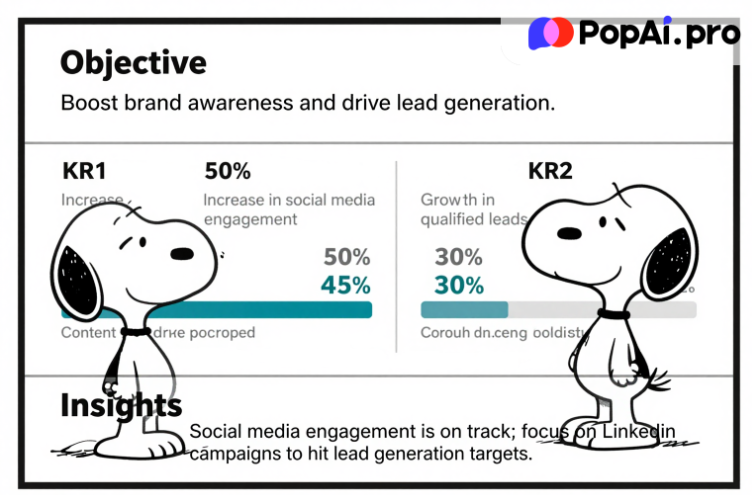
Example 1: Quarterly OKR Review Slide for a Marketing Team. Suppose you’re a marketing manager needing to present your team’s Q3 OKR progress. With PopAi, start by uploading your team’s Q3 OKR document (PDF or DOC). PopAi’s intelligent reading comprehension automatically extracts the objective (“Boost brand awareness and drive lead generation”) and key results (KR1: 50% increase in social media engagement; KR2: 30% growth in qualified leads). It then generates a slide with a clear layout: a top section for the objective, a middle section with progress bars for each KR (pulling data from your uploaded document), and a bottom section with AI-generated insights (“Social media engagement is on track; focus on LinkedIn campaigns to hit lead generation targets”). Here’s a ready-to-use template from PopAi:
Objective: Boost brand awareness and drive lead generation KR1: 50% increase in social media engagement (Current Progress: 45%) KR2: 30% growth in qualified leads (Current Progress: 22%) Key Insights: [AI-generated based on data] | Next Steps: [Actionable items from PopAi’s AI chat suggestions]
Example 2: Annual Performance Appraisal Slide for an Individual Contributor. For HR professionals, creating personalized performance appraisal slides can be time-consuming. With PopAi, upload the employee’s performance report and job description. PopAi’s AI-driven content editing summarizes the employee’s achievements, identifies areas for growth, and aligns feedback with company OKRs. It generates a slide with a balanced layout: “Key Achievements” (with metrics), “Areas for Development,” and “Alignment with Team OKRs.” The template below is customizable via PopAi’s flexible document creation feature:
Employee Name: [Name] | Role: [Role] Key Achievements: 1. Exceeded Q2 lead generation target by 15% (aligned with Team OKR KR2); 2. Launched 3 successful social media campaigns, driving 25% more engagement. Areas for Development: Enhance data analysis skills to optimize campaign ROI. OKR Alignment: Contributions directly support Company Objective “Drive sustainable revenue growth.”
In both examples, PopAi eliminates manual data entry and design work, ensuring consistency and accuracy. Its automatic save management feature also ensures you never lose your progress, creating a streamlined knowledge management experience.
Pro Tips to Elevate Your Slides with PopAi
To make the most of PopAi for OKR Management and Performance Appraisal slides, here are some pro tips tailored to the tool’s capabilities:
1. Use PopAi’s AI chat for real-time guidance: If you’re stuck on how to frame a KR or phrase performance feedback, use the AI chatbot (supports 200+ languages) to ask questions like “How to present missed OKR targets constructively?” or “What metrics should I include in a sales performance appraisal slide?” The chatbot provides instant, actionable answers to refine your content.
2. Leverage automatic conversion for existing documents: If you have old OKR or appraisal documents (Word, PDF), use PopAi’s automatic conversion to PPT feature. It will retain key data, restructure content for slides, and even add relevant visuals—saving you hours of retyping and redesigning.
3. Customize with AI art for visual appeal: For slides that stand out, use PopAi’s AI art generator to create custom visuals. For example, generate a “goal achievement” infographic for OKR slides or a “growth journey” illustration for performance appraisals. Simply type a text description (e.g., “minimalist infographic showing Q3 OKR progress for a sales team”) and insert the generated image directly into your slides.
4. Collaborate with seamless document management: PopAi’s intelligent document management feature lets you organize all your OKR and appraisal slides in one place. You can categorize slides by quarter, team, or employee, making it easy to share with stakeholders and track revisions. The one-click annotation feature also allows collaborators to add feedback directly on slides, streamlining the review process.
Ready-to-Copy Phrases for OKR & Performance Appraisal Slides
To save you even more time, here are ready-to-copy phrases for different sections of your OKR Management and Performance Appraisal slides, all optimized via PopAi’s AI-driven content editing:
OKR Slide Opening Phrases: – “This quarter, our team’s OKRs focus on [Objective], with clear key results to track progress.” – “Aligning with company strategy, our Q[X] OKRs aim to [core goal], supported by actionable key results.” – “Let’s dive into our OKR progress, highlighting wins, challenges, and next steps.”
OKR Progress Update Phrases: – “KR1: [Goal] is on track (XX% complete) – thanks to [key action].” – “KR2: [Goal] is currently at XX% complete; we’ll adjust our strategy by [action] to hit the target.” – “We’ve exceeded KR3: [Goal] by XX%, driven by [factor] – this aligns with [company objective].”
Performance Appraisal Strengths Phrases: – “[Employee] consistently delivers on key results, with [specific achievement] directly supporting team OKRs.” – “Their ability to [skill] has been instrumental in hitting [performance metric], aligning with company goals.” – “[Employee] demonstrates strong alignment with organizational OKRs, particularly in [area].”
Performance Appraisal Development Phrases: – “To further support OKR achievement, focusing on [skill] will enhance [specific outcome].” – “Developing [area] will help [employee] contribute more effectively to future team OKRs.” – “Investing in [training/skill] will align with [company objective] and boost performance in [key area].”
OKR Slide Closing Phrases: – “Our Q[X] OKR progress positions us well to achieve [company goal] – next steps include [action].” – “Thank you for your focus on these OKRs; let’s collaborate to hit our remaining targets.” – “For detailed feedback on OKR alignment, please review the annotated slides and reach out via PopAi’s collaboration tools.”
With PopAi, creating impactful OKR Management and Performance Appraisal slides is no longer a tedious, time-consuming task. Its AI-powered tools streamline every step—from data extraction and content generation to design and collaboration—ensuring your slides are not just visually stunning, but also strategically aligned and persuasive. Whether you’re a manager, HR professional, or team lead, PopAi empowers you to focus on what matters most: driving results and aligning your team with organizational goals.