AI Presentation Maker vs Traditional PPT Tools: Which Fits?
Updated September 1, 2026 · PopAi Academy Editorial Team
The choice between an AI presentation maker vs traditional PPT tools depends on the work: blank-page speed, fine-grained control, collaboration, or a repeatable brand system.
This comparison covers audiences, output quality, cost and control, realistic use cases, a migration path, and FAQ so you can choose the right workflow for each deck.
AI Presentation Maker vs Traditional PPT Tools: Compare the Job
An AI workflow is strongest at turning a brief or document into a structured first draft. Traditional PowerPoint is strongest when a designer needs precise object-level control or a mature internal template system.
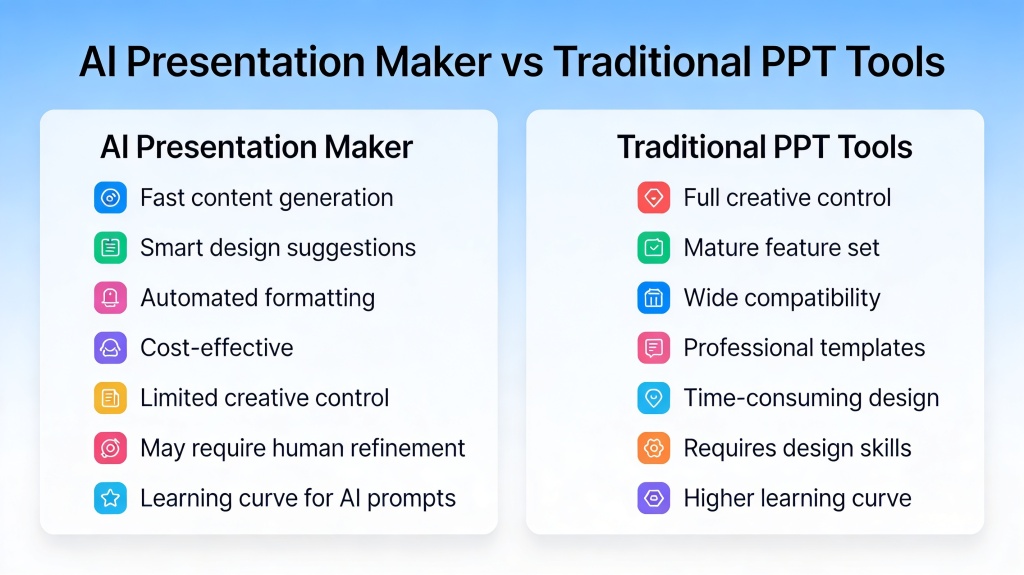
Feature, Price, and Output Quality Comparison
| Question | AI presentation maker | Traditional PPT tool |
|---|---|---|
| Starting point | Prompt, file, or outline | Blank canvas or template |
| Speed | Fast first structure | Manual build time |
| Control | Guided layouts and editable objects | Fine-grained object control |
| Consistency | AI can apply a style system | Depends on template discipline |
| Cost | Often tiered by generation/export | License or existing suite |
| Output risk | Facts and wording need review | Manual errors and stale templates |
| Best use | Drafting and repeatable workflows | Final polish and exact control |
Pros, Cons, and Practical Use Cases
Choose AI when
- You have a short deadline and a clear brief.
- You need several outline or visual directions.
- The deck starts from documents, notes, or a data summary.
Choose traditional PPT when
- The presentation has strict pixel-level or legal requirements.
- A specialist must build complex diagrams or animations.
- Your team already has a controlled, approved master template.
Real scenario: a sales team can generate a proposal structure from discovery notes, then move the approved copy into its existing PowerPoint master for final brand and legal review.
How to Migrate Without Losing Control
- Inventory your approved fonts, colors, layouts, and slide examples.
- Choose one low-risk deck and define the audience and success measure.
- Generate an outline, compare it with the existing master, and keep only useful patterns.
- Export to PPTX, run the normal review process, and record what should become a template.
Frequently Asked Questions
What is the difference between an AI presentation maker and PowerPoint?
AI tools accelerate outlining and first-draft design from prompts or files, while PowerPoint gives mature manual control over every object and animation.
Which option is better for beginners?
AI can reduce blank-page work, while a traditional tool remains useful when a beginner must follow a fixed company template.
Can AI output match a traditional PPT template?
It can get close when you provide clear brand rules, but inspect spacing, typography, charts, and export behavior before approval.
Should a team replace PowerPoint completely?
Usually no. A hybrid workflow often gives the best balance: AI for structure and alternatives, PowerPoint for final control and handoff.